
Fail to remove (reduplicative) recycle bin(s) from the side bar❓
46 views
Skip to first unread message

Shelly Yvette
Nov 4, 2023, 5:44:33 PM11/4/23
to OneCommander
- version:3.58.0.0
- Non-Commercial Use
- language: Chinese
Hello, I found that I can not remove the recycle bin from the side bar after the version updated and the "Create default sidebar folders" button pressed.
I can remove all the others folders except the recycle bin.
More confusing, after pressing the "Create default sidebar folders" button repeatedly, there came reduplicative undeletable bin folders.


OneCommander Support
Nov 4, 2023, 5:51:41 PM11/4/23
to OneCommander
What if you right-click on the recycle bin in the list and then "Remove from group"?
Shelly Yvette
Nov 4, 2023, 11:38:29 PM11/4/23
to OneCommander
Well, I can successfully remove the "Lenovo" group and owned bin folders by the method you said, 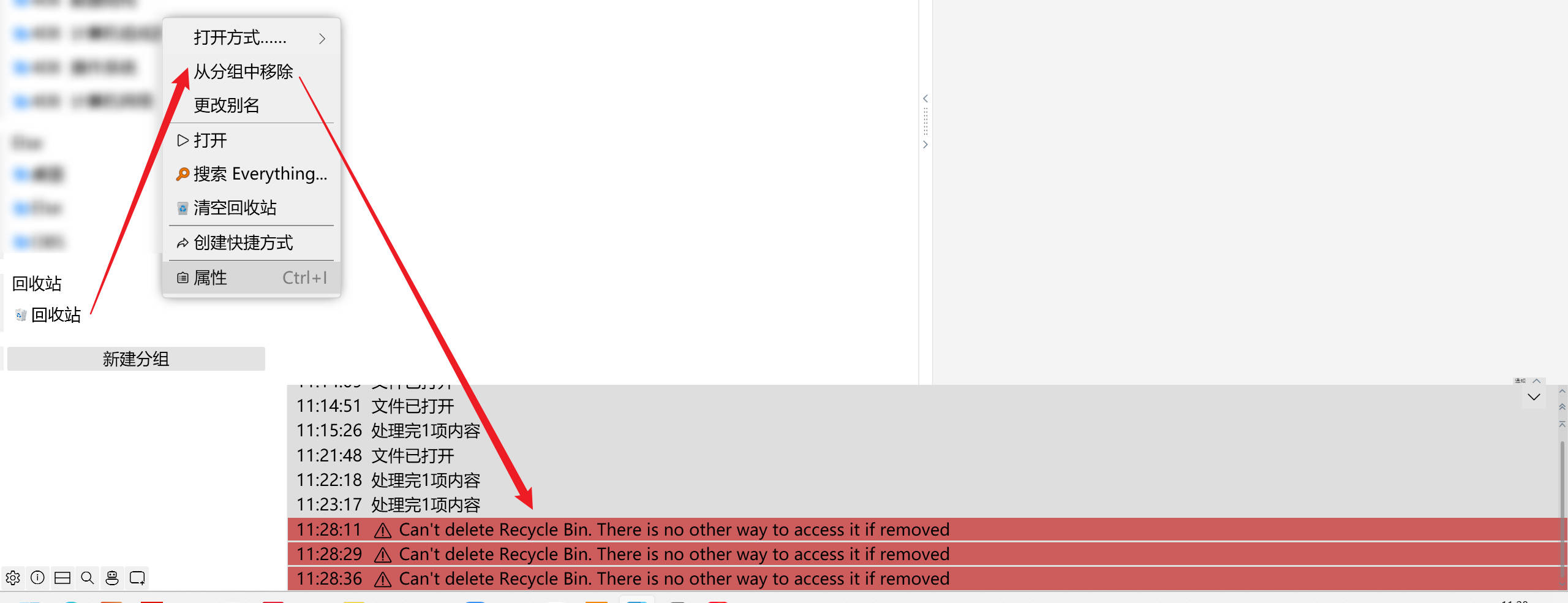
but when I do the same thing to the remaining bin folder, here comes the warning:
Can't delete Recycle Bin. There is no other way to access it if removed.
OneCommander Support
Nov 5, 2023, 12:14:36 AM11/5/23
to OneCommander
You can't remove the last Recycle Bin - there has to be at least one in sidebar because of the listed reason.
Shelly Yvette
Nov 5, 2023, 1:15:40 AM11/5/23
to OneCommander
Thanks.🥰
Reply all
Reply to author
Forward
0 new messages