
[Omkar Youth Club] How to give comment on Posts?
0 views
Skip to first unread message

Omkar Youth Club
Feb 21, 2011, 2:09:39 AM2/21/11
to omkaryo...@googlegroups.com
Those who want to give comment on the posts, just go to the end of the post.You will find a link "comments".Look at the picture below.

1. Click on "comments"
2. Write your comment in the window provided.
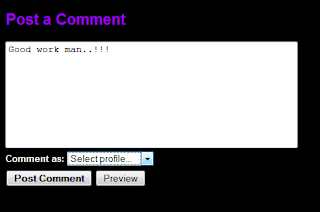
3. Then in "Comment as", select Name/URL.
4. Write your Name and keep the URL field blank.
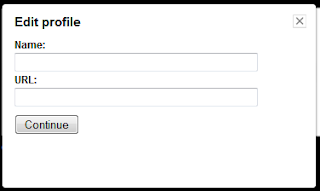
5. Click on "Continue".
6. Click on "Post Comment"
Thats it. Your comment will be uploaded.

1. Click on "comments"
2. Write your comment in the window provided.

3. Then in "Comment as", select Name/URL.
4. Write your Name and keep the URL field blank.

5. Click on "Continue".
6. Click on "Post Comment"
Thats it. Your comment will be uploaded.
--
Posted By Omkar Youth Club to Omkar Youth Club at 2/21/2011 12:39:00 PM
Reply all
Reply to author
Forward
0 new messages