
How To SIGN UP For This Group

Josh Ford
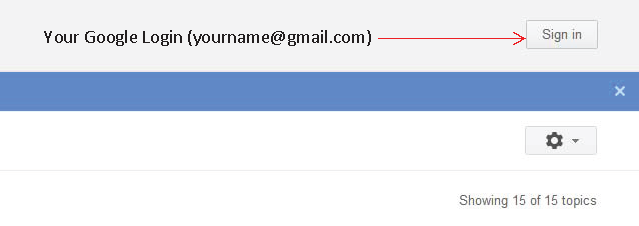
- Located at the top right part of your screen, click "Sign in" to sign in your Google account with your google ID. This would be your email such as your...@gmail.com. You can sign in from the groups screen as shown below. If you don't have a google account, you will need to create one. Signing in to your google account and signing up for a new google account are both different from signing up for this google group.
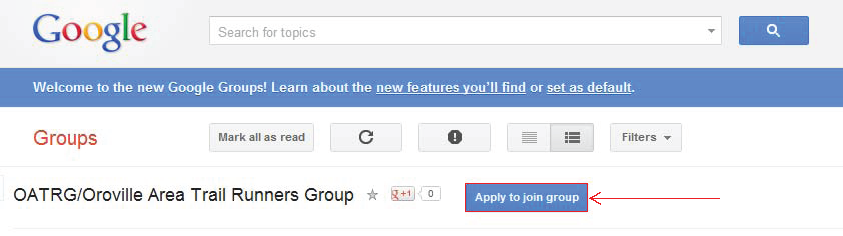
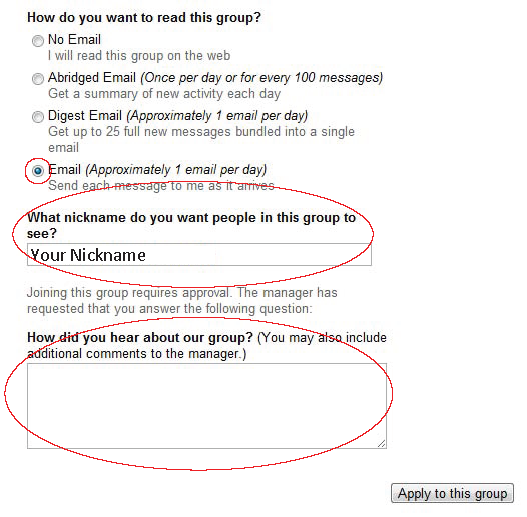
3. On the next screen, you will be asked to choose how you would like to read this group. By default, 'Email' is selected. Leave this selected unless you prefer one of the other options. Give yourself a nickname. This is what the group sees. You can put your full name here, your first name or a nickname. I would suggest using your name so we all know how to address you. Finally, include a comment about how you heard about the group and click 'Apply to this group' to finish.
That's it! Once the administrator has approved your group membership, you can begin posting to the group. Until then you are welcome to read any post on the site.
Also, a few of you have asked why we just don't use Facebook. The easy answer is that although Google Groups may take some getting used to, it is designed to host organized discussions regarding specific topics where Facebook is designed to interact socially. In our case, we are trying to organize runs, sometimes on a daily basis at a specific time and place. For instance, if you are going to go for a run on Saturday, August 4th, you would create a post with the subject 'Saturday, August 4th'. The body of that post would be where you are running and when it will be. For those browsing the group, they can quickly identify any events for Saturday, August 4th.
If this were on Facebook, there is really no way to keep the topics organized. Someone searching for a run to join on a particular day would have to sift through what could be pages of discussions about various topics. You can create events in Facebook, but they have their own web address and are generally used to host a larger, one-time event.
Hope this helps!
Josh