
Change textbox value, gets not displayed
686 views
Skip to first unread message

Sebastian Dreßler
Apr 25, 2013, 6:11:30 AM4/25/13
to npys...@googlegroups.com
Hi,
yet another problem: https://gist.github.com/sdressler/5458768 (I hope there are no mistakes in the code, I've shortened it a bit, so don't care about missing functions...). In lines #50 and #55 I'm trying to update the textbox at the bottom. However, only the "done" message gets displayed. I've tried to update the display (w. clear), which updates the textbox contents but erases the left tree widget, defined at l#37. This widget gets restored when I'm pressing a key.
Cheers,
Sebastian

Nicholas Cole
Apr 25, 2013, 7:26:42 AM4/25/13
to npys...@googlegroups.com
Hi Sebastian,
yet another problem: https://gist.github.com/sdressler/5458768 (I hope there are no mistakes in the code, I've shortened it a bit, so don't care about missing functions...). In lines #50 and #55 I'm trying to update the textbox at the bottom. However, only the "done" message gets displayed. I've tried to update the display (w. clear), which updates the textbox contents but erases the left tree widget, defined at l#37. This widget gets restored when I'm pressing a key.
I've tried your code and I can't quite work out what the problem is that you are hitting. I had to replace your two dummy functions with just standard values, but they seem to display as I would expect (I assume you are running on Python 3).
The code below works for me - if you select a "folder", the list on the right and the status box both get updated immediately. What happens on your system?
Best wishes,
N.
import npyscreen, curses
class FolderTreeAction(npyscreen.MLTreeAction):
def __init__(self, *args, **keywords):
super().__init__(*args, **keywords)
self.F = keywords['F']
def actionHighlighted(self, act_on_this, key_press):
self.F.get_content(act_on_this.getContent())
class MainForm(npyscreen.FormBaseNew):
DEFAULT_X_OFFSET = 1
BLANK_LINES_BASE = 0
BLANK_COLUMNS_RIGHT = 0
def draw_form(self):
MAX_Y, MAX_X = self.lines, self.columns
self.curses_pad.hline(MAX_Y - 3, 0, '-', MAX_X)
self.curses_pad.hline(MAX_Y - 1, 0, '-', MAX_X)
self.curses_pad.vline(0, self.FOLDERS_WIDTH + 1, curses.ACS_VLINE, MAX_Y - self.BOTTOM_SPACE + 1)
def set_status(self, status):
self.MultiTextField.value = status
self.MultiTextField.update()
def create(self):
MAX_X = self.columns
MAX_Y = self.lines
self.FOLDERS_WIDTH = int(MAX_X * 0.1)
self.MESSAGE_LIST_WIDTH = MAX_X - self.FOLDERS_WIDTH - 10
self.BOTTOM_SPACE = 4
self.MultiTextField = self.add(npyscreen.Textfield, rely=MAX_Y - 2, relx = 1, editable=0)
FolderTree = self.add(FolderTreeAction, F=self, rely = 1, max_height = MAX_Y - 4, max_width = self.FOLDERS_WIDTH)
self.add(npyscreen.Textfield, rely = MAX_Y - 2)
FolderTreeData = npyscreen.NPSTreeData(content='Root', ignoreRoot=False)
for F in ['test', 'test2', 'test3']: # Dummy routine
FolderTreeData.newChild(content=F.split(), selectable=True)
FolderTree.values = FolderTreeData
self.MessageList = self.add(npyscreen.MultiLine, relx = self.FOLDERS_WIDTH + 3, rely = 1, max_height = MAX_Y - 4, max_width = self.MESSAGE_LIST_WIDTH - 1)
def get_content(self, folder):
self.set_status("Working");
self.MessageList.values = ['2','3','4']
#self.MessageList.update() # this does work, by chance but
self.MessageList.display() # this is better.
self.set_status("Done");
class MailerAppManaged(npyscreen.NPSAppManaged):
def onStart(self):
F = self.addForm('MAIN', MainForm)
M = MailerAppManaged()
M.run()
Sebastian Dreßler
Apr 25, 2013, 7:35:07 AM4/25/13
to npys...@googlegroups.com
Hi Nicholas,
Sorry for not providing the complete app, and yes, it's Python 3. The problem is not when it comes to display "Done" but "Working". I.e. the function that provides the values for the multiline widget needs some time and I tried to notify the user in the bottom line about that. Putting npyscreen.notify("Working")after set_status and before self.MessageList.values works, but this is not what I want.
Thanks,
Sebastian
Sebastian
Nicholas Cole
Apr 25, 2013, 9:14:35 AM4/25/13
to npys...@googlegroups.com
On Thu, Apr 25, 2013 at 12:35 PM, Sebastian Dreßler <sebastian...@gmail.com> wrote:
Hi Nicholas,Sorry for not providing the complete app, and yes, it's Python 3. The problem is not when it comes to display "Done" but "Working". I.e. the function that provides the values for the multiline widget needs some time and I tried to notify the user in the bottom line about that. Putting npyscreen.notify("Working")after set_status and before self.MessageList.values works, but this is not what I want.Thanks,
Sebastian
Oh, I see. That's an easy fix. You need to change self.MultiTextField.update() in your set_status method to self.MultiTextField.display()
I know the method names are less than obvious, but because of the way the underlying curses library works, it is sometimes convenient to have a method that actually updates the internal representation of what should be drawn to the screen, and a separate method that actually draws onto the actual terminal.
Essentially, whenever you want what is actually on the screen to change, call the relevant .display() method, while if you are creating your own widgets define how they are to print themselves in the .update() method.
Best wishes,
N.
Nicholas Cole
Apr 26, 2013, 11:34:14 AM4/26/13
to npys...@googlegroups.com
Sebastian,
Did that fix your issue?
N
Sebastian Dreßler
Apr 27, 2013, 12:25:16 PM4/27/13
to npys...@googlegroups.com
Hi,
Yes, it did. And I tried it before, but there was the issue that parts of the screen were cleared too. This was because I didn't rebooted after a kernel update. Now everything is working, thanks a lot. Currently, I'm trying to make a kind of grid-widget but when moving, I want to always select the whole row, not cells. I'm still figuring out ;)
Cheers,
Sebastian

mastermind_muc
Apr 29, 2013, 8:12:50 AM4/29/13
to npys...@googlegroups.com
Hi Sebastian,
> Currently, I'm trying to make a kind of grid-widget but when moving, I want to always select the whole row, not cells. I'm still figuring out ;)
sounds really useful, if you got it, it would be nice if you shared it with us. Maybe Nico will accept it as a new standard widget. Keep me informed :-)
Kind regards,
Lasse
> Currently, I'm trying to make a kind of grid-widget but when moving, I want to always select the whole row, not cells. I'm still figuring out ;)
Kind regards,
Lasse
Nicholas Cole
Apr 29, 2013, 4:31:52 PM4/29/13
to npys...@googlegroups.com
I'm always happen to accept new, useful widgets ;-)
I would help write this one, but I'm not quite clear what it is supposed to do. You want to display columns but only be able to select a line, rather than individual cells, is that right?
Do you want to be able to scroll left and right, too?
N.
Sebastian Dreßler
Apr 30, 2013, 2:08:41 AM4/30/13
to npys...@googlegroups.com
Exactly, like
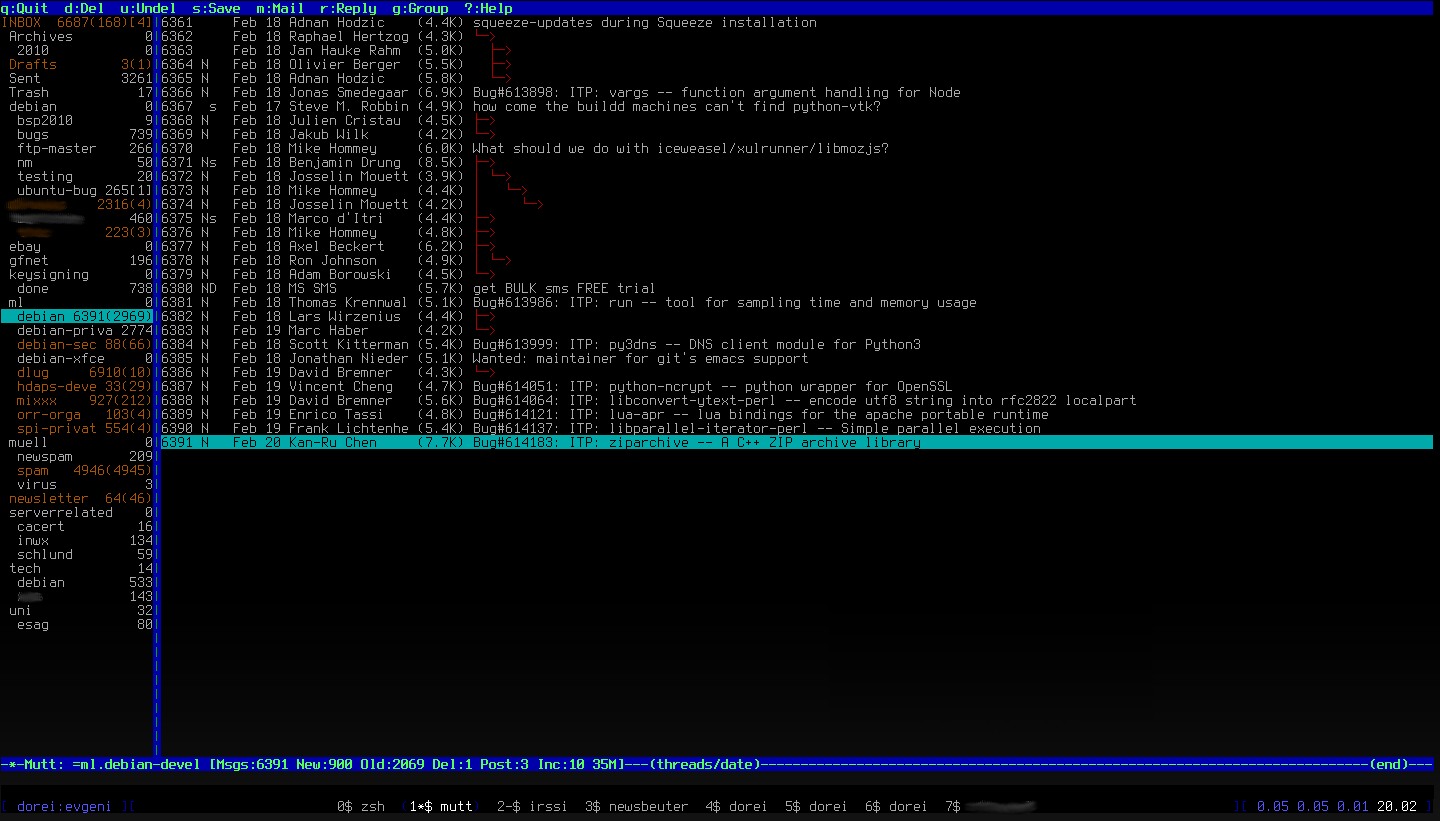
Scrolling left/right is not needed IMO. This should not be that hard, I think. Because there is the grid widget as basis and the only thing that needs to be done is changing the selection behavior, or am I wrong?
Cheers,
Sebastian
Sebastian Dreßler
Apr 30, 2013, 4:10:25 PM4/30/13
to npys...@googlegroups.com
I'm working on it now. If there's something available, I'll post it via GitHub and inform you.
Cheers,
Sebastian
Reply all
Reply to author
Forward
0 new messages