
Difference between connecting websockify to listening host and target host
585 views
Skip to first unread message

Aitha Tarun
Oct 9, 2022, 3:22:25 AM10/9/22
to noVNC
Hi,
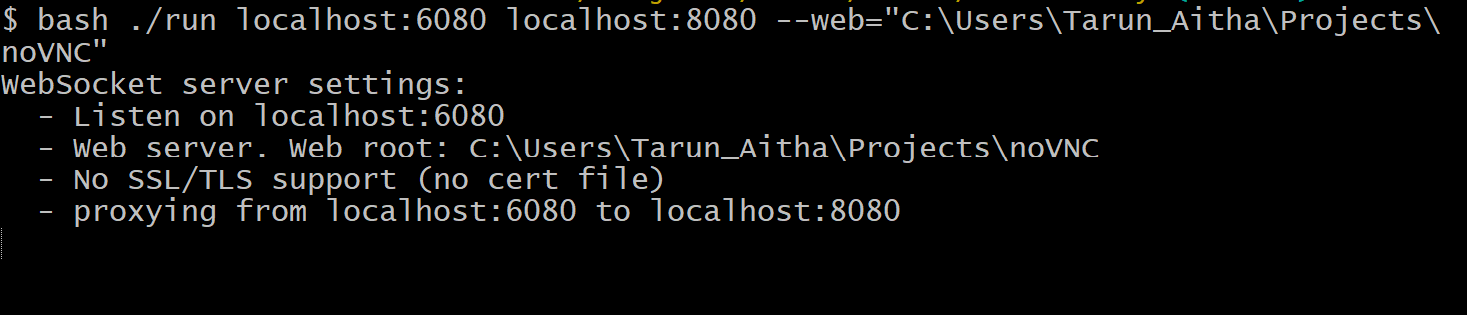
 VS
VS 
I am proxying websockify from localhost:6080 to localhost:8080
In noVNC what is the difference between connecting to listening host and target host
VS I have created a node websocket server on localhost:8080, it is detecting the client when I connect to 8080.
But RfbProxy also creates socket server on localhost:8080 to playback the recorded session, it is detecting the client when I connect to 6080.

Michael Williams
Oct 11, 2022, 4:37:56 PM10/11/22
to noVNC
Aitha,
I'm not clear on your setup. Are you running the noVNC web client on your local machine, and connecting to an SSH tunnel locally?
The port you put in the noVNC web client settings is the port the client will use to connect to the VNC server you installed on your remote machine.
On your remote machine, you can put a reverse proxy to accept the incoming connection and proxy it to a local connection where the VNC server is listening.
Does this help?
Aitha Tarun
Oct 12, 2022, 1:11:42 AM10/12/22
to noVNC
Yes, I am running a noVNC web client on my local machine and not using SSH tunneling. Yes, I understood that we could use a proxy as a mediator to communicate between the client and the server.
But my doubt is when the VNC server is running on port 8080, one-time noVNC is connecting to it through 6080, and other times it is connecting directly through 8080.
Also, this might help to answer my doubt, when we enable session recording on websockify the recording will only start when we connect to 6080 and will not work if we directly connect to 8080, I want to know why there is a difference.
Will a proxy server be created by noVNC on port 6080?
Michael Williams
Oct 14, 2022, 11:11:58 AM10/14/22
to no...@googlegroups.com
Aitha,
Just to be clear, are you using two machines, one for the web browser with noVNC client at home, and another elsewhere for the VNC server ? Or are you testing the configuration with the web browser with noVNC client and the VNC server on the same machine ?
What VNC server are you running (tigervnc, tightvnc, etc) , and what port did you assign it to listen on ?
Websockify accepts incoming (also called upstream connections) connections on whatever port you assign it to listen on, and forwards them to whatever port you assign. The VNC server (for example tigervnc) is listening on a port, usually 5091 as a default. So websockify would typically listen on the VNC server host to port 6080 and forward to 5091 on the same host.
8080 is an alternative for port 80 (the default http port) It is unusual to use 8080 for something other than http.
FYI, details about the process of listening:
When a process listens, it typically listens on "all the addresses" on the host. So this means that it would accept connections on the Internet (public) address for that port (e.g. something like 3.23.144.17:5091), or on the private address for that host (e.g. 10.0.0.25:5091), or the localhost address (e.g. 127.0.0.1:5091). If you have a home machine (a host), it would have addresses on your main interface (either a Wi-Fi or ethernet interface) for accessing the Internet and your local devices at home.Your host would have a public address from your Internet service provider (ISP), and would also have a private address within your house (e.g. 10.0.0.25), and would have the address 127.0.0.1 which is the localhost address.
The same is true for the host running the VNC server. So the vnc server will listen on all three addresses for port 5091. If you assign the VNC server a different port, such as 6080, it will accept connections from your noVNC client on port 6080.
--
You received this message because you are subscribed to the Google Groups "noVNC" group.
To unsubscribe from this group and stop receiving emails from it, send an email to novnc+un...@googlegroups.com.
To view this discussion on the web visit https://groups.google.com/d/msgid/novnc/6b34b77c-c8f6-4d5b-8112-b3ed928fdf6fn%40googlegroups.com.
| |||||||||||||||||||
| |||||||||||||||||||


Reply all
Reply to author
Forward
0 new messages