
Unable to get any output from debug Node
305 views
Skip to first unread message

ashesh rocky
Sep 20, 2016, 6:35:47 AM9/20/16
to Node-RED
Hello ,
I was trying out Node-red tool for the very first time, but i was unable to get the output for even the very basic "vcgencmd" .
I started the Node-red in my Pi 3 by issuing following command -----> "sudo node-red-start"
Once started i can see the server started in localhost:1880. I was able to open Node-Red windows by opening "ip-address:1880" on my laptop browser connected to pi via ethernet and also by opening in pi built in browser.
All good to this stage , I was about to deploy a simple use case on plotting my Pi internal temp onto Bluemix IOT platform.
I created a simple flow by adding in three components ,
1. execute - Added command as vcgencmd , unchecked msg.payload and append with measure_temp.
2. added a debug from output section
3. Added a inject from Input section as timestamp.
Made a connection to wire up all three nodes and deploy. The deployment was success and upon clicking the inject button , i see no null string output under debug tab.
Result: msg.payload : string(0)
Can anyone guide me on what i did wrong. Sorry for the long post. BTW the tool appears to be very user friendly provided i get the output as expected 😊, I also tried the same command via terminal and it throws the current temp of pi board.
Thanks in advance.
I was trying out Node-red tool for the very first time, but i was unable to get the output for even the very basic "vcgencmd" .
I started the Node-red in my Pi 3 by issuing following command -----> "sudo node-red-start"
Once started i can see the server started in localhost:1880. I was able to open Node-Red windows by opening "ip-address:1880" on my laptop browser connected to pi via ethernet and also by opening in pi built in browser.
All good to this stage , I was about to deploy a simple use case on plotting my Pi internal temp onto Bluemix IOT platform.
I created a simple flow by adding in three components ,
1. execute - Added command as vcgencmd , unchecked msg.payload and append with measure_temp.
2. added a debug from output section
3. Added a inject from Input section as timestamp.
Made a connection to wire up all three nodes and deploy. The deployment was success and upon clicking the inject button , i see no null string output under debug tab.
Result: msg.payload : string(0)
Can anyone guide me on what i did wrong. Sorry for the long post. BTW the tool appears to be very user friendly provided i get the output as expected 😊, I also tried the same command via terminal and it throws the current temp of pi board.
Thanks in advance.

Julian Knight
Sep 20, 2016, 6:57:07 AM9/20/16
to Node-RED
Did you wire up all 3 outputs to debug? How about trying a builtin command first such as "ls".

Mark Setrem
Sep 20, 2016, 7:26:01 AM9/20/16
to Node-RED
Why are you running root?
On my Pi running as a normal user (as per instructions on http://nodered.org/docs/hardware/raspberrypi), I can run the command and receive back a temp.
[{"id":"55f85bc3.aa07a4","type":"exec","z":"8fe8ce2b.70173","command":"vcgencmd","addpay":false,"append":"measure_temp","useSpawn":false,"name":"","x":294.5,"y":99.5,"wires":[["74473c78.8bb8c4"],["94e3debc.6b1c2"],[]]},{"id":"39887d96.c67782","type":"inject","z":"8fe8ce2b.70173","name":"","topic":"","payload":"","payloadType":"date","repeat":"","crontab":"","once":false,"x":114.5,"y":70,"wires":[["55f85bc3.aa07a4"]]},{"id":"94e3debc.6b1c2","type":"debug","z":"8fe8ce2b.70173","name":"stderr","active":true,"console":"false","complete":"payload","x":470.5,"y":111,"wires":[]},{"id":"74473c78.8bb8c4","type":"debug","z":"8fe8ce2b.70173","name":"stdout","active":true,"console":"false","complete":"payload","x":481.5,"y":52,"wires":[]}]
(running node-red 0.14.6 with nodejs v4.3.2 on a pi3)
ashesh rocky
Sep 20, 2016, 7:28:33 AM9/20/16
to Node-RED
Hi julian ,
I have connected only execute node to debug , isn't that the way to do it ?
inject Node ----> execute Node ----> debug Node
Thats my connection. I did a simple usecase to print out the timestamp and modify the output by formatting. That works well , but it dosenot involve any execute node. I will try to perform simple example with "ls"and update once done.
Thanks
Julian Knight
Sep 20, 2016, 8:41:34 AM9/20/16
to Node-RED
The clues from Mark and myself both allude to OS issues you get when changing context from a standard user running in a console to root user running inside an application.
The reason I suggest using a builtin command like ls is that it works in any context, only the output changes. This may not be true of other commands.
The reason I suggest using a builtin command like ls is that it works in any context, only the output changes. This may not be true of other commands.

Nicholas O'Leary
Sep 20, 2016, 8:43:14 AM9/20/16
to Node-RED Mailing List
Hi,
it would be helpful if you were to share how exactly you have the Exec node configured.
Also note the Coursera course I'm guessing you are doing does explain how to do this....
Nick
--
http://nodered.org
Join us on Slack to continue the conversation: http://nodered.org/slack
---
You received this message because you are subscribed to the Google Groups "Node-RED" group.
To unsubscribe from this group and stop receiving emails from it, send an email to node-red+unsubscribe@googlegroups.com.
To post to this group, send an email to node...@googlegroups.com.
Visit this group at https://groups.google.com/group/node-red.
For more options, visit https://groups.google.com/d/optout.
ashesh rocky
Sep 20, 2016, 9:23:12 AM9/20/16
to Node-RED
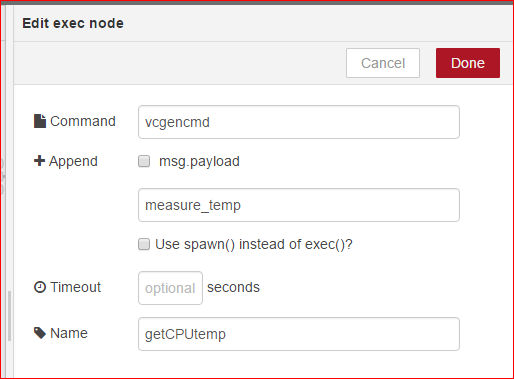

Hi guys ,
I have attached screenshots of my content of execute Node and Flow diagram itself. You can also see the output i get when i click inject timestamp.
This time i started the node-red-start without the sudo command , and i am logged into pi using the default user which is "pi" , i have not created any other user account for now.
Is their any issue with the flow model ?
On Tuesday, 20 September 2016 20:43:14 UTC+8, Nick O'Leary wrote:
Hi,it would be helpful if you were to share how exactly you have the Exec node configured.Also note the Coursera course I'm guessing you are doing does explain how to do this....Nick
On 20 September 2016 at 11:35, ashesh rocky <ashes...@gmail.com> wrote:
Hello ,
I was trying out Node-red tool for the very first time, but i was unable to get the output for even the very basic "vcgencmd" .
I started the Node-red in my Pi 3 by issuing following command -----> "sudo node-red-start"
Once started i can see the server started in localhost:1880. I was able to open Node-Red windows by opening "ip-address:1880" on my laptop browser connected to pi via ethernet and also by opening in pi built in browser.
All good to this stage , I was about to deploy a simple use case on plotting my Pi internal temp onto Bluemix IOT platform.
I created a simple flow by adding in three components ,
1. execute - Added command as vcgencmd , unchecked msg.payload and append with measure_temp.
2. added a debug from output section
3. Added a inject from Input section as timestamp.
Made a connection to wire up all three nodes and deploy. The deployment was success and upon clicking the inject button , i see no null string output under debug tab.
Result: msg.payload : string(0)
Can anyone guide me on what i did wrong. Sorry for the long post. BTW the tool appears to be very user friendly provided i get the output as expected 😊, I also tried the same command via terminal and it throws the current temp of pi board.
Thanks in advance.
--
http://nodered.org
Join us on Slack to continue the conversation: http://nodered.org/slack
---
You received this message because you are subscribed to the Google Groups "Node-RED" group.
To unsubscribe from this group and stop receiving emails from it, send an email to node-red+u...@googlegroups.com.
Mark Setrem
Sep 20, 2016, 9:31:54 AM9/20/16
to Node-RED
The only issue in your wiring is that you have wired the debug node up to stderr rather than stdout
If you want the debug node to display the stdout you need to connect the debug node up to the stdout output.
(as per the flow I pasted into my previous answer)
ashesh rocky
Sep 20, 2016, 9:52:40 AM9/20/16
to Node-RED
Hi Mark ,
Thanks a lot for the explanation , i did not read through the info content for execute , My bad , i assumed it would be similar to other node with just one output.
Thank you and others for looking into my issues.
I can get it working now :-)
Regards
Ashesh
Mark Setrem
Sep 20, 2016, 11:41:12 AM9/20/16
to Node-RED
No problem, it's always worth looking at the info panel on the right hand side if you get stuck. Click on the node, and the info panel generally explains the outputs as well as what specific formats any input needs to be in.
Reply all
Reply to author
Forward
0 new messages