
What is the difference between terminal commands and the exec node in Node red?
447 views
Skip to first unread message

Phil Grant
Mar 24, 2016, 4:30:25 PM3/24/16
to Node-RED
Does anyone know why a command typed in the terminal window would work correctly but when run from the exec node it looks like it's running and gives the same response but not actually do what it should do?

Ben Hardill
Mar 24, 2016, 4:44:13 PM3/24/16
to Node-RED
Running as different users?
Running on different working directories?
Running on different working directories?
What is the command you are trying to run?
Phil Grant
Mar 24, 2016, 4:49:24 PM3/24/16
to Node-RED
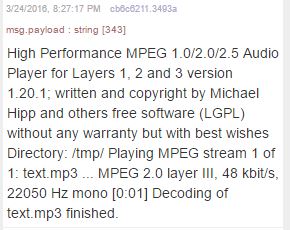
The running as different users could be it but I'm not sure, also the output from the exec node shows it played OK
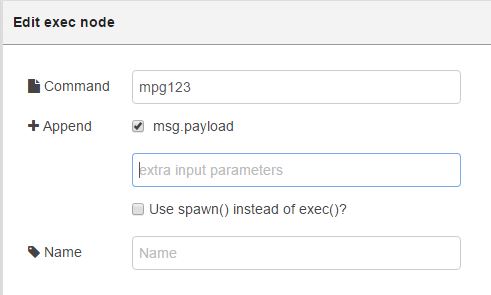
exec node
Output from the exec node, it's the same as seen in the terminal window after execution

Julian Knight
Mar 24, 2016, 7:40:53 PM3/24/16
to Node-RED
Which user are you running NR as? Are you running NR as root (e.g. you installed globally) or as the pi user?

Phil Grant
Mar 25, 2016, 4:47:59 AM3/25/16
to node...@googlegroups.com
I'm using the version that was built in to Jessie for the Raspberry pi 3 so I didn't install it as such, when I run it from the terminal I think I'm running it as 'pi'
If it was a permissions issue wouldn't there be an error in the exec node output text?
--
http://nodered.org
Join us on Slack to continue the conversation: http://nodered.org/slack
---
You received this message because you are subscribed to a topic in the Google Groups "Node-RED" group.
To unsubscribe from this topic, visit https://groups.google.com/d/topic/node-red/WwBnSWIWBRU/unsubscribe.
To unsubscribe from this group and all its topics, send an email to node-red+u...@googlegroups.com.
To post to this group, send email to node...@googlegroups.com.
Visit this group at https://groups.google.com/group/node-red.
For more options, visit https://groups.google.com/d/optout.

Mark Setrem
Mar 25, 2016, 5:07:07 AM3/25/16
to Node-RED
As there's no error it would suggest to me that as far as the Pi is concerned it has happily played the file, its just you can't hear it.
When you run the command via the command line where does it play?
When you run the command via the command line where does it play?
Have you tried using the raspi-config advanced option to force all sound to the port you want?
Phil Grant
Mar 25, 2016, 5:11:54 AM3/25/16
to Node-RED
I'm playing the audio through a small Bluetooth speaker and I haven't looked at the raspi-config since I installed it, I will have a look at the config with the Bluetooth connected but it does play fine when the commands are entered into the terminal window.
Mark Setrem
Mar 25, 2016, 5:46:58 AM3/25/16
to Node-RED
I hadn't picked up on the fact you were using Bluetooth.
Have you set it up as a ALSA device?
Have you set it up as a ALSA device?
There are also options in mpg123 to direct the output to a specific device such as ALSA which might be worth trying

Dave C-J
Mar 25, 2016, 6:06:25 AM3/25/16
to node...@googlegroups.com
Do you have any other GPIO hooked up ? Pi shares it's audio with some of the GPIO timing so will break with each other quite happily.
Phil Grant
Mar 25, 2016, 6:07:53 AM3/25/16
to node...@googlegroups.com
I'm a bit of a novice when it comes to Linux so although I've followed advice on installing Bluez and blueman and I've followed other advice to list sink devices and make one a default and then it seems to work fine but then later on..... it connects using the GUI Bluetooth interface but hten doesn't appear in the pulseaudio volume control as it did an hour before.
This is driving me mad but when It does work it works from the terminal but not from the exec node and I'm wondering why not.
I suppose I have two problems
1. Getting the Bluetooth speaker to connect reliably.
2. getting the command to correctly run from and exec node.
How do I set it up as an ALSA device?
Thanks for taking the time to help out.
--
http://nodered.org
Join us on Slack to continue the conversation: http://nodered.org/slack
---
You received this message because you are subscribed to a topic in the Google Groups "Node-RED" group.
To unsubscribe from this topic, visit https://groups.google.com/d/topic/node-red/WwBnSWIWBRU/unsubscribe.
To unsubscribe from this group and all its topics, send an email to node-red+u...@googlegroups.com.
To post to this group, send an email to node...@googlegroups.com.
Visit this group at https://groups.google.com/group/node-red.
For more options, visit https://groups.google.com/d/optout.
Phil Grant
Mar 25, 2016, 6:08:29 AM3/25/16
to node...@googlegroups.com
I have a DS18B20 connected
On 25 March 2016 at 10:06, Dave C-J <dce...@gmail.com> wrote:
Do you have any other GPIO hooked up ? Pi shares it's audio with some of the GPIO timing so will break with each other quite happily.
--
http://nodered.org
Join us on Slack to continue the conversation: http://nodered.org/slack
---
You received this message because you are subscribed to a topic in the Google Groups "Node-RED" group.
To unsubscribe from this topic, visit https://groups.google.com/d/topic/node-red/WwBnSWIWBRU/unsubscribe.
To unsubscribe from this group and all its topics, send an email to node-red+u...@googlegroups.com.
To post to this group, send email to node...@googlegroups.com.
Visit this group at https://groups.google.com/group/node-red.
For more options, visit https://groups.google.com/d/optout.
Mark Setrem
Mar 25, 2016, 6:48:38 AM3/25/16
to Node-RED
Heres a guide to walk you through setting up with ALSA
http://ghostwriter.wikia.com/wiki/Install_Bluetooth_speakers_on_Raspberry_Pi
Dave C-J
Mar 25, 2016, 7:31:36 AM3/25/16
to node...@googlegroups.com
On one of my Pi it plays an mp3 via both command line and exec node fine - so it is possible.
Typically the ds18b20 uses pin7 (GPIO4) - which I think may well be the one they also use for audio - as it has a hardware timer behind it. - So try without the ds18b20 node in place. (may need to reboot to remove all trace - as once they have messed with the registers they won't get reset.
Dave C-J
Mar 25, 2016, 10:13:56 AM3/25/16
to node...@googlegroups.com
OK - I'm 2 for 2 so far all working... :-(
make sure you don't have the "append msg.payload" option ticked
and I've also uses omxplayer - for me it's built in and "just works"
(though mpg123 was also ok)
def try without the ds18b20.

Greg EVA
Mar 25, 2016, 11:39:03 AM3/25/16
to Node-RED
This idea is perhaps way out there.... but perhaps worth a try.
There is a program called 'screen' in Unix which emulates an environment and allows controlling that environment from other processes. Think of it as a terminal session, but opened in a background process. You may to install it in order to use it (sudo apt-get install screen), and access it's man page (man screen).
Why? I have often seen scripts run without the full environment setup (ie; environment variables), and I am wondering if this is perhaps something that is missing. Using screen should create the full environment with your profile and bashrc files loaded, and then run the command that you specify.
As others have asked, is it about the user? Perhaps the user running the script doesn't have access to the bluetooth speaker device.
You can (and should) try to capture the standard error and output of the script to a file and then inspect that file to see exactly what happened during the execution. You can do this by appending ' &> somefile' to the end of your play command.
There is a program called 'screen' in Unix which emulates an environment and allows controlling that environment from other processes. Think of it as a terminal session, but opened in a background process. You may to install it in order to use it (sudo apt-get install screen), and access it's man page (man screen).
Why? I have often seen scripts run without the full environment setup (ie; environment variables), and I am wondering if this is perhaps something that is missing. Using screen should create the full environment with your profile and bashrc files loaded, and then run the command that you specify.
As others have asked, is it about the user? Perhaps the user running the script doesn't have access to the bluetooth speaker device.
You can (and should) try to capture the standard error and output of the script to a file and then inspect that file to see exactly what happened during the execution. You can do this by appending ' &> somefile' to the end of your play command.
Dave C-J
Mar 25, 2016, 11:49:46 AM3/25/16
to node...@googlegroups.com
oh... and finally make sure you are fully pathing the audio file... eg /home/pi/myfile.mp3
Phil Grant
Mar 25, 2016, 8:04:26 PM3/25/16
to node...@googlegroups.com
Well, I removed the DS18B20 node, rebooted and now it seems to work fine via the headphone socket (it wouldn't work with the DS18B20 node) .
More investigating with Bluetooth tomorrow to confirm,
Thanks Dave.
On 25 March 2016 at 11:31, Dave C-J <dce...@gmail.com> wrote:
On one of my Pi it plays an mp3 via both command line and exec node fine - so it is possible.Typically the ds18b20 uses pin7 (GPIO4) - which I think may well be the one they also use for audio - as it has a hardware timer behind it. - So try without the ds18b20 node in place. (may need to reboot to remove all trace - as once they have messed with the registers they won't get reset.
--
http://nodered.org
Join us on Slack to continue the conversation: http://nodered.org/slack
---
You received this message because you are subscribed to a topic in the Google Groups "Node-RED" group.
To unsubscribe from this topic, visit https://groups.google.com/d/topic/node-red/WwBnSWIWBRU/unsubscribe.
To unsubscribe from this group and all its topics, send an email to node-red+u...@googlegroups.com.
To post to this group, send email to node...@googlegroups.com.
Visit this group at https://groups.google.com/group/node-red.
For more options, visit https://groups.google.com/d/optout.
Reply all
Reply to author
Forward
Message has been deleted
0 new messages