
display serial data in UI
845 views
Skip to first unread message

matt vorwald
Jun 3, 2016, 9:38:56 AM6/3/16
to Node-RED
Here is the setup. I have a grain dryer that dumps data out to an rs232 printer. I've gotten node red on a raspberry pi to read that data in and display it on the debug page. However, i'd like to view that data vie the UI page along w/ the rest of my controls. What would be the most efficient way of achieving that? Also, i'd like to store that data somewhere and dump it out as a csv file for archival purposes.
i'll attach images of what the printer data looks like and a screen shot of my debug scree.
thanks for any suggestions!
matt

Dave C-J
Jun 3, 2016, 11:44:35 AM6/3/16
to node...@googlegroups.com
Hi Matt,
when you say "theUI page" ... do you mean you have node-red-contrib-ui installed already ?
if so I would start by splitting those debug messages into name value pairs with a function node... something like
// split the payload (assumes always has spaces around the = sign)
var b = msg.payload.split(" = ");
msg.topic = b[0];
msg.payload = b[1];
return msg;
then feed that into a switch node that switches on the topic to create a load of outputs - then feed them into
whichever widgets you fancy for the UI...

Mark Setrem
Jun 3, 2016, 12:46:19 PM6/3/16
to Node-RED
The other advice is to think about where you are going to end up storing the data.
The sdcards that the pi uses have a tendency to fail if you are doing a lot of writes to them. So they don't make the best long term storage solution.
(see openenergymonitor.org if you want more details)
One solution would be to use a small hard disk such as http://wdlabs.wd.com but it really depends where the pi is located and what the connectivity is like.
If you get stuck, heres always the community here to help out
matt vorwald
Jun 3, 2016, 1:07:01 PM6/3/16
to Node-RED
Please pardon my ignorance, i'm very green. About 2 months w/ an arduino and 1 week w/ Pi. I do have the UI components installed into node red. So fare everything I've learned has been from this youtube vid. Thanks for the info i'll be doing a lot of googeling and i'll report back if i get to stuck, or a major success. I was quite pleased to see the serial data in the debugger last night!!

Julian Knight
Jun 3, 2016, 1:13:12 PM6/3/16
to Node-RED
Certainly the SD cards can be temperamental. At the least you will want a high-quality branded SD card such as a Samsung EVO. I've been using a 32GB EVO microSDHC UHS-I card for months now and really hammered it without issues. One of the best things you can do is to connect the Pi to a small UPS so that you never get the power cut on you. A USB SSD or HDD of course will mean you don't really need to worry so much but I'd still get a UPS if you need to be sure you won't end up with corrupted data.
In terms of what to use as a database, kind of depends how quickly those updates come through. If it is as often as, lets say, every 30s or even every minute, that's a lot of data and you may hit the next issue which is that a Pi is a 32bit architecture which limits the db size you can have. MongoDB for example, which is popular for this kind of thing is actually not very good here as it has a tendency to reach a max size and simply fall in a heap and refuse to come back! The kind of data you have there might work OK in MySQL but for ease of monitoring and graphing, you might want to consider InfluxDB or one of the other time-series databases. InfluxDB has pre-built versions for the Pi and has a built-in method for summarising data such that you can keep detailed sensor data for a period, lets say a week, whilst automatically summarising the data, perhaps to an hourly average, for long-term analysis. Keeps the data sizes manageable.
Doing that also presents you with an alternative UI using something like Grafana which is used to easily build dashboards. So you could have both the immediate figures and historical graphs shown side by side.
You might also, if you plan to use the data for further processing, consider simultaneously updating both your database, for history and dashboard, and MQTT for further processing. Then you can create any number of flows that listen to the MQTT data and update a UI page, turns on a light if the grain exceeds certain conditions, controls the drying process or whatever.
All this might seem overwhelming but as you actually build up step by step thanks to the ease of using NR, you will be amazed as to what you can achieve even with just a Pi.
Julian Knight
Jun 3, 2016, 1:15:23 PM6/3/16
to Node-RED
Hey, you should be congratulating yourself, you've made good progress already. The main downside is that it is addictive this IoT stuff! Soon you will have Internet connected doorbells like the rest of us :)
Dave C-J
Jun 3, 2016, 1:20:22 PM6/3/16
to node...@googlegroups.com
Julian let's keep it simple for now... he's asked for CSV, let's start there.
Mark Setrem
Jun 3, 2016, 1:22:08 PM6/3/16
to Node-RED
Ahhh OK lets take a step back.
So personally I would forget about the ui components for the time being (there a new version coming soon anyway).
So personally I would forget about the ui components for the time being (there a new version coming soon anyway).
You need to split up each line as it comes in to grab the value that changes and strip off the one bit and do that for each bit of information you want.
This is probably most easily done in a function node where you write some basic javascript to do it ( the code that C-J wrote) , there are numerous javascript tutorials you can google, as well as this forum. So I'd suggest the next step is to add a function node between the serial and debug nodes and try to get just the value printing in the debug node.
(By default the debug node displays the contents on msg.payload but you can change it)
Whilst it is not going to contain a node-red-flow that does what you want there's the library of node-red-nodes and flows on http://flows.nodered.org which can often help understand how flows work etc.
matt vorwald
Jun 7, 2016, 11:48:35 AM6/7/16
to Node-RED
is there a way to test my parsing w/o having to have the serial cable hooked up to the grain bin? Can i setup an inject node and feed that into the parsing function?
Dave C-J
Jun 7, 2016, 12:12:41 PM6/7/16
to node...@googlegroups.com
hi Matt,
sure - but as usual there may be some slight wrinkles (hopefully not)... main gotcha is if the serial data contains binary characters. From what you have posted so far it looks like simple ascii... If so then yes it will be easy to either capture simple lines into a file that you could replay back in - or use individual lines within an inject node.
matt vorwald
Jun 8, 2016, 4:57:23 PM6/8/16
to Node-RED
need a little java script help. is there a "includes" method in node-red? i've attached a pic of my flow. But my plan is to make a function for each type of line of data that is dumped out of the serial port. In my ignorance of javascript I've attempted to inject some test data to work out some of my skills before i start dealing w/ the real stuff. Anyways i'm injecting data looking for TRUE or FALSE. If true i'll print it to debug and if not it'll move on to the next function. I get this worked out then i'll pick up the data in subsequent nodes and do w/ it as i wish. However I need a good method to parse. I thought "includes" would do it, any thoughts?
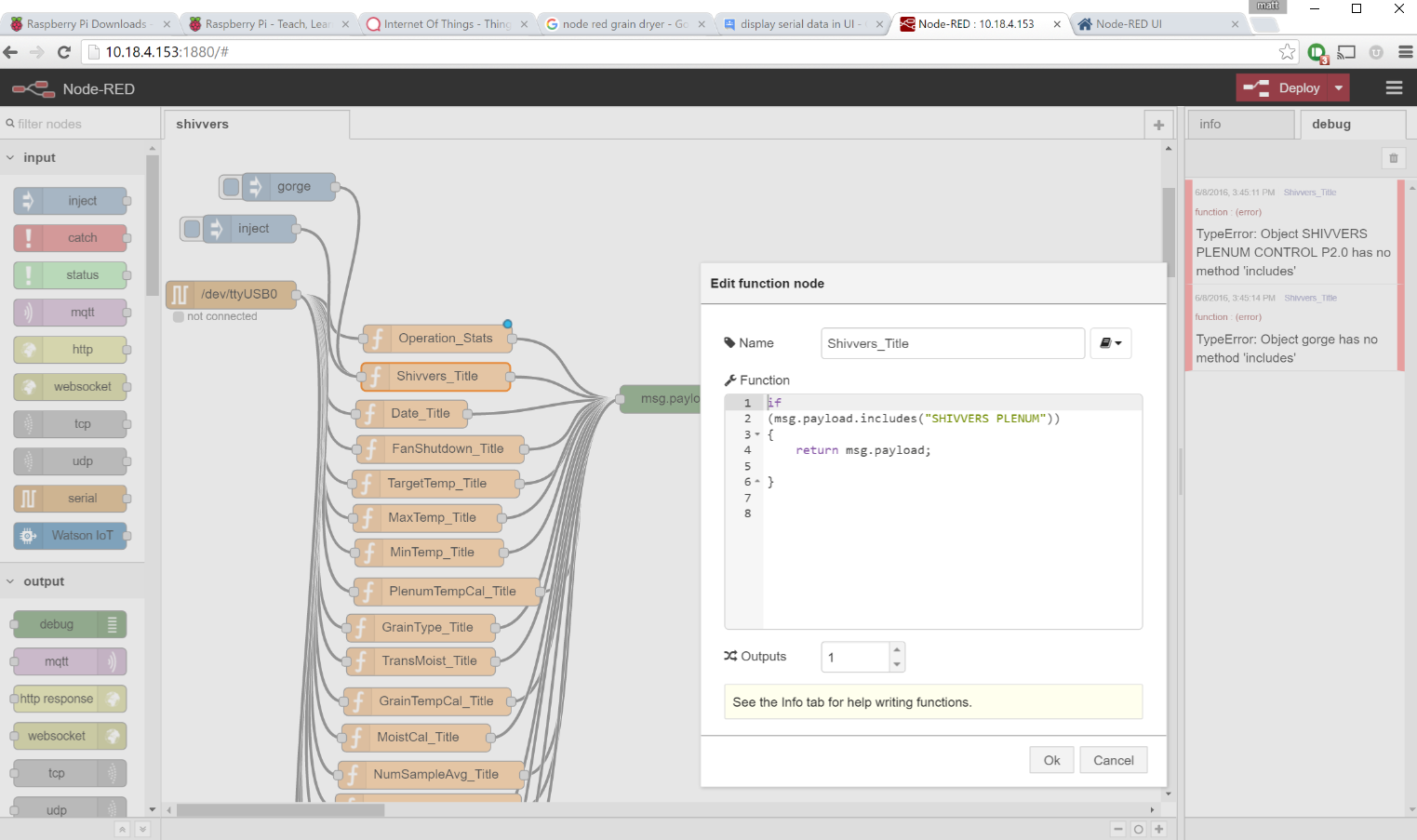

Nicholas O'Leary
Jun 8, 2016, 5:00:24 PM6/8/16
to Node-RED Mailing List
Matt,
there are lots of ways to do it with JavaScript.
If you know that msg.payload is a string, you can do:
if (msg.payload.indexOf("The Text You Want") !== -1) {
}
or use Regular Expressions
if (/The Text You Want/.test(msg.payload)) {
}
or ....
If you're not familiar with it, StackOverflow.com is a very good place to search for these sorts of JavaScript questions.
Nick
--
http://nodered.org
Join us on Slack to continue the conversation: http://nodered.org/slack
---
You received this message because you are subscribed to the Google Groups "Node-RED" group.
To unsubscribe from this group and stop receiving emails from it, send an email to node-red+u...@googlegroups.com.
To post to this group, send email to node...@googlegroups.com.
Visit this group at https://groups.google.com/group/node-red.
For more options, visit https://groups.google.com/d/optout.
Dave C-J
Jun 8, 2016, 6:28:37 PM6/8/16
to node...@googlegroups.com
the switch node also has a "contains" option so many of these could be handles within one node....
matt vorwald
Jun 9, 2016, 11:07:37 AM6/9/16
to Node-RED

matt vorwald
Jun 9, 2016, 11:36:57 AM6/9/16
to Node-RED
OK what am i doing wrong, in my head this should spit out the value of -1.4, or at least 1.4
msg.payload = parseInt(msg.payload);
return msg;
I'm using this code in the function "MoistCal_Title"
Here is my flow if anyone could take a peak.
[{"id":"ee629807.2fd5a8","type":"serial-port","z":"f5ac9dc.e45ae6","serialport":"/dev/ttyUSB0","serialbaud":"1200","databits":"8","parity":"none","stopbits":"1","newline":"\\n","bin":"false","out":"char","addchar":false},{"id":"874e1c13.3369c","type":"serial in","z":"f5ac9dc.e45ae6","name":"","serial":"ee629807.2fd5a8","x":75,"y":427,"wires":[["dda43047.18ef6"]]},{"id":"7e4cfeb7.ff4ee","type":"function","z":"f5ac9dc.e45ae6","name":"Operation_Stats","func":"return msg;","outputs":"1","noerr":0,"x":662,"y":127,"wires":[[]]},{"id":"e4e24146.f6868","type":"function","z":"f5ac9dc.e45ae6","name":"Shivvers_Title","func":"if \n(msg.payload.includes(\"SHIVVERS PLENUM\"))\n{\n return msg.payload;\n \n}\n\n","outputs":1,"noerr":0,"x":673,"y":49,"wires":[[]]},{"id":"55741e29.72a4f","type":"function","z":"f5ac9dc.e45ae6","name":"Date_Title","func":"\nreturn msg;","outputs":1,"noerr":0,"x":645,"y":168,"wires":[[]]},{"id":"9bcecf6d.733a1","type":"function","z":"f5ac9dc.e45ae6","name":"FanShutdown_Title","func":"\nreturn msg;","outputs":1,"noerr":0,"x":676,"y":206,"wires":[[]]},{"id":"3a6b5416.0fa11c","type":"function","z":"f5ac9dc.e45ae6","name":"TargetTemp_Title","func":"\nreturn msg;","outputs":1,"noerr":0,"x":671,"y":243,"wires":[[]]},{"id":"5def0b7c.9475c4","type":"function","z":"f5ac9dc.e45ae6","name":"MaxTemp_Title","func":"\nreturn msg;","outputs":1,"noerr":0,"x":662,"y":280,"wires":[[]]},{"id":"1392fba.dd2ea04","type":"function","z":"f5ac9dc.e45ae6","name":"MinTemp_Title","func":"\nreturn msg;","outputs":1,"noerr":0,"x":664,"y":317,"wires":[[]]},{"id":"3a5e6ecd.4ac5a2","type":"function","z":"f5ac9dc.e45ae6","name":"PlenumTempCal_Title","func":"\nreturn msg;","outputs":1,"noerr":0,"x":683,"y":359,"wires":[[]]},{"id":"60055eaf.8f111","type":"function","z":"f5ac9dc.e45ae6","name":"TransMoist_Title","func":"\nreturn msg;","outputs":1,"noerr":0,"x":673,"y":396,"wires":[[]]},{"id":"db31f1b1.b5406","type":"function","z":"f5ac9dc.e45ae6","name":"GrainTempCal_Title","func":"\nreturn msg;","outputs":1,"noerr":0,"x":680,"y":439,"wires":[[]]},{"id":"5ba8be3b.a53a9","type":"function","z":"f5ac9dc.e45ae6","name":"MoistCal_Title","func":"msg.payload = parseInt(msg.payload);\nreturn msg;","outputs":1,"noerr":0,"x":680,"y":478,"wires":[["afc0cc6b.ade4b"]]},{"id":"f5668973.c33068","type":"function","z":"f5ac9dc.e45ae6","name":"NumSampleAvg_Title","func":"\nreturn msg;","outputs":1,"noerr":0,"x":684,"y":518,"wires":[[]]},{"id":"771c4cba.b6cab4","type":"function","z":"f5ac9dc.e45ae6","name":"ContFlowDelay_Title","func":"\nreturn msg;","outputs":1,"noerr":0,"x":673,"y":94,"wires":[[]]},{"id":"d96a12b7.e0706","type":"function","z":"f5ac9dc.e45ae6","name":"SweepOffTime_Title","func":"\nreturn msg;","outputs":1,"noerr":0,"x":681,"y":556,"wires":[[]]},{"id":"97d6ac22.5dc7f","type":"function","z":"f5ac9dc.e45ae6","name":"NumTransferd_Title","func":"\nreturn msg;","outputs":1,"noerr":0,"x":678,"y":605,"wires":[[]]},{"id":"6c1e8910.4d8248","type":"inject","z":"f5ac9dc.e45ae6","name":"","topic":"","payload":"gorge","payloadType":"str","repeat":"","crontab":"","once":false,"x":90,"y":259,"wires":[["dda43047.18ef6"]]},{"id":"cb064e7c.b8e72","type":"inject","z":"f5ac9dc.e45ae6","name":"","topic":"","payload":"MOISTURE CAL = -1.4","payloadType":"str","repeat":"","crontab":"","once":false,"x":139,"y":304,"wires":[["dda43047.18ef6"]]},{"id":"dda43047.18ef6","type":"switch","z":"f5ac9dc.e45ae6","name":"parser","property":"payload","propertyType":"msg","rules":[{"t":"cont","v":"SHIVVERS PLENUM","vt":"str"},{"t":"cont","v":"CONT. FLOW","vt":"str"},{"t":"cont","v":"--","vt":"str"},{"t":"cont","v":"ON","vt":"str"},{"t":"cont","v":"DATE","vt":"str"},{"t":"cont","v":"FAN SHUT-DOWN","vt":"str"},{"t":"cont","v":"TARGET TEMP","vt":"str"},{"t":"cont","v":"MAX TEMP","vt":"str"},{"t":"cont","v":"MIN TEMP","vt":"str"},{"t":"cont","v":"PLENUM TEMP CAL","vt":"str"},{"t":"cont","v":"TRANSFER MOISTURE","vt":"str"},{"t":"cont","v":"GRAIN TEMP","vt":"str"},{"t":"cont","v":"MOISTURE CAL","vt":"str"},{"t":"cont","v":"NUMBER OF SAMPLES","vt":"str"},{"t":"cont","v":"SWEEP OFF","vt":"str"},{"t":"cont","v":"# TRANSFERRED","vt":"str"}],"checkall":"false","outputs":16,"x":382,"y":281,"wires":[["e4e24146.f6868"],["771c4cba.b6cab4"],["7e4cfeb7.ff4ee"],["7e4cfeb7.ff4ee"],["55741e29.72a4f"],["9bcecf6d.733a1"],["3a6b5416.0fa11c"],["5def0b7c.9475c4"],["1392fba.dd2ea04"],["3a5e6ecd.4ac5a2"],["60055eaf.8f111"],["db31f1b1.b5406"],["5ba8be3b.a53a9"],["f5668973.c33068"],["d96a12b7.e0706"],["97d6ac22.5dc7f"]]},{"id":"afc0cc6b.ade4b","type":"debug","z":"f5ac9dc.e45ae6","name":"","active":true,"console":"false","complete":"false","x":1011,"y":243,"wires":[]},{"id":"108741f3.b664be","type":"comment","z":"f5ac9dc.e45ae6","name":"SHIVVERS TITLE","info":"The only reason this is here is so this line doesn't \nget sucked into the states\n\n\nSHIVVERS CONTROL contain's and \"ON\"","x":883,"y":47,"wires":[]}]
Mark Setrem
Jun 9, 2016, 11:54:29 AM6/9/16
to Node-RED
So if you google parseInt with the return page e.g. http://www.w3schools.com/jsref/jsref_parseint.asp you'll see in the "technical details"
"If the first character cannot be converted to a number, NaN is returned" i.e Not a Number
But its easy to strip out the initial bit using the "Change node".
I left the parseInt function in as well so you can see what it returns
[{"id":"914422e7.6ebbe","type":"function","z":"421246fa.bdedb8","name":"MoistCal_Title","func":"msg.payload = parseInt(msg.payload);\nreturn msg;","outputs":1,"noerr":0,"x":970,"y":556,"wires":[["a701c996.58fe38"]]},{"id":"2aea6fc9.d5159","type":"inject","z":"421246fa.bdedb8","name":"","topic":"","payload":"MOISTURE CAL = -1.4","payloadType":"str","repeat":"","crontab":"","once":false,"x":194,"y":382,"wires":[["1306f0bd.ecf90f"]]},{"id":"1306f0bd.ecf90f","type":"switch","z":"421246fa.bdedb8","name":"parser","property":"payload","propertyType":"msg","rules":[{"t":"cont","v":"SHIVVERS PLENUM","vt":"str"},{"t":"cont","v":"CONT. FLOW","vt":"str"},{"t":"cont","v":"--","vt":"str"},{"t":"cont","v":"ON","vt":"str"},{"t":"cont","v":"DATE","vt":"str"},{"t":"cont","v":"FAN SHUT-DOWN","vt":"str"},{"t":"cont","v":"TARGET TEMP","vt":"str"},{"t":"cont","v":"MAX TEMP","vt":"str"},{"t":"cont","v":"MIN TEMP","vt":"str"},{"t":"cont","v":"PLENUM TEMP CAL","vt":"str"},{"t":"cont","v":"TRANSFER MOISTURE","vt":"str"},{"t":"cont","v":"GRAIN TEMP","vt":"str"},{"t":"cont","v":"MOISTURE CAL","vt":"str"},{"t":"cont","v":"NUMBER OF SAMPLES","vt":"str"},{"t":"cont","v":"SWEEP OFF","vt":"str"},{"t":"cont","v":"# TRANSFERRED","vt":"str"}],"checkall":"false","outputs":16,"x":437,"y":359,"wires":[[],[],[],[],[],[],[],[],[],[],[],[],["4dc993d1.b2366c"],[],[],[]]},{"id":"a701c996.58fe38","type":"debug","z":"421246fa.bdedb8","name":"","active":true,"console":"false","complete":"false","x":1066,"y":321,"wires":[]},{"id":"4dc993d1.b2366c","type":"change","z":"421246fa.bdedb8","name":"","rules":[{"t":"change","p":"payload","pt":"msg","from":"MOISTURE CAL =","fromt":"str","to":"","tot":"str"}],"action":"","property":"","from":"","to":"","reg":false,"x":728,"y":556,"wires":[["914422e7.6ebbe","a701c996.58fe38"]]}]
SPOILER ALERT As parseInt returns an integer it will return -1.
matt vorwald
Jun 9, 2016, 12:28:20 PM6/9/16
to Node-RED
SPOILER ALERT As parseInt returns an integer it will return -1.
Didn't see that one coming!! LOL
Thanks!
a penny for your thoughts on this node.
would this be a better fit for my ambitions?
matt vorwald
Jun 9, 2016, 12:34:15 PM6/9/16
to Node-RED
parseFloat
:-)
Mark Setrem
Jun 9, 2016, 12:43:49 PM6/9/16
to Node-RED
Personally, the way I started was with the core nodes and function nodes when I needed them.
I could then be sure that when I ran into problems they were likely to be my problems not an issue with a new node (nothing against the contrib-node you suggested I have never used it)
When I had finished writing a flow that did what I wanted, i then started optimising it by using different nodes to simplify the flow.
It was a good way of learning basic javascript at the same time.
matt vorwald
Jun 29, 2016, 10:33:18 AM6/29/16
to Node-RED
alright, so i'm ready to save some data. I've spent 2 days trying to install influx and grafana w/ no success. I'm not that great at linux so i'm not really surprised. What is a good easy database that i can start dumping data in and pull back out of using node-red?
Julian Knight
Jun 29, 2016, 2:13:21 PM6/29/16
to Node-RED
Hi Mat, I've lost track of this conversation. You are on a Pi yes? If so, are you using Rasbian Jessie? (latest version).
If you are, installing InfluxDB should be easy, just follow the instructions on their website to add the repo to you environment so that you can do apt-get update and then an install. Grafana is slightly harder because you need to go to GitHub to get a 3rd party install but it is still pretty easy.
If you want to look at something else, I think we need to start by looking at how much data you will be handling because the poor old Pi is good but it will only handle so much.
Dave C-J
Jun 29, 2016, 2:48:57 PM6/29/16
to node...@googlegroups.com
And indeed it depends how "database-y" you want to be... Are you going to want to complex queries across various field within that data - or just simple things like pull back the last x rows of data ?
If the former then yes you need to struggle on with a proper database.
If simple then it may be possible to get away with a simple key value store - such as the http://flows.nodered.org/node/node-red-node-leveldb
or maybe a simple file based log... that you can then "tail" to get the last x lines.
So as usual it all depends what you really need to do.
Mark Setrem
Jun 29, 2016, 4:44:13 PM6/29/16
to Node-RED
Either way if you are running on a Pi and writing databasey stuff (yep that's a technical term) you need to think about the reliability of the SDcard and think about moving the storage location off the SDcard onto a hard disk of some sort. As frequent writes are a common way of corrupting the SDcard
A quick Google should give you lots of options
matt vorwald
Jul 1, 2016, 4:39:50 PM7/1/16
to Node-RED
I tossed mysql on because it has myphpadmin, and i don't like to type stuff :-) I'm writing to the sd card now, but i understand the concern and am going to find a usb hard disk, I'm hoping it's not too terrible to move the database too it. I got the mysql node installed, is there a node that i can use to put together various msg.payloads into a sql statement? Or do i have to make a function for the whole shibang? It would be awesome if there was such a node because as previously stated, "I don't like to type stuff!"
thanks guys/gals/!


Colin Law
Jul 2, 2016, 3:27:15 AM7/2/16
to node...@googlegroups.com
On 29 June 2016 at 21:44, Mark Setrem <mse...@gmail.com> wrote:
> Either way if you are running on a Pi and writing databasey stuff (yep that's a technical term) you need to think about the reliability of the SDcard and think about moving the storage location off the SDcard onto a hard disk of some sort. As frequent writes are a common way of corrupting the SDcard
It all depends on how much data is being written and how often.
> Either way if you are running on a Pi and writing databasey stuff (yep that's a technical term) you need to think about the reliability of the SDcard and think about moving the storage location off the SDcard onto a hard disk of some sort. As frequent writes are a common way of corrupting the SDcard
Unless you are continually writing a lot of data I would not worry too
much initially. Make sure you make an image dump of the card once you
get it all working and then if you find problems you can easily move
to a new card. I suggest that the time to get a hard disc is if you
find regular problems with SD. I have systems that have run for years
with SD cards and USB sticks (which are the same technology) with very
few problems. I use Sandisk generally, which have proved very
reliable.
So my suggestion is don't fix a problem until you find that you have
one. Obviously if one were doing safety critical applications then
things might be different.
Colin
Colin
>
> A quick Google should give you lots of options
>
> --
> http://nodered.org
>
> Join us on Slack to continue the conversation: http://nodered.org/slack
> ---
> You received this message because you are subscribed to the Google Groups "Node-RED" group.
> To unsubscribe from this group and stop receiving emails from it, send an email to node-red+u...@googlegroups.com.
> To post to this group, send an email to node...@googlegroups.com.
> http://nodered.org
>
> Join us on Slack to continue the conversation: http://nodered.org/slack
> ---
> You received this message because you are subscribed to the Google Groups "Node-RED" group.
> To unsubscribe from this group and stop receiving emails from it, send an email to node-red+u...@googlegroups.com.
Julian Knight
Jul 2, 2016, 7:13:14 AM7/2/16
to Node-RED
I somewhat agree with this. But, only as long as you use a good quality card. Cheap, unbranded cards seems to not last long.
It is also worth noting that the majority of writes come from logs in any case so unless you are REALLY hitting a database hard, it is unlikely to make that much difference. The best thing to do would be to change the OS logging to be RAM-based rather than card-based.
Reply all
Reply to author
Forward
0 new messages