
Internet Explorer 11
322 views
Skip to first unread message

Michael Boldischar
Apr 9, 2015, 10:16:53 AM4/9/15
to node...@googlegroups.com
Hello,
Has anyone done any testing in Internet Explorer for Node-RED? One of our testers discovered it doesn't work in IE 11. Is IE a supported browser for Node-RED?

Nicholas O'Leary
Apr 9, 2015, 10:54:27 AM4/9/15
to Node-RED Mailing LIst
Hi Michael,
we don't routinely test with IE - we mostly use Chrome/Firefox users around here.
I have fixed a couple IE related issues in the past, but not looked at it for a while. If you have any details, please do share.
Nick
On 9 April 2015 at 15:16, Michael Boldischar <michael.j....@gmail.com> wrote:
Hello,Has anyone done any testing in Internet Explorer for Node-RED? One of our testers discovered it doesn't work in IE 11. Is IE a supported browser for Node-RED?
--
http://nodered.org
---
You received this message because you are subscribed to the Google Groups "Node-RED" group.
To unsubscribe from this group and stop receiving emails from it, send an email to node-red+u...@googlegroups.com.
For more options, visit https://groups.google.com/d/optout.

Dave C-J
Apr 9, 2015, 11:00:57 AM4/9/15
to node...@googlegroups.com
Hi,
Which version are they using. I have version 0.10.4 open in front of me... on IE v11.0.17
or is there a specific problem with particular nodes or flows ?

Julian Knight
Apr 9, 2015, 12:45:08 PM4/9/15
to node...@googlegroups.com
I just did a quick check too and it seems OK. Pretty quick actually. I normally use Firefox on Windows.

Brandon Bayer
Apr 9, 2015, 3:29:21 PM4/9/15
to node...@googlegroups.com
Hello,
I'm the guy having the issue.
Node-RED: v0.10.4
Node.js: v0.8.28
IE: 11.0.9600.17691
I never even get to the login page. This is what I get:
![]()
If I enable script debugging, I get the following errors:
![]()
And I get 'RED' is undefined as below in settings.js, comms.js, and state.js.
![]()
-Brandon
I'm the guy having the issue.
Node-RED: v0.10.4
Node.js: v0.8.28
IE: 11.0.9600.17691
I never even get to the login page. This is what I get:
If I enable script debugging, I get the following errors:
And I get 'RED' is undefined as below in settings.js, comms.js, and state.js.
-Brandon
Nicholas O'Leary
Apr 9, 2015, 3:32:07 PM4/9/15
to Node-RED Mailing LIst
Hi Brandon,
none of your images are coming through for me - can you resend, or stick them somewhere and link to them?
Cheers,
Nick
--
Brandon Bayer
Apr 9, 2015, 3:32:45 PM4/9/15
to node...@googlegroups.com
My screenshots weren't attached. Try #2
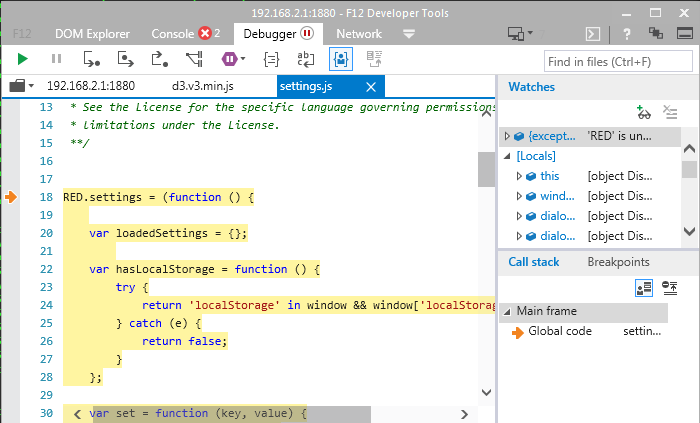


-Brandon
On Thursday, April 9, 2015 at 9:16:53 AM UTC-5, Michael Boldischar wrote:
Dave C-J
Apr 9, 2015, 4:18:38 PM4/9/15
to node...@googlegroups.com
Any chance you can retry with node v0.10 ?
Brandon Bayer
Apr 13, 2015, 11:41:04 AM4/13/15
to node...@googlegroups.com
I tried node v0.10.38 and nothing is different.
-Brandon
-Brandon
Nicholas O'Leary
Apr 13, 2015, 11:47:48 AM4/13/15
to Node-RED Mailing LIst
HI Brandon,
I would not expect the node.js runtime to matter - these are client-side errors.
Certainly odd to get an error in d3, although a quick google of that error (CSSStyleDeclaration is undefined) and d3 reveals this: https://github.com/mbostock/d3/issues/599
Could you edit public/index.html, add the following:
<meta http-equiv="X-UA-Compatible" content="IE=edge" />and see how you get on then?
Nick
--

Emil Oberg
Apr 13, 2015, 4:20:32 PM4/13/15
to node...@googlegroups.com
Nota bene:
If you're on a managed computer, there are some corner case policies which can force IE into compatibility mode, even if the meta tag is set. This has been been a headache of mine more than once when developing websites for the public sector.
Workaround is to send the data as HTTP Headers: (Header: X-UA-Compatible, value: IE=edge) which IE listens to, no matter what policies are set, so you probably want to add that to the Express sever Nick.
Emil
Brandon Bayer
Apr 28, 2015, 9:23:23 AM4/28/15
to node...@googlegroups.com
Nick,
Adding that meta tag fixes it! Should I file a github bug report for this?
-Brandon
Adding that meta tag fixes it! Should I file a github bug report for this?
-Brandon
Nicholas O'Leary
Apr 28, 2015, 9:26:56 AM4/28/15
to Node-RED Mailing LIst
Thanks Brandon - fix pushed: https://github.com/node-red/node-red/commit/653d0e71e42c88dcf3d42fc600f4c35e982651c8
Nick
Reply all
Reply to author
Forward
0 new messages