
How to skip login on each nightwatch test
2,319 views
Skip to first unread message

Todor
Oct 8, 2015, 9:35:01 AM10/8/15
to NightwatchJs
Each of my Nightwatch.js tests requires authentication in order to run and for the time being I can't make authentication to be done via cookies (of course if test fill in a username and password it logs in, but it takes time this way)
I have a working PHPSESSID (tested in Fiddler) cookie and trying to set it via nightwatch setCookie function like this:
browser
    .setCookie({
        name     : "PHPSESSID",
        value    : "gfnpqlflvlrkd2asj18ja2ewrt",
        path     : "/admin", //(Optional)
        domain   : "example.com", //(Optional)
        secure   : true, //(Optional)
        httpOnly : false // (Optional)
    })
    .url("www.example.com/admin")
however www.example.com/admin redirects me back to www.example.com/login meaning authentication didn't pass.
Is there any solution?

Daniel Rinehart
Oct 8, 2015, 10:43:31 AM10/8/15
to NightwatchJs
Are you running your tests using HTTPS URLs? The cookie you created has "secure: true" so won't be sent with an HTTP only request.
--
You received this message because you are subscribed to the Google Groups "NightwatchJs" group.
To unsubscribe from this group and stop receiving emails from it, send an email to nightwatchjs...@googlegroups.com.
To post to this group, send email to nightw...@googlegroups.com.
To view this discussion on the web visit https://groups.google.com/d/msgid/nightwatchjs/e96f08de-874f-4de3-8002-f0be3a85831a%40googlegroups.com.
For more options, visit https://groups.google.com/d/optout.
Todor
Oct 8, 2015, 11:34:59 AM10/8/15
to NightwatchJs
I run all my test via HTTPS and I set urls using https, just the example here is like this.
Well, I found a way to set cookie like that:
browser
    .url("https://www.example.com/")
    .setCookie({
        name     : "PHPSESSID",
        value    : "gfnpqlflvlrkd2asj18ja2ewrt",
        path     : "/admin", //(Optional)
        domain   : "example.com", //(Optional)
        secure   : true, //(Optional)
        httpOnly : false // (Optional)
    })
.url("https://www.example.com/admin")
and it works that way, but what if I don't have the cookie yet, so I login the normal way with username and password, then I'd like to store the cookie somewhere, so next time just to set it like above.
I tried storing the cookie in browser.globals object:
.getCookie("PHPSESSID", function(result){ self.globals.cookieSet = result.value; });but on the next test browser.globals doesn't have property cookieSet.
What am I missing?

Andrei Rusu
Oct 8, 2015, 6:06:44 PM10/8/15
to nightw...@googlegroups.com
If the cookie is session based it might be expired when you close the
browser so you will not be able to reuse it even if you can store it
in the globals. Are you using external globals?
browser so you will not be able to reuse it even if you can store it
in the globals. Are you using external globals?
> --
> You received this message because you are subscribed to the Google Groups
> "NightwatchJs" group.
> To unsubscribe from this group and stop receiving emails from it, send an
> email to nightwatchjs...@googlegroups.com.
> To post to this group, send email to nightw...@googlegroups.com.
> To view this discussion on the web visit
> https://groups.google.com/d/msgid/nightwatchjs/1c0e95c8-a889-4faf-bf8f-e2046e6e2c05%40googlegroups.com.
> You received this message because you are subscribed to the Google Groups
> "NightwatchJs" group.
> To unsubscribe from this group and stop receiving emails from it, send an
> email to nightwatchjs...@googlegroups.com.
> To post to this group, send email to nightw...@googlegroups.com.
> To view this discussion on the web visit
Todor
Oct 9, 2015, 3:58:04 AM10/9/15
to NightwatchJs
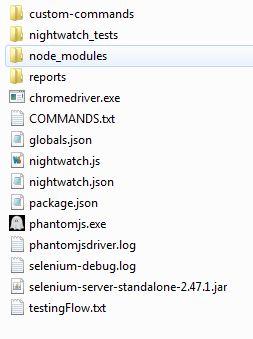
I tried to use extrenal globals.json file, but it seems I can't set globals path in nightwatch.json properly, so I'm using globals set within nightwatch.json -> .test_settings -> globals
My root test folder looks like this, so what the globals path is supposed to be in my case for external globals?:
Reply all
Reply to author
Forward
0 new messages