
Can I be able to generate my to-do list to show//view all tasks based on @context?
42 views
Skip to first unread message

oloo...@gmail.com
Sep 13, 2015, 1:53:20 PM9/13/15
to MyLifeOrganized
I'm trying to generate/view all my tasks with a specific @context (like @calls, @computer, etc.) across all folders (which I named based on roles like personal, business, family, social, etc.). So if I search "@calls" it will pull just all the @calls to-dos pulling from all folders? I don't see this option in the the to-do view options.

Dwight Arthur
Sep 13, 2015, 11:42:00 PM9/13/15
to MyLifeOrganized
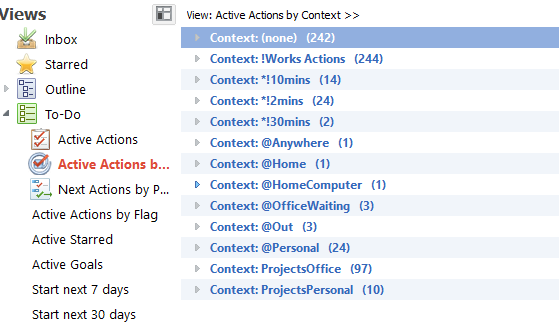
Hi, do you see a view called Active Actions by Context? It will show you all of your contexts and the tasks under each. If the hit F6 it will collapse the view so that you will just see a lisy of contexts. Then you can pick the one you are interested in and click it to see the tasks.
There are a lot of ways to do this, I'm guessing that this might be one of the eadier ways.
-Dwihht

Steve Gledhill
Sep 14, 2015, 5:08:31 AM9/14/15
to MyLifeOrganized
The view that Dwight mentioned is in the Todo section of views on the right hand side. It is the second item in my list but all I can read is : "Active Action ...". When you hover over it you see that the full name is : "Active Actions by Context".
Another, slightly different way to do it is to use the context filters in the filter section of the left hand side. This will filter only the tasks with a selected context in the current view/workspace.
I have attached a couple of images showing how each of these look
On Sunday, 13 September 2015 18:53:20 UTC+1, oloo...@gmail.com wrote:
On Sunday, 13 September 2015 18:53:20 UTC+1, oloo...@gmail.com wrote:


Christoph Zwerschke
Sep 14, 2015, 3:14:42 PM9/14/15
to mylifeo...@googlegroups.com
Am 14.09.2015 um 11:08 schrieb Steve Gledhill:
> Another, slightly different way to do it is to use the context filters
> in the filter section of the left hand side. This will filter only the
> tasks with a selected context in the current view/workspace.
Also, note that in the head bar of the task grid there will be an
> Another, slightly different way to do it is to use the context filters
> in the filter section of the left hand side. This will filter only the
> tasks with a selected context in the current view/workspace.
asterisk to remind you that the view has been altered. You can reset it
with the "Reset View" button on the bottom. If you often filter for that
context, you can create a special view with that filter. You can also
create a workspace with that special view activated.
-- Christoph
Reply all
Reply to author
Forward
0 new messages