
Exposure Time clear Resin.
1,241 views
Skip to first unread message

Thorsten Harzmeier
Jan 31, 2015, 5:36:59 PM1/31/15
to muve-3d-su...@googlegroups.com
Hello. I have a new dlp muve1. And use Makerjuice G Resin. With the main Parameters 8sec. the resin is totaly overcured.
Can anybody tell me exposure times for clear resin?
Thorsten
Can anybody tell me exposure times for clear resin?
Thorsten

mUVe 3D Admin
Feb 1, 2015, 9:02:56 AM2/1/15
to muve-3d-su...@googlegroups.com
Thorsten,
Makerjuice actually says on their site that clear resin won't cure properly, it needs pigment to work correctly. However, that doesn't mean you can't get a good print.
Our guess is that you'll have to lower your Z axis layer to .05mm and possibly lower, then you will also need to lower your layer cure times substantially to something like 3000 or even lower. That way you're effectively fighting against the limitations of the resin where the light is on too long and the cure is too deep to allow a good print.
I do believe we have a couple members of the forum here that have posted clear resin images and have also shared their cure times, you may want to search around a bit!
mUVe 3D Support
Thorsten Harzmeier
Feb 4, 2015, 2:51:48 PM2/4/15
to muve-3d-su...@googlegroups.com
Hello Thanks for your answer. I found no other user who shared theri cure times. But I´ll test with lower Z Layer and a cure time of 2000ms.
Next I test white pigment.
A problem is the banding, the right nut on the Z axis spindle is loose and wobbles about 1mm.
Thorsten
Next I test white pigment.
A problem is the banding, the right nut on the Z axis spindle is loose and wobbles about 1mm.
Thorsten

Chrissie
Oct 25, 2015, 1:03:52 PM10/25/15
to mUVe 3D Support Group
Dear Thorsten, it would be super helpful if you could post the settings you are printing the clear resin with.
Many thanks! and Regards,
Chris

Ryan LaBarre
Nov 29, 2015, 11:11:10 PM11/29/15
to mUVe 3D Support Group
yes, id love that too.
i bought a liter of clear resin as well and need to start printing some customer parts in clear.
Chrissie
Dec 4, 2015, 8:54:25 AM12/4/15
to mUVe 3D Support Group
Ryan, what I found out in the meantime:
- clear can be difficult, because of "light scattering".
- Manufacturers are selling their resins as "good for all UV curing devices". But there is a difference in UV bands between Laser/LED and DLP. A resin that has been created and tested for Lasers, might work less well with DLPs (while it may still work well, but clear resin might be especially sensitive/tricky). So with clear resins you might make extra sure the manufacturer has tested it with DLPs. And then they should be able to provide you with DLP specific curing time suggestions. Or buy resin that has specifically been created for DLP.
Ryan LaBarre
Dec 4, 2015, 10:12:00 AM12/4/15
to mUVe 3D Support Group
so the stuff i bought is FSL Clear resin which is a called full spectrum laser haha.
so i guess we will test out thie $130 bottle haha.
once i figure out why my azteeg x5 board keeps rebooting mid print
Chrissie
Dec 4, 2015, 10:45:49 AM12/4/15
to mUVe 3D Support Group
Why do you need clear? Pigmented resin seems to be easier.

Matthew Caron
Dec 4, 2015, 11:40:01 AM12/4/15
to mUVe 3D Support Group
You could also just spend $10 on some pigment.. MakerJuice sells it.
Ryan LaBarre
Dec 6, 2015, 11:28:22 PM12/6/15
to mUVe 3D Support Group
Because im making parts of for a customer that requires the tubes be clear. He needs to see the grain being passed down the tubes and to be able to visually spot any jams etc. Its not easily moldable and castable, so we will end up printing it... so i need to get clear working :)
Chrissie
Dec 7, 2015, 5:49:11 AM12/7/15
to mUVe 3D Support Group
But you dont always need totally clear. A bit of color pigment makes a big difference for printing, and the result is still pretty much "look through".
Ryan LaBarre
Dec 7, 2015, 10:22:54 AM12/7/15
to mUVe 3D Support Group
didnt really think about that.. what pigment would give the best result? keep it more clear but still cure well?
thanks

João Maia e Silva
Dec 7, 2015, 10:35:40 AM12/7/15
to mUVe 3D Support Group
Hi,
ember's resins PR48, the one they disclosed the formulation, is a clear resin and they use an optical brighter OB+
you can check the resin her http://learn.ember.autodesk.com/blog/open-source-resin
hard to say if it would work with yours
best
Ryan LaBarre
Dec 11, 2015, 3:53:39 PM12/11/15
to mUVe 3D Support Group
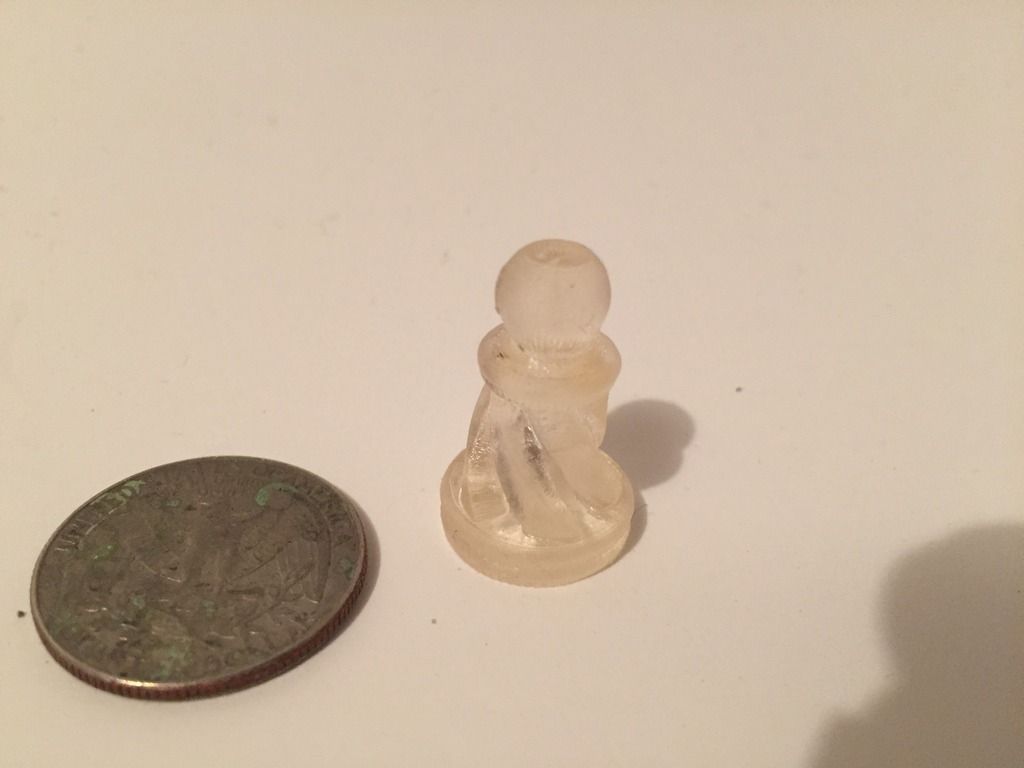
So i just got around to testing clear on my piece of poo cheap form1+ knockoff SLA.
first attempt, no change in settings
Man.... something to be said for easy :)
Chrissie
Dec 11, 2015, 5:05:31 PM12/11/15
to mUVe 3D Support Group
yes, but Ryan, you are using this machine "out of the box", without tinkering I assume...
With the Muve3d I had similar "starting problems" like you, because I tried to do lots of non-standard things immediately.
Then I just printed a calibration part with a resin working good with DLP: immediate success.
And now we are printing the most complicated parts in stunning quality 24/7 without the slightest problem since weeks already.
With the Muve3d I had similar "starting problems" like you, because I tried to do lots of non-standard things immediately.
Then I just printed a calibration part with a resin working good with DLP: immediate success.
And now we are printing the most complicated parts in stunning quality 24/7 without the slightest problem since weeks already.
Ryan LaBarre
Dec 11, 2015, 5:32:28 PM12/11/15
to mUVe 3D Support Group
oh no. im not saying im giving up or im not happy with my muve. first off dean is amazing, and support is great. im just saying it is more effort, but the juice is worth the squeeze. My comparison photo of my two chess piece tests proves that.
the quality on the muve when it works is unreal, and im happily testing toward that goal. I just know from experience one is easier than the next :) i can print with 10 different resins without changing a single setting and that has its own appeal as well.
Im all on board the muve express.
however im printing with red right now and getting almost no adhesion to the build plate. strange
Ryan LaBarre
Dec 11, 2015, 5:33:08 PM12/11/15
to mUVe 3D Support Group
oh and chrissie. i am tinkering quite a bit. ive gone through nearly a liter of resin, however its black which sucks apparently haha.
ill get it. il figure it out
Chrissie
Dec 12, 2015, 2:38:12 AM12/12/15
to mUVe 3D Support Group
Ryan, adhesion to the build plate is the one thing I always had, right from the beginning, that was never the slightest problem.
- longer base layer time? (60 sec?)
- more base layers?
- larger base (sqmm)?
- thicker base?
- ultra slow peel moves for the 1st 30 layers?
- longer base layer time? (60 sec?)
- more base layers?
- larger base (sqmm)?
- thicker base?
- ultra slow peel moves for the 1st 30 layers?
Reply all
Reply to author
Forward
0 new messages