
Re: [ss-stf '10828'] Web Hosting Free - Customized for school websites.

Johnson Dcunha (net804) Naravi High School
I will have to overcome an issue with the provider of the service. Due to the limitations in availing staff and maintenance for the mxz.in, I have to rethink about continuing the same service. Also, I have seen 0 sign ups to mxz.in in the past 3 months.
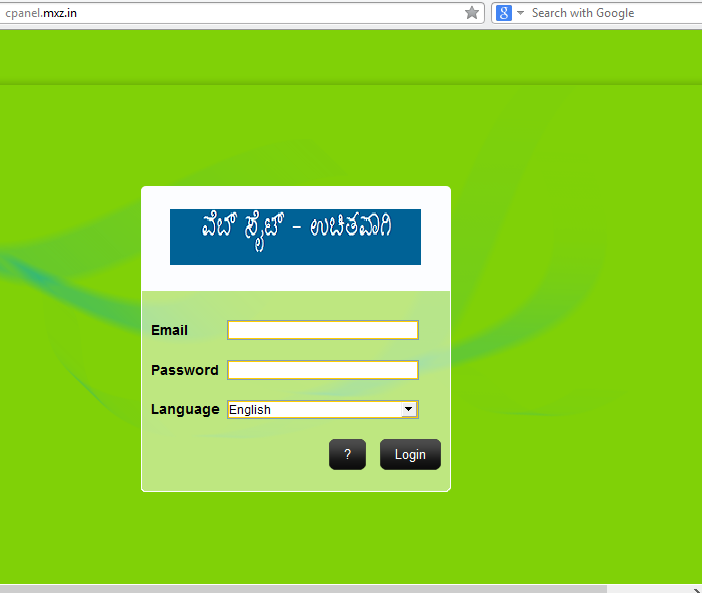
The page cpanel.mxz.in was meant only for signing in to the hosting.. To sign up, one has to visit www.mxz.in.
Currently, http://mxz.in/ is made functional again. I need to close out this site if no one takes the advantage of free hosting.
(The service was kept inactive due to the reasons mentioned above, and also in conserving server load by eliminating unused services and spam.)
There is one more requirement: i.e..., One has to be regular in maintaining/updating the free web site. (at least once in 15 days or 30 days. by logging into the control panel.)
No provider likes to keep junk or unused spam on their web servers. So, if someone is not using it, it is considered as junk, and eventually it will be removed... so that others can get benefited by these resources.
Regards.
Johnson Dcunha
Naravi High School.
___________________________________
On Tuesday, 10 June 2014 18:03:11 UTC+5:30, Yogesh योगि wrote:
Dear sir,
An opportunity for all stf members to build your own school websites. As well as personal sites.
- Register an account at http://mxz.in to avail free website hosting.
Above website is not loading or shows 403 permission forbidden error. I guess its been maintained by you, please check it.
- After Sign up, Verify your email address by visiting your Inbox. check confirmation email. and click on the confirmation link. If by mistake, your email provider has moved the email to junk or spam, you may not see the confirmation email inside the inbox. You will have to check in other folders of you mail.
- Login at http://cpanel.mxz.in/ and Click on 'Hostning' , And then click 'Create new account'
In above link, i didn't see 'hosting' anywhere.:( its only asking email and password.
- If you already created webspace here, click on the 'switch' button to enter the control panel.
- After creating a hosting account, you can start using it.
- Use 'Zyro Builder' or 'Auto Installer' to install a easy website. [Auto installer contains many options. I suggest 'Wordpress' for beginners]. If it is difficult for you, Use Zyro builder only.
- If you feel messy, or if you do some thing wrong, its fine, try again. Keep safe back up of your files. Download all your files using FTP software.
- If you want to clean everything and start again, Click on 'Reload Account'. All your files and settings will be erased to the initial stage.
Please note: There are many alternate sites offering similar features, but 'unlimited' features is a misleading trick. You can find and use reliable alternatives from other sites as well.
A glance on few Features (Free)
- 5Gb of space expandable upto 10GB.
- 100 GB of bandwidth per month. (We hardly use even 25% of it)
- 'Mysql' databases.
- PHP webhosting
- Easy site builder.
- Custom Sub domains : Eg : 'www.yourschool.mxz.in' is completely free.
- You can use your own domain name as well. Eg: www.myschool.in (A domain must be registered first by you via a registrar. A famous registrar For example: godaddy.com.This will cost some money. But it is all up to you if a domain name is needed by you. You can always use free sub domain for your school.)
- Remember to share your ideas with others when you have got enough knowledge
If you did not like the above site, you can try http://www.mzf.in as well. This offers more features and some 'unlimited features as well. Its worth is not completely known.
mzf.in is working.:)
thanks,
--
Yogesh K S
Sent from an Electronic Device
ಜೋನ್ಸನ್ ಡಿಕುನ್ಹಾ Johnson Dcunha
- Visit http://mxz.in/
- Click on 'Order' ($0.00 free hosting).
- A sign up form will appear. Please enter your accurate details.
- Click on 'Signup'
- Now a confirmation message will be sent to your email address. There will be two messages. One contains your login information. another contains confirmation (verification) mail.
- If you do not get email to inbox, check your spam / junk folders. (If your email claint have mistaken it as junk.)

- Go to your email inbox and open the confirmation message.Click on the link to activate your account.

- After clicking, you will be taken to the login page. (in some cases, login page is skipped)
- Now you can create hosting account inside it. (If you miss, this is the URL: http://cpanel.mxz.in.)
- Click on 'Create new account.

- A new page will appear, asking your fundamental website details. You can choose 'sub-domain' freely. (Sub domain is a part of main domain. for example, 'google.com' is a domain. where as, 'groups.google.com' is subdomain). Here you will get 'abc.mxz.in' or 'yourschoolname.mxz.in' as your web site address. You must choose your desired name.
- You can also use your own .com, .in, .net etc domain names - if you have already purchased a domain name from any registrar. (Dont worry, it is not really essential to get your site here. Just select sub domain, and enter the name you like)

- Enter your password and other details., and click on 'Create.
- It will start creating your space. You can see the status at the right corner of your screen.
- Click on 'VIEW RESULT' after completing the progress to 100%.

- Thus you will come to see a new page.
- Click on the 'switch' button to enter the corresponding hosting panel. You will see following information as given below.


ಜೋನ್ಸನ್ ಡಿಕುನ್ಹಾ Johnson Dcunha
There are static websites as well as dynamic websites.
- Go to http://cpanel.mxz.in. Log in to the control panel.
- Go to Hosting section and choose 'switch' (if you have multiple site accounts)
- A page with many icons will appear. Go to websites section. Click on Auto installer.

- A number of CMS will be listed. You are free to install any of them. But in this case, we will install 'Wordpress'.
- Remember that there is another traditional way of installing wordpress and CMSs, That will not be discussed here. This tutorial is aimed to show you the easier ways to create websites.

- A page with form will appear. Just fill it. (No need to worry about databases and configuration, it will do it automatically. But keep a safe note of it, after it is made available to you)

- After entering details, click on 'Install wordpress'.
- A new page will appear with all the details of your site. Please copy and save them in a safe location for future use.
- After this, you can click on 'manage' (Admin url) or directly enter your website (installation Url) address in the address bar. and enter!
- Remember that your subdomain is the prefix of your website address (In my case, the subdomain I chose is 'nhs'. so, the website address of my free site is: 'nhs.mxz.in' or http://nhs.mxz.in (without the quotation ' ' mark). This address can be given to anyone to view the Website.
- And my Admin address is http://nhs.mxz.in/wp-admin (this is private and only for the site owner.)
- So the pages can be added only after logging in. I will continue that part in the next post.
On Sunday, 15 June 2014 22:17:42 UTC+5:30, danammazalaki wrote:
But sir how to create pages and contents?On 15 June 2014 21:20, Johnson Dcunha <net...@gmail.com> wrote:http://cpanel.mxz.in/switcher is not visible to general public as website. But I noticed that you created a site which is mentioned in the 'Account information' of your control panel. The same information is also sent to your email.Domain name: <......>.mxz.in is your website address. In my case, it is: nhs.mxz.inAll the pages and html, php (Home page is always 'index.html' or 'index.php' in most cases) all files should be uploaded or kept in/public_html folder.It is really appreciable to get such a quick response. Thank you Ma'm and all the best with all the innovations.Johnson DcunhaNaravi High School
On Sunday, 15 June 2014 20:43:28 UTC+5:30, danammazalaki wrote:Sir thank you very much for nice informationI have create my own web site which is given below
http://cpanel.mxz.in/switcher
----
Please provide your full name, school name and address below your mail.
Public Software for Public Institutions
ಸಾರ್ವಜನಿಕ ಇಲಾಖೆಗೆ ಸಾರ್ವಜನಿಕ ತಂತ್ರಾಂಶ
Are you using pirated Khasagi Tantramsha? Adopt Sarvajanika Tantramsha. For Sarvajanika Tantramsha free download, visit http://public-software.in/FOSS-applications
---
You received this message because you are subscribed to the Google Groups "englishstf" group.
To unsubscribe from this group and stop receiving emails from it, send an email to englishstf+...@googlegroups.com.
To post to this group, send email to engli...@googlegroups.com.
Visit this group at http://groups.google.com/group/englishstf.
For more options, visit https://groups.google.com/d/optout.
--ಶ್ರೀಮತಿ ದಾನಮ್ಮ. ಚ. ಝಳಕಿ.
ಪ್ರೌಢಶಾಲಾ ಸಹ ಶಿಕ್ಷಕಿ
ಬೆಳಗಾವಿ
Please provide your full name, school name and address below your mail.
Public Software for Public Institutions
ಸಾರ್ವಜನಿಕ ಇಲಾಖೆಗೆ ಸಾರ್ವಜನಿಕ ತಂತ್ರಾಂಶ
Are you using pirated Khasagi Tantramsha? Adopt Sarvajanika Tantramsha. For Sarvajanika Tantramsha free download, visit http://public-software.in/FOSS-applications
---
You received this message because you are subscribed to the Google Groups "englishstf" group.
To unsubscribe from this group and stop receiving emails from it, send an email to englishstf+...@googlegroups.com.
To post to this group, send email to engli...@googlegroups.com.
Visit this group at http://groups.google.com/group/englishstf.
For more options, visit https://groups.google.com/d/optout.
--ಶ್ರೀಮತಿ ದಾನಮ್ಮ. ಚ. ಝಳಕಿ.
ಪ್ರೌಢಶಾಲಾ ಸಹ ಶಿಕ್ಷಕಿ
ಬೆಳಗಾವಿ
