
Google Groups no longer supports new Usenet posts or subscriptions. Historical content remains viewable.
Dismiss
Taskbar mail icon missing
1,105 views
Skip to first unread message

prof Johnson PHD
Nov 3, 2019, 12:55:46 PM11/3/19
to mozilla-suppo...@lists.mozilla.org
Got the (32 bit) Thunderbird update 68.2.1 and now the mail icon on
taskbar has vanished???? using windows 10...anyone else notice this and
how to get it back?
taskbar has vanished???? using windows 10...anyone else notice this and
how to get it back?
😉 Good Guy 😉
Nov 3, 2019, 3:48:41 PM11/3/19
to mozilla-suppo...@lists.mozilla.org
On 03/11/2019 17:55, prof Johnson PHD
wrote:
Got the (32 bit) Thunderbird update 68.2.1 and now the mail icon on taskbar has vanished???? using windows 10...anyone else notice this and how to get it back?
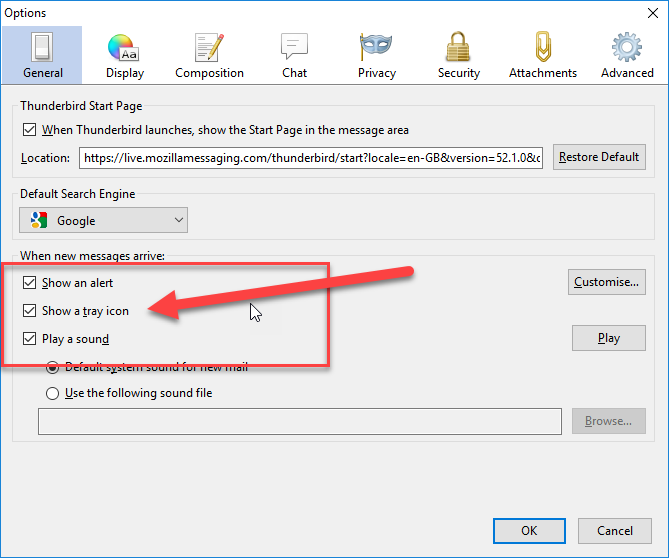
Please check your Options so that they look like this:

--
With over 1,000,000 million devices
now running Windows 10, customer satisfaction is higher than any
previous version of windows.
Steve
Nov 3, 2019, 4:44:03 PM11/3/19
to mozilla-suppo...@lists.mozilla.org
On 2019-11-03 11:55 a.m., prof Johnson PHD wrote:
> Got the (32 bit) Thunderbird update 68.2.1 and now the mail icon on taskbar has vanished???? using windows 10...anyone else notice this and how to get it back?
Windows Settings/Personalization/Taskbar/Notification area, Select which icons..., turn TB to On.
> Got the (32 bit) Thunderbird update 68.2.1 and now the mail icon on taskbar has vanished???? using windows 10...anyone else notice this and how to get it back?
prof Johnson PHD
Nov 3, 2019, 6:55:56 PM11/3/19
to mozilla-suppo...@lists.mozilla.org
On Sun, 11/3/2019 3:27 PM, 😉 Good Guy 😉 wrote:
> On 03/11/2019 17:55, prof Johnson PHD wrote:
>> Got the (32 bit) Thunderbird update 68.2.1 and now the mail icon on
>> taskbar has vanished???? using windows 10...anyone else notice this
>> and how to get it back?
> Please check your Options so that they look like this:
>
> { alt-no } <https://i.imgur.com/k1yLKuV.png>
> On 03/11/2019 17:55, prof Johnson PHD wrote:
>> Got the (32 bit) Thunderbird update 68.2.1 and now the mail icon on
>> taskbar has vanished???? using windows 10...anyone else notice this
>> and how to get it back?
> Please check your Options so that they look like this:
>
>
> --
> With over 1,000,000 million devices now running Windows 10, customer
> satisfaction is higher than any previous version of windows.
Thanks for your help and reply...mine is just just like you show but no
> --
> With over 1,000,000 million devices now running Windows 10, customer
> satisfaction is higher than any previous version of windows.
mail icon?
prof Johnson PHD
Nov 3, 2019, 7:01:20 PM11/3/19
to mozilla-suppo...@lists.mozilla.org
explaining this but I meant the envelope that shows when you have mail
that is what is missing....
Andy Burns
Nov 3, 2019, 7:22:23 PM11/3/19
to mozilla-suppo...@lists.mozilla.org
prof Johnson PHD wrote:
> I meant the envelope that shows when you have mail that is what is missing.
Is it in the 'overflow' icons area? (like a caret symbol icon in the
> I meant the envelope that shows when you have mail that is what is missing.
system tray)
prof Johnson PHD
Nov 3, 2019, 9:45:34 PM11/3/19
to mozilla-suppo...@lists.mozilla.org

Onno Ekker
Nov 4, 2019, 2:28:12 AM11/4/19
to mozilla-suppo...@lists.mozilla.org
Hi prof Johnson,
I had this happen to me after each upgrade for TB68. The way to get
the taskbar icon back for we was (I think):
- Rightclick on the taskbar icon and select Unpin from taskbar
- Close Thunderbird
- Click on the missing taskbar icon (it still shows an empty paper for me)
- Now you get a message from Windows saying that it can't find the
shortcut and it prompts you to remove it
- Remove the shortcut
- Start Thunderbird again by another way than the taskbar icon, which
is now removed
- Pin the new taskbar icon again
HTH
Onno
On Sun, Nov 3, 2019 at 6:55 PM prof Johnson PHD
<US...@serv4.dca1.giganews.com> wrote:
>
> Got the (32 bit) Thunderbird update 68.2.1 and now the mail icon on
> taskbar has vanished???? using windows 10...anyone else notice this and
> how to get it back?
> _______________________________________________
> support-thunderbird mailing list
> support-t...@lists.mozilla.org
> https://lists.mozilla.org/listinfo/support-thunderbird
> To unsubscribe, send an email to support-thund...@lists.mozilla.org?subject=unsubscribe
I had this happen to me after each upgrade for TB68. The way to get
the taskbar icon back for we was (I think):
- Rightclick on the taskbar icon and select Unpin from taskbar
- Close Thunderbird
- Click on the missing taskbar icon (it still shows an empty paper for me)
- Now you get a message from Windows saying that it can't find the
shortcut and it prompts you to remove it
- Remove the shortcut
- Start Thunderbird again by another way than the taskbar icon, which
is now removed
- Pin the new taskbar icon again
HTH
Onno
On Sun, Nov 3, 2019 at 6:55 PM prof Johnson PHD
<US...@serv4.dca1.giganews.com> wrote:
>
> Got the (32 bit) Thunderbird update 68.2.1 and now the mail icon on
> taskbar has vanished???? using windows 10...anyone else notice this and
> how to get it back?
> support-thunderbird mailing list
> support-t...@lists.mozilla.org
> https://lists.mozilla.org/listinfo/support-thunderbird
> To unsubscribe, send an email to support-thund...@lists.mozilla.org?subject=unsubscribe
prof Johnson PHD
Nov 4, 2019, 10:25:51 AM11/4/19
to mozilla-suppo...@lists.mozilla.org
avail..I will keep searching and thanks again....
WaltS48
Nov 4, 2019, 5:38:21 PM11/4/19
to mozilla-suppo...@lists.mozilla.org
mail using TB 68.2.1 on my Windows 10 laptop.
It does disappear quickly.
0 new messages