
Google Groups no longer supports new Usenet posts or subscriptions. Historical content remains viewable.
Dismiss
Firefox claims that it's up to date although it isn't
48 views
Skip to first unread message

entwi...@gmail.com
Oct 16, 2016, 10:25:20 AM10/16/16
to support...@lists.mozilla.org
I am using Firefox stable en-US on Windows 7 64-bit.
For a year or so Firefox hasn't been able to detect new updates (not
only stable but also dev and nightly).
I always resorted to manually updating Firefox but it is getting
tiresome since I have several versions of Firefox installed.
Do you guys have any idea what could cause Firefox to incorrectly detect
that it is up to date?
For a year or so Firefox hasn't been able to detect new updates (not
only stable but also dev and nightly).
I always resorted to manually updating Firefox but it is getting
tiresome since I have several versions of Firefox installed.
Do you guys have any idea what could cause Firefox to incorrectly detect
that it is up to date?

Good Guy
Oct 16, 2016, 1:33:05 PM10/16/16
to mozilla-sup...@lists.mozilla.org
Could
it be that you have inadvertently checked the box as shown in
this picture:
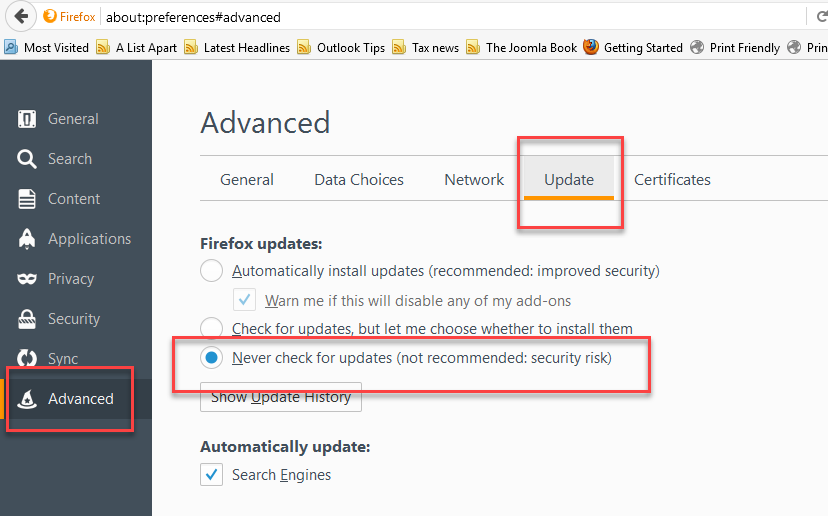

--
With over 400 million
devices now running Windows 10, customer satisfaction is
higher than any previous version of windows.
entwi...@gmail.com
Oct 16, 2016, 3:07:33 PM10/16/16
to Firefox help community
Yeah it was set to never check for updates. I changed it to
automatically install updates and I restarted Firefox.
However my About Firefox dialogue still tells me that my version is
48.0.2 and that it's up to date, despite 49.0.1 being already available.
> support-firefox mailing list
> support...@lists.mozilla.org
> https://lists.mozilla.org/listinfo/support-firefox
> To unsubscribe, send an email to support-fir...@lists.mozilla.org?subject=unsubscribe
automatically install updates and I restarted Firefox.
However my About Firefox dialogue still tells me that my version is
48.0.2 and that it's up to date, despite 49.0.1 being already available.
> Could it be that you have inadvertently checked the box as shown in
> this picture:
>
> Updates Blocked <http://i.imgur.com/Spft5Fd.png>
> this picture:
>
>
> --
> With over 400 million devices now running Windows 10, customer
> satisfaction is higher than any previous version of windows.
>
>
> _______________________________________________
> --
> With over 400 million devices now running Windows 10, customer
> satisfaction is higher than any previous version of windows.
>
>
> support-firefox mailing list
> support...@lists.mozilla.org
> https://lists.mozilla.org/listinfo/support-firefox
> To unsubscribe, send an email to support-fir...@lists.mozilla.org?subject=unsubscribe
WaltS48
Oct 16, 2016, 5:46:21 PM10/16/16
to mozilla-sup...@lists.mozilla.org
On 10/16/2016 03:07 PM, entwi...@gmail.com wrote:
> Yeah it was set to never check for updates. I changed it to
> automatically install updates and I restarted Firefox.
>
> However my About Firefox dialogue still tells me that my version is
> 48.0.2 and that it's up to date, despite 49.0.1 being already available.
>
>
Are you on the Release channel?
> Yeah it was set to never check for updates. I changed it to
> automatically install updates and I restarted Firefox.
>
> However my About Firefox dialogue still tells me that my version is
> 48.0.2 and that it's up to date, despite 49.0.1 being already available.
>
>
> On 16.10.2016 19:32, Good Guy wrote:
>> On 16/10/2016 06:51, entwi...@gmail.com wrote:
>>> I am using Firefox stable en-US on Windows 7 64-bit.
>>> For a year or so Firefox hasn't been able to detect new updates (not
>>> only stable but also dev and nightly).
>>> I always resorted to manually updating Firefox but it is getting
>>> tiresome since I have several versions of Firefox installed.
>>> Do you guys have any idea what could cause Firefox to incorrectly
>>> detect that it is up to date?
>>
>> Could it be that you have inadvertently checked the box as shown in
>> this picture:
>>
>> Updates Blocked <http://i.imgur.com/Spft5Fd.png>
>>
--
Coexist <https://www.coexist.org/>
Ubuntu 16.04LTS
responder
Oct 16, 2016, 9:18:02 PM10/16/16
to mozilla-sup...@lists.mozilla.org
One is on the release channel and the other not. I tried to put it on
release but never figured out how.
entwi...@gmail.com
Oct 17, 2016, 12:32:59 AM10/17/16
to Firefox help community
>Are you on the Release channel?
Yes I am. app.update.channel in about:config is release.
On Monday, 17.10.2016 03:17, responder wrote:
> On 10/16/2016 5:45 PM, WaltS48 wrote:
> I have the same problem on one of my PC's. Same version Win7 64bit on
> both.
>
> One is on the release channel and the other not. I tried to put it on
> release but never figured out how.
> both.
>
> One is on the release channel and the other not. I tried to put it on
> release but never figured out how.
Wolf K.
Oct 17, 2016, 10:01:23 AM10/17/16
to mozilla-sup...@lists.mozilla.org
having "several versions", all of which have apparently been updated at
different times. I suspect detritus left over from different updates is
confusing the update/version query. If so, you may be able to fix it
with a simple uninstall + clean install of the latest version. Worth a
try, you've already spent more time on this than a clean install would
have taken.
FWIW, I'm on the ESR channel, and the latest versions is 45.4.0.
--
Best,
Wolf K.
kirkwood40.blogspot.ca
entwi...@gmail.com
Oct 17, 2016, 11:35:21 AM10/17/16
to wol...@sympatico.ca, Firefox help community
> I've read the other responses. I suspect that the problem comes from
> having "several versions", all of which have apparently been updated
> at different times. I suspect detritus left over from different
> updates is confusing the update/version query. If so, you may be able
> to fix it with a simple uninstall + clean install of the latest
> version. Worth a try, you've already spent more time on this than a
> clean install would have taken.
I figured it out.
Apparently some malware changed app.update.url.override to
http://au4.moziila.org
I reset it and updating works again flawlessly.
Ed Mullen
Oct 17, 2016, 1:41:45 PM10/17/16
to mozilla-sup...@lists.mozilla.org
On 10/16/2016 at 9:17 PM, responder's prodigious digits fired off:
Download and install the latest release version.
--
Ed Mullen
http://edmullen.net/
If there's one thing I can't stand, it's intolerance.
--
Ed Mullen
http://edmullen.net/
If there's one thing I can't stand, it's intolerance.
Anonymous
Oct 17, 2016, 2:29:21 PM10/17/16
to mozilla-sup...@lists.mozilla.org
--
ken1943
WaltS48
Oct 17, 2016, 7:21:55 PM10/17/16
to mozilla-sup...@lists.mozilla.org
installed.
<http://mzl.la/1BAQGnB>
0 new messages