
Form.Validator and display:none input are not validate
1,085 views
Skip to first unread message

Mushr00m
Jan 10, 2013, 10:33:05 AM1/10/13
to mootool...@googlegroups.com
Hi all !
I'm using Form.Validator to validate a form, no problem here. My only issue is that some input are in a div that is not visible (display:none) at the submit form moment. So I pass the option ignoreHidden: false to my Form.Validator but it's still not working. The onElementValidate is just call for the visible inputs. Even stranger after submiting the form even if the onElementValidate is not call for the hidden inputs, they still get the validation-failed class...
Has anybody had this issue ?
Thanks a lot
I'm using Form.Validator to validate a form, no problem here. My only issue is that some input are in a div that is not visible (display:none) at the submit form moment. So I pass the option ignoreHidden: false to my Form.Validator but it's still not working. The onElementValidate is just call for the visible inputs. Even stranger after submiting the form even if the onElementValidate is not call for the hidden inputs, they still get the validation-failed class...
Has anybody had this issue ?
Thanks a lot
Mushr00m
Jan 10, 2013, 10:45:36 AM1/10/13
to mootool...@googlegroups.com
I added a litlle example on JSFIDDLE : http://jsfiddle.net/6dQ5p/
As you can see in your js console the first input that is in a display:none div is not validate...
As you can see in your js console the first input that is in a display:none div is not validate...

Aaron Newton
Jan 10, 2013, 11:32:25 AM1/10/13
to mootool...@googlegroups.com
http://mootools.net/docs/more/Forms/Form.Validator
ignoreHidden - (boolean) if true (the default), all fields that are not visible to the user (who are display:none or whose parents are display:none) are not validated.
Mushr00m
Jan 10, 2013, 11:34:03 AM1/10/13
to mootool...@googlegroups.com
That's why i put FALSE
Aaron Newton
Jan 10, 2013, 11:46:44 AM1/10/13
to mootool...@googlegroups.com
Mushr00m
Jan 10, 2013, 2:50:30 PM1/10/13
to mootool...@googlegroups.com
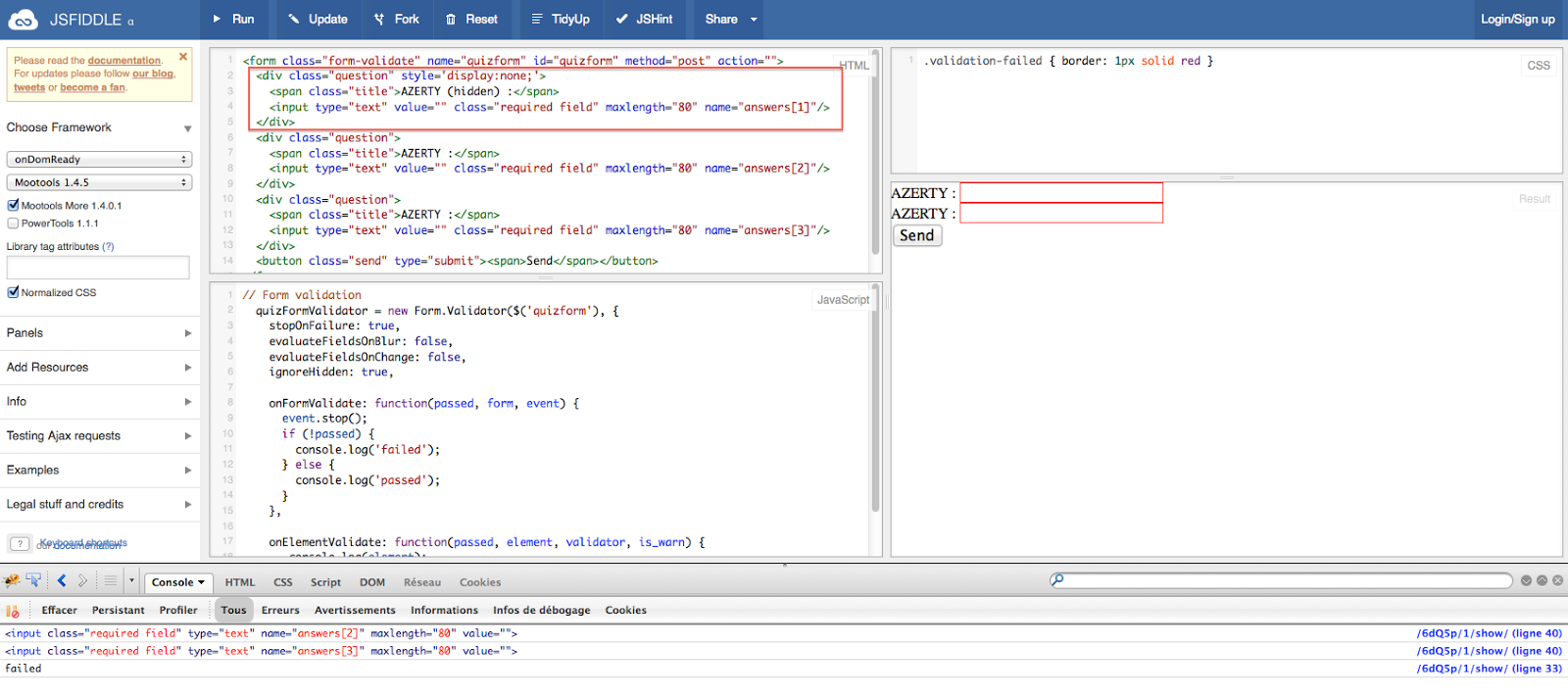
if you look you see 2 input, but they are 3, the first is in a hidden div, and in the console you can see that only the 2 visible ones pass in onElementValidate... the first is not checked.
Take a look at this screenshot, it should have 3 line in the console :
Aaron Newton
Jan 10, 2013, 3:35:43 PM1/10/13
to mootool...@googlegroups.com
Ah. In this case, it's a mix of two things. 1) the FORM fails to validate if that hidden element is empty and ignoreHidden = false, but 2) the ELEMENT is not passed to the 'elementValidate' event, which is arguably a bug.
This line:
is the culprit. It explicitly does not fire the event if the element is hidden (even if it was used for validation).
Mushr00m
Jan 10, 2013, 3:39:54 PM1/10/13
to mootool...@googlegroups.com
Yes your are right it's the 2), the ekelent is not passed... So what should I do ? is there a way to work around ?
Thanks for your help and time !
Thanks for your help and time !
Aaron Newton
Jan 10, 2013, 3:50:30 PM1/10/13
to mootool...@googlegroups.com
If you wanted to hack it, you could monkey patch it (I'd open a ticket on github about this regardless):
Form.Validator = Class.Refactor(Form.Validator, {
test: function(className, field, warn){
var isValid = this.previous.apply(this, arguments);
if (!field.isVisible()) this.fireEvent('elementValidate', [isValid, field, className, warn]);
return isValid;
}
});
Mushr00m
Jan 10, 2013, 3:54:56 PM1/10/13
to mootool...@googlegroups.com
Sorry for my lack of knowledge but I just have to use your code in my script without having to hack the mootools core is that right ?
Can you provide me the link on github to follow it ?
Thanks
Can you provide me the link on github to follow it ?
Thanks
Aaron Newton
Jan 10, 2013, 4:01:32 PM1/10/13
to mootool...@googlegroups.com
Sorry, I don't quite get what you're asking. Form.Validator is in MooTools More (not Core), but that's a minor detail. Rather than have you change the code you should use Class.Refactor (also available in MooTools More) to alter the behavior of Form.Validator. If you include MooTools w/ core + Form.Validator + Class.Refactor from More and then run my script (before you create an instance of Form.Validator) it should produce the desired effects:
NOTE: I had a typo in my first version; it's Class.refactor, with a lower case "r" - not Class.Refactor
Mushr00m
Jan 10, 2013, 4:08:38 PM1/10/13
to mootool...@googlegroups.com
Sorry for my english I'm French, so my sentence have some mistakes...Even if you didn't understood me, you answered my question ;-)
I just tried your code, but it seems that now it's looping twice in the first hidden input... But it's OK as you explain me what Refactor was for I must be able to fix it.
Hope the Mootools team will fix it on the next version !
Thanks again
I just tried your code, but it seems that now it's looping twice in the first hidden input... But it's OK as you explain me what Refactor was for I must be able to fix it.
Hope the Mootools team will fix it on the next version !
Thanks again
Aaron Newton
Jan 10, 2013, 5:04:21 PM1/10/13
to mootool...@googlegroups.com
Pushed to mootools:
Should be in next release of More.
Mushr00m
Jan 12, 2013, 6:40:45 PM1/12/13
to mootool...@googlegroups.com
I have a little other question about Form.Validator and I don't think it need a new topic for it...
If I use a button (with onclick="myform.submit();") external form the form <form>...</form> to submit the form the Form.Validator is never called, is that normal ? the Form.Validator doen't always listen the submit event for is form ?
Thanks
If I use a button (with onclick="myform.submit();") external form the form <form>...</form> to submit the form the Form.Validator is never called, is that normal ? the Form.Validator doen't always listen the submit event for is form ?
Thanks
Message has been deleted
Mushr00m
Jan 12, 2013, 7:22:58 PM1/12/13
to mootool...@googlegroups.com
Ok I found how to make your code work without loop twice on the hidden inputs : http://jsfiddle.net/6dQ5p/3/
Aaron Newton
Jan 13, 2013, 3:02:44 PM1/13/13
to mootool...@googlegroups.com
The native methods for elements (like .submit()) do not fire events. So what you should do instead is call .fireEvent('submit') on the form element. Better yet, just call .validate on the form validator.
You should not put this inline on the element (onclick=...) but rather use element.addEvent('click', myValidator.validate.bind(myValidator))
Mushr00m
Jan 13, 2013, 4:52:08 PM1/13/13
to mootool...@googlegroups.com
Thanks for your answer, you confirm that what I did is the correct way.
Reply all
Reply to author
Forward
0 new messages