
want to start using mongo (from mysql)- some newbie questions :)
60 views
Skip to first unread message

amikazmi
Jul 15, 2010, 8:58:09 PM7/15/10
to mongodb-user
Hi all,
Hope you can help me with these questions.. thought to ask all of them
at once..
Sorry for my bad English :)
1.
I read that mongo takes more HD space then mysql due to the document
nature and the indexing.
How much more space are we talking here?
If I want to convert a 10 Gig mysql.. what size should I expect mongo
to use?
2.
How does the "document" modeling plays with the 4MG limit?
If I want to make Post model that has many Comments- I need to embed
the comments in the Post document (as I saw in a tutorial)
The Post document can exceed the 4MG (if it has more then say.. n >
500 comments)
Probably most Post documents wont have this problem, but we always
need to look at the worst case.
So we have to put every Comment in its own document?
3.
When modeling many-to-many (like students - teachers relationships)
you cant put either one in the other document..
Do you still denormalize somehow, or just saves ids list of each
other?
Isn't it "rational" way of thinking?
4.
There are no transactions.. so what if I want to update 1000 objects,
and update number 995 fails?
I need to keep the 995 previous objects versions and revert the
changes myself with application code?
what happens if the reverting fails?
5.
a. We have simple indexes, and we have Map-Reduce.
Does the map reduce calculate every time there is a query, or the map
step is saved somewhere?
b. If it is saved somewhere.. does the reduce step runs every time
that data is updated?
c. While the map-reduce functions run.. does mongo waits for them to
finish or return the last calculated data?
6.
Is there a plan to let users write the map-reduce functions not in
javascript (like couchdb plans) ?
Ruby seems to fit prefeclty.. instead of:
r = function(k,vals) {
var sum=0;
for(var i in vals) sum += vals[i];
return sum;
}
you could write:
r = lambda { |k, vals| vals.sum }
Thanks for reading this far :)
Hope you can help me with these questions.. thought to ask all of them
at once..
Sorry for my bad English :)
1.
I read that mongo takes more HD space then mysql due to the document
nature and the indexing.
How much more space are we talking here?
If I want to convert a 10 Gig mysql.. what size should I expect mongo
to use?
2.
How does the "document" modeling plays with the 4MG limit?
If I want to make Post model that has many Comments- I need to embed
the comments in the Post document (as I saw in a tutorial)
The Post document can exceed the 4MG (if it has more then say.. n >
500 comments)
Probably most Post documents wont have this problem, but we always
need to look at the worst case.
So we have to put every Comment in its own document?
3.
When modeling many-to-many (like students - teachers relationships)
you cant put either one in the other document..
Do you still denormalize somehow, or just saves ids list of each
other?
Isn't it "rational" way of thinking?
4.
There are no transactions.. so what if I want to update 1000 objects,
and update number 995 fails?
I need to keep the 995 previous objects versions and revert the
changes myself with application code?
what happens if the reverting fails?
5.
a. We have simple indexes, and we have Map-Reduce.
Does the map reduce calculate every time there is a query, or the map
step is saved somewhere?
b. If it is saved somewhere.. does the reduce step runs every time
that data is updated?
c. While the map-reduce functions run.. does mongo waits for them to
finish or return the last calculated data?
6.
Is there a plan to let users write the map-reduce functions not in
javascript (like couchdb plans) ?
Ruby seems to fit prefeclty.. instead of:
r = function(k,vals) {
var sum=0;
for(var i in vals) sum += vals[i];
return sum;
}
you could write:
r = lambda { |k, vals| vals.sum }
Thanks for reading this far :)

Kyle Banker
Jul 15, 2010, 11:49:48 PM7/15/10
to mongod...@googlegroups.com
Answers below:
On Thu, Jul 15, 2010 at 8:58 PM, amikazmi <amit...@gmail.com> wrote:
Hi all,
Hope you can help me with these questions.. thought to ask all of them
at once..
Sorry for my bad English :)
1.
I read that mongo takes more HD space then mysql due to the document
nature and the indexing.
How much more space are we talking here?
If I want to convert a 10 Gig mysql.. what size should I expect mongo
to use?
This depends entirely on the types of data you're storing and the nature of the documents. Documents
are stored as BSON. You can read about the format here: http://bsonspec.org/#/specification
There's always some padding added per document, as well, and each document stores its own keys,
which can account for some of the extra storage space. Best thing to do is prototype.
2.
How does the "document" modeling plays with the 4MG limit?
If I want to make Post model that has many Comments- I need to embed
the comments in the Post document (as I saw in a tutorial)
The Post document can exceed the 4MG (if it has more then say.. n >
500 comments)
Probably most Post documents wont have this problem, but we always
need to look at the worst case.
So we have to put every Comment in its own document?
4mb is a lot bigger than 500 comments. Keep in mind that you don't always store 1-many
relationships in a single document. You might relate them. See here:
3.
When modeling many-to-many (like students - teachers relationships)
you cant put either one in the other document..
Do you still denormalize somehow, or just saves ids list of each
other?
Isn't it "rational" way of thinking?
Usually, you store arrays of foreign key references on both sides of the relation. Have a look at this:
4.
There are no transactions.. so what if I want to update 1000 objects,
and update number 995 fails?
I need to keep the 995 previous objects versions and revert the
changes myself with application code?
what happens if the reverting fails?
There are no multi-object transactions, but you can do atomic operations on a single document, which,
if needed, could allow you to implement some transaction-like behavior on the application side. But if you really need
multi-object transactions, you may need to go with something else for that part of your app.
5.
a. We have simple indexes, and we have Map-Reduce.
Does the map reduce calculate every time there is a query, or the map
step is saved somewhere?
It recalculates each time, and the results are saved in a new collection,
b. If it is saved somewhere.. does the reduce step runs every time
that data is updated?
c. While the map-reduce functions run.. does mongo waits for them to
finish or return the last calculated data?
You'll need to wait until it finished, but you can run it in the background.
6.
Is there a plan to let users write the map-reduce functions not in
javascript (like couchdb plans) ?
Ruby seems to fit prefeclty.. instead of:
r = function(k,vals) {
var sum=0;
for(var i in vals) sum += vals[i];
return sum;
}
you could write:
r = lambda { |k, vals| vals.sum }
It'll be in JavaScript unless we find something more efficient.
Thanks for reading this far :)
--
You received this message because you are subscribed to the Google Groups "mongodb-user" group.
To post to this group, send email to mongod...@googlegroups.com.
To unsubscribe from this group, send email to mongodb-user...@googlegroups.com.
For more options, visit this group at http://groups.google.com/group/mongodb-user?hl=en.

zack_syah
Oct 13, 2011, 7:46:20 AM10/13/11
to mongod...@googlegroups.com
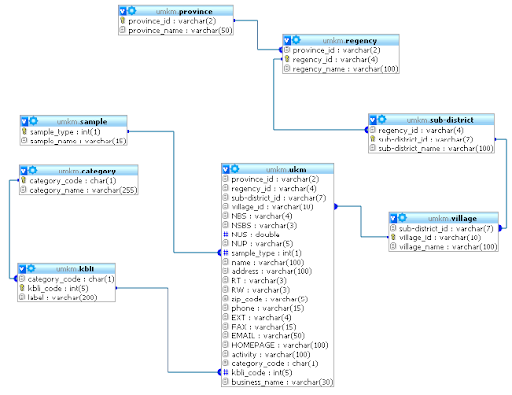
Marc
Oct 13, 2011, 2:05:44 PM10/13/11
to mongodb-user
Hello.
When you have a new question it is best to start a new discussion, as
opposed to posting it on an old thread. This way, you will have the
best chance of people seeing and responding to your question.
I have noticed that you have asked this similar question on several
other threads, so by now you know that there is no "one size fits all"
solution to converting a database from SQL to MongoDB. Because the
data structures are so different (Relational versus Document-
Oriented), careful thought must be put into how your application is
going to input and retrieve data from the MongoDB collection: What
fields are going to be queried most? How frequently will your nested
documents be accessed? How frequently are your nested documents going
to change? How large will they become? (Each document has a maximum
size of 16mb, so if a value is an array of nested documents that could
potentially grow ad infinitum, that array should be made into its own
collection.)
If your data structure is relatively simple, Mongo has a tool called
mongoimport, which can be used for importing files that contain one
JSON, CSV, or TSV string per line. The documentation on MongoImport
is here: http://www.mongodb.org/display/DOCS/Import+Export+Tools
Because your data structure appears to contain a lot of referenced
documents, this tool is probably not the best choice for your
requirements.
Most users find that it is preferable for them to write their own
program that reads in one line of their SQL table at a time, creates a
Mongo Document with the appropriate schema for their application, and
inputs it into their new Mongo collection. A Google search for
"converting mysql to mongodb" returns some articles written by other
people who have done this.
http://www.google.com/search?q=converting+mysql+to+mongodb
Mongo's "SQL to Mongo Mapping Chart" may give you an idea of how to
structurey our data based on the types of queries that you intend to
perform.
http://www.mongodb.org/display/DOCS/SQL+to+Mongo+Mapping+Chart
All that being said, I will give you an example of how your data might
be displayed as a Mongo document. However, I cannot make any claims
to as whether it is the correct format (and the likelihood is that it
is not), because I don't know the details of your application.
Hopefully, though it will provide you with a starting point:
{
provence_id : varchar(2),
regency_id : varchar(4),
sub-district_id : varchar(7),
village_id:{
sub-district_id:{
regency_id:{
province_id:{
province_id : varchar(2),
province_name : varchar(50),
}
regency_id : varchar(4),
regency_name : varchar(100),
}
sub-district_id : varchar(7),
sub-district_name : varchar(100),
}
village_id : varchar(10),
village_name : varchar(100),
}
NBS : varchar(4),
NSBS : varchar(3),
NUS : double,
NUP : varchar(5),
sample_type:{
sample_type : int(1),
sample_name : varchar(15),
}
name : varchar(100),
address : varchar(100),
RT : varchar(3),
RW : varchar(3),
zip_code : varchar(5),
phone : varchar(15),
EXT : varchar(4),
FAX : varchar(15),
EMAIL : varchar(50),
HOMEPAGE : varchar(100),
activity : varchar(100),
category_code : char(1),
kbli_code:{
category_code:{
category_code : char(1),
category_name : varchar(255),
}
klbi_code : int(5),
label : varchar(200),
}
business_name : varchar(30),
}
In the above example, all of the referenced tables have been turned
into embedded documents. Embedding documents inside documents inside
documents can be tricky (possible, but tricky) to write to and query
in Mongo. As was mentioned before, if a key will have an array of sub-
documents as its value, One could potentially run into trouble with
the 16mb document size limit if it is not initially known how large
the list could become. For example: if there will be multiple
klbi_codes, your document might look like:
{
provence_id : varchar(2),
regency_id : varchar(4),
...
kbli_code:[
{category_code : char(1),
category_name : varchar(255),
klbi_code : int(5),
label : varchar(200),
},
{category_code : char(1),
category_name : varchar(255),
klbi_code : int(5),
label : varchar(200),
}
...
}
This should be fine if the list will only contain a few sub-documents,
but there could be an issue if there will be hundreds of klbi_codes
per document.
In addition to embedding documents (denormalized data structure),
Mongo also supports values that are references to other documents
(normalized data structure). In a nutshell, reads will be slower with
a normalized data structure, but updates will be quicker, because only
one document will be changed. Here is a link to the Mongo
documentation of referencing documents:
http://www.mongodb.org/display/DOCS/Database+References
There was also a question asked on Stack Overflow on whether to embed
documents or reference them, which you may find useful:
http://stackoverflow.com/questions/5373198/a-simple-mongodb-question-embed-or-reference
Finally, I recommend that you read the Mongo Docs on Schema Design:
http://www.mongodb.org/display/DOCS/Schema+Design
In the "see also" section at the end, there are many good references
to books on the subject and presentations on schema design.
If you have any additional questions, please start a new discussion on
the mongodb-user Google group, and state specifically what your
application will be, what queries your application will be making, and
what parts of your data will be updated the most frequently and ask
for some recommendations. If you can even provide some example
documents of schemas that you are considering, then all the better.
The MongoDB community is here to help. Good luck!
Sincerely,
Marc
When you have a new question it is best to start a new discussion, as
opposed to posting it on an old thread. This way, you will have the
best chance of people seeing and responding to your question.
I have noticed that you have asked this similar question on several
other threads, so by now you know that there is no "one size fits all"
solution to converting a database from SQL to MongoDB. Because the
data structures are so different (Relational versus Document-
Oriented), careful thought must be put into how your application is
going to input and retrieve data from the MongoDB collection: What
fields are going to be queried most? How frequently will your nested
documents be accessed? How frequently are your nested documents going
to change? How large will they become? (Each document has a maximum
size of 16mb, so if a value is an array of nested documents that could
potentially grow ad infinitum, that array should be made into its own
collection.)
If your data structure is relatively simple, Mongo has a tool called
mongoimport, which can be used for importing files that contain one
JSON, CSV, or TSV string per line. The documentation on MongoImport
is here: http://www.mongodb.org/display/DOCS/Import+Export+Tools
Because your data structure appears to contain a lot of referenced
documents, this tool is probably not the best choice for your
requirements.
Most users find that it is preferable for them to write their own
program that reads in one line of their SQL table at a time, creates a
Mongo Document with the appropriate schema for their application, and
inputs it into their new Mongo collection. A Google search for
"converting mysql to mongodb" returns some articles written by other
people who have done this.
http://www.google.com/search?q=converting+mysql+to+mongodb
Mongo's "SQL to Mongo Mapping Chart" may give you an idea of how to
structurey our data based on the types of queries that you intend to
perform.
http://www.mongodb.org/display/DOCS/SQL+to+Mongo+Mapping+Chart
All that being said, I will give you an example of how your data might
be displayed as a Mongo document. However, I cannot make any claims
to as whether it is the correct format (and the likelihood is that it
is not), because I don't know the details of your application.
Hopefully, though it will provide you with a starting point:
{
provence_id : varchar(2),
regency_id : varchar(4),
sub-district_id : varchar(7),
village_id:{
sub-district_id:{
regency_id:{
province_id:{
province_id : varchar(2),
province_name : varchar(50),
}
regency_id : varchar(4),
regency_name : varchar(100),
}
sub-district_id : varchar(7),
sub-district_name : varchar(100),
}
village_id : varchar(10),
village_name : varchar(100),
}
NBS : varchar(4),
NSBS : varchar(3),
NUS : double,
NUP : varchar(5),
sample_type:{
sample_type : int(1),
sample_name : varchar(15),
}
name : varchar(100),
address : varchar(100),
RT : varchar(3),
RW : varchar(3),
zip_code : varchar(5),
phone : varchar(15),
EXT : varchar(4),
FAX : varchar(15),
EMAIL : varchar(50),
HOMEPAGE : varchar(100),
activity : varchar(100),
category_code : char(1),
kbli_code:{
category_code:{
category_code : char(1),
category_name : varchar(255),
}
klbi_code : int(5),
label : varchar(200),
}
business_name : varchar(30),
}
In the above example, all of the referenced tables have been turned
into embedded documents. Embedding documents inside documents inside
documents can be tricky (possible, but tricky) to write to and query
in Mongo. As was mentioned before, if a key will have an array of sub-
documents as its value, One could potentially run into trouble with
the 16mb document size limit if it is not initially known how large
the list could become. For example: if there will be multiple
klbi_codes, your document might look like:
{
provence_id : varchar(2),
regency_id : varchar(4),
...
kbli_code:[
{category_code : char(1),
category_name : varchar(255),
klbi_code : int(5),
label : varchar(200),
},
{category_code : char(1),
category_name : varchar(255),
klbi_code : int(5),
label : varchar(200),
}
...
}
This should be fine if the list will only contain a few sub-documents,
but there could be an issue if there will be hundreds of klbi_codes
per document.
In addition to embedding documents (denormalized data structure),
Mongo also supports values that are references to other documents
(normalized data structure). In a nutshell, reads will be slower with
a normalized data structure, but updates will be quicker, because only
one document will be changed. Here is a link to the Mongo
documentation of referencing documents:
http://www.mongodb.org/display/DOCS/Database+References
There was also a question asked on Stack Overflow on whether to embed
documents or reference them, which you may find useful:
http://stackoverflow.com/questions/5373198/a-simple-mongodb-question-embed-or-reference
Finally, I recommend that you read the Mongo Docs on Schema Design:
http://www.mongodb.org/display/DOCS/Schema+Design
In the "see also" section at the end, there are many good references
to books on the subject and presentations on schema design.
If you have any additional questions, please start a new discussion on
the mongodb-user Google group, and state specifically what your
application will be, what queries your application will be making, and
what parts of your data will be updated the most frequently and ask
for some recommendations. If you can even provide some example
documents of schemas that you are considering, then all the better.
The MongoDB community is here to help. Good luck!
Sincerely,
Marc
zack_syah
Oct 20, 2011, 11:19:03 PM10/20/11
to mongod...@googlegroups.com
My database just for search engine, as an example I want to find the business_name, then that will appear starting from the province_name to the name of the business_name in ukm table. my database no update.
Marc
Oct 21, 2011, 12:10:02 PM10/21/11
to mongodb-user
Queries are very straightforward in MongoDB.
If you are using the document structure that I gave as an example in
my previous post (and I cannot say that it is the best structure for
your application...you will have to determine that for yourself) a
query for a specific business_name is simply:
> db.ukm.find({"business_name":"my_business"})
For example purposes, here is a made-up document:
> db.ukm.save({
village_id:{
sub_district_id:{
regency_id:{
province_id:{
province_id : 001,
province_name : "province001"
},
regency_id : 002,
regency_name : "regency002"
},
sub_district_id : 003,
sub_district_name : "sub_district003"
},
village_id : 004,
village_name : "villeage004"
},
NBS : "myNBS",
NSBS : "myNBBS",
NUS : 42,
NUP : "myNUP",
sample_type:{
sample_type : 5,
sample_name : "sample5"
},
name : "MY_NAME",
address : "123 main street",
zip_code : 12345,
phone : "555-5555",
EXT : 123,
FAX : "555-5556",
EMAIL : "mye...@email.com",
HOMEPAGE : "www.village004.com",
activity : "My Activity",
kbli_code:{
category_code:{
category_code : "a",
category_name : "category_a"
},
klbi_code : 100,
label : "Label_A"
},
business_name : "my_business"
})
If you want to query for a business_name in a given province, the
query would be:
> db.ukm.find({"business_name":"my_business", "village_id.sub_district_id.regency_id.province_id.province_name":"province001"})
This is a pretty convoluted query, you see what I mean when I said
that this might not be the best document structure for your
application.
Here is a link to the Mongo Document on Embedded Documents (dot
notation)
http://www.mongodb.org/display/DOCS/Dot+Notation+(Reaching+into+Objects)
If you want to query for a business name and have only the provence
returned, the query would be:
> db.ukm.find({"business_name":"my_business"}, {"village_id.sub_district_id.regency_id.province_id.province_name":1})
Here is a link to the Mongo Document on Querying:
http://www.mongodb.org/display/DOCS/Querying
There are a two (short) tutorials on how to create, read, update, and
delete documents in MongoDB. Hopefully, these will give you a better
understanding of Mongo's document-oriented data structure, and how it
is different from the Relational Databases (Table Structures) that you
are used to.
http://try.mongodb.org/ - MongoDB's tutorial
http://tutorial.mongly.com/tutorial/index - A tutorial written by a
member of our community and MongoDB contributor, Karl Seguin
If you are using the document structure that I gave as an example in
my previous post (and I cannot say that it is the best structure for
your application...you will have to determine that for yourself) a
query for a specific business_name is simply:
> db.ukm.find({"business_name":"my_business"})
For example purposes, here is a made-up document:
> db.ukm.save({
village_id:{
sub_district_id:{
regency_id:{
province_id:{
province_id : 001,
province_name : "province001"
},
regency_id : 002,
regency_name : "regency002"
},
sub_district_id : 003,
sub_district_name : "sub_district003"
},
village_id : 004,
village_name : "villeage004"
},
NBS : "myNBS",
NSBS : "myNBBS",
NUS : 42,
NUP : "myNUP",
sample_type:{
sample_type : 5,
sample_name : "sample5"
},
name : "MY_NAME",
address : "123 main street",
zip_code : 12345,
phone : "555-5555",
EXT : 123,
FAX : "555-5556",
EMAIL : "mye...@email.com",
HOMEPAGE : "www.village004.com",
activity : "My Activity",
kbli_code:{
category_code:{
category_code : "a",
category_name : "category_a"
},
klbi_code : 100,
label : "Label_A"
},
business_name : "my_business"
})
If you want to query for a business_name in a given province, the
query would be:
> db.ukm.find({"business_name":"my_business", "village_id.sub_district_id.regency_id.province_id.province_name":"province001"})
This is a pretty convoluted query, you see what I mean when I said
that this might not be the best document structure for your
application.
Here is a link to the Mongo Document on Embedded Documents (dot
notation)
http://www.mongodb.org/display/DOCS/Dot+Notation+(Reaching+into+Objects)
If you want to query for a business name and have only the provence
returned, the query would be:
> db.ukm.find({"business_name":"my_business"}, {"village_id.sub_district_id.regency_id.province_id.province_name":1})
Here is a link to the Mongo Document on Querying:
http://www.mongodb.org/display/DOCS/Querying
There are a two (short) tutorials on how to create, read, update, and
delete documents in MongoDB. Hopefully, these will give you a better
understanding of Mongo's document-oriented data structure, and how it
is different from the Relational Databases (Table Structures) that you
are used to.
http://try.mongodb.org/ - MongoDB's tutorial
http://tutorial.mongly.com/tutorial/index - A tutorial written by a
member of our community and MongoDB contributor, Karl Seguin
zack_syah
Oct 25, 2011, 7:01:55 PM10/25/11
to mongod...@googlegroups.com
I read in http://www.mongodb.org/display/DOCS/Import+Export+Tools whether I should import one by one a table to CSV, then import from CSV to JSON?
Marc
Oct 26, 2011, 7:13:09 PM10/26/11
to mongodb-user
If you can export your existing database into CSV format, then you can
import it into a mongo collection as described in the "Import Export
Tools" document that you linked to.
Unfortunately, CSV format is "flat". To represent your collection as
a .csv file is the same as to represent it in a table. There is no
way to embed documents is a .csv file. Another drawback of this is
that in a .csv file, data can only exist as a string or a number.
There are a few other data types that may be imported as well. They
are explained here: http://www.mongodb.org/display/DOCS/Mongo+Extended+JSON
However, if you can flatten your documents to fit in this two-
dimensional format, then you will be able to import it with mongo
import. Here is an example of what this might look like:
The .csv file (example.csv):
001, "province001", 002, "regency002", 003, "sub_district003", 004,
"villeage004", "myNBS", "myNBBS", 42, "myNUP", 5, "sample5",
"MY_NAME", "123 main street", 12345, "555-5555", 123, "555-5556",
"mye...@email.com", "www.village004.com", "My Activity", "a",
"category_a", 100, "Label_A", "my_business"
In a terminal:
./mongoimport --host localhost --db test --collection ukm --type csv --
file /Path/To/example.csv --fields
province_id,province_name,regency_id,regency_name,sub_district_id,sub_district_name,village_id,village_name,NBS,NSBS,NUS,NUP,sample_type,sample_name,name,address,zip_code,phone,EXT,FAX,EMAIL,HOMEPAGE,activity,category_code,category_name,klbi_code,label,business_name
connected to: localhost
imported 1 objects
Now, you can connect to your database in the JS terminal and see the
imported collection.
> db.ukm.find()
{ "_id" : ObjectId("4ea893a86c9d0f8c91ad2d76"), "province_id" : 1,
"province_name" : "province001", "regency_id" : 2, "regency_name" :
"regency002", "sub_district_id" : 3, "sub_district_name" :
"sub_district003", "village_id" : 4, "village_name" : "villeage004",
import it into a mongo collection as described in the "Import Export
Tools" document that you linked to.
Unfortunately, CSV format is "flat". To represent your collection as
a .csv file is the same as to represent it in a table. There is no
way to embed documents is a .csv file. Another drawback of this is
that in a .csv file, data can only exist as a string or a number.
There are a few other data types that may be imported as well. They
are explained here: http://www.mongodb.org/display/DOCS/Mongo+Extended+JSON
However, if you can flatten your documents to fit in this two-
dimensional format, then you will be able to import it with mongo
import. Here is an example of what this might look like:
The .csv file (example.csv):
001, "province001", 002, "regency002", 003, "sub_district003", 004,
"villeage004", "myNBS", "myNBBS", 42, "myNUP", 5, "sample5",
"MY_NAME", "123 main street", 12345, "555-5555", 123, "555-5556",
"mye...@email.com", "www.village004.com", "My Activity", "a",
"category_a", 100, "Label_A", "my_business"
In a terminal:
./mongoimport --host localhost --db test --collection ukm --type csv --
file /Path/To/example.csv --fields
province_id,province_name,regency_id,regency_name,sub_district_id,sub_district_name,village_id,village_name,NBS,NSBS,NUS,NUP,sample_type,sample_name,name,address,zip_code,phone,EXT,FAX,EMAIL,HOMEPAGE,activity,category_code,category_name,klbi_code,label,business_name
connected to: localhost
imported 1 objects
Now, you can connect to your database in the JS terminal and see the
imported collection.
> db.ukm.find()
{ "_id" : ObjectId("4ea893a86c9d0f8c91ad2d76"), "province_id" : 1,
"province_name" : "province001", "regency_id" : 2, "regency_name" :
"regency002", "sub_district_id" : 3, "sub_district_name" :
"sub_district003", "village_id" : 4, "village_name" : "villeage004",
"NBS" : "myNBS", "NSBS" : "myNBBS", "NUS" : 42, "NUP" : "myNUP",
"sample_type" : 5, "sample_name" : "sample5", "name" : "MY_NAME",
"address" : "123 main street", "zip_code" : 12345, "phone" :
"555-5555", "EXT" : 123, "FAX" : "555-5556", "EMAIL" :
"mye...@email.com", "HOMEPAGE" : "www.village004.com", "activity" :
"My Activity", "category_code" : "a", "category_name" : "category_a",
"555-5555", "EXT" : 123, "FAX" : "555-5556", "EMAIL" :
"mye...@email.com", "HOMEPAGE" : "www.village004.com", "activity" :
Reply all
Reply to author
Forward
0 new messages