
difficulties exporting information in MHN

Stephen McCann
Hi,
for a third year college project to analyse information from honeypots, I have
1. Set up a Linux server in AWS
2. Connected to an instance of that server with Putty
3. Used MHN to deploy several honeypots
Through the MHN web app, I can see I am getting a lot of attacks from different countries/regions/ip address etc. using different honeypots like Kippo, p0f and Dionaea.
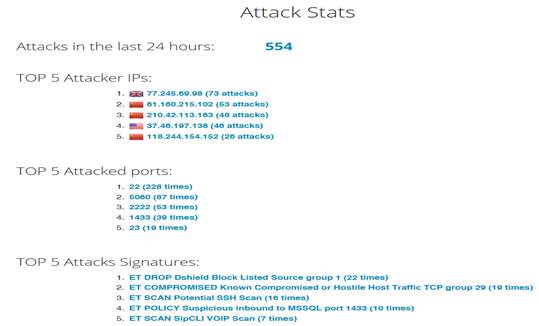
There is a bit of information in the attack stats section but I was looking for a lot more (like below) if possible.
· id is our Mongo ObjectID field.
· ident is an identifier from our specific kippo honeypot. These IDs are unique to each honeypot.
· timestamp is fairly self-explanatory
· normalized is a boolean, whether our data has been normalized or not. Again, this is a feature of mnemosyne to normalize data from multiple channels.
· channel is the channel from which are data originated. As expected, this is from a kippo honeypot, so our channel is kippo.sessions.
· payload is by far the most interesting one here, as it contains the meat of our "attack". Notice that within payload, we have several nested fields (in order of appearance):
· peerIP - Our "attacking" IP address
· commands - Commands issued during the session
· loggedin - Username/password used to login
· version - SSH version
· ttylog - Hex log of our tty session [truncated in this example]
· urls - URLs used during the session to download things
· hostIP - The IP of our host
· peerPort - The port used by our "attacker"
· session - Session ID
· startTime - Session start time
· hostPort - The host port; typically 22 for things like Kippo
· credentials - Captured information if the "attacker" tries to create a new account or change a password
· endTime - Session end time
· unknownCommands - Any commands that Kippo is unfamiliar with
I am having some difficulty in retrieving and exporting this information to some sort of readable file in order for it to be filtered and analysed further. Can you give me any tips on how to do this?
Do I need to use the CLI in Linux to export the information to a file or can it be taken from the MHN web app in some way?
If you require any further information from me please let me know
Thanks
Stephen McCann
Stephen McCann
Below is the results of some commands I have entered which may or may not help you giving me advice
ubuntu@ip-************:~$ sudo netstat -luntp
Active Internet connections (only servers)
Proto Recv-Q Send-Q Local Address Foreign Address State PID/Program name
tcp 0 0 0.0.0.0:987 0.0.0.0:* LISTEN 1027/sshd
tcp 0 0 127.0.0.1:27017 0.0.0.0:* LISTEN 29610/mongod
tcp 0 0 127.0.0.1:3306 0.0.0.0:* LISTEN 11434/mysqld
tcp 0 0 0.0.0.0:2222 0.0.0.0:* LISTEN 23732/python
tcp 0 0 127.0.0.1:28017 0.0.0.0:* LISTEN 29610/mongod
tcp6 0 0 :::987 :::* LISTEN 1027/sshd
tcp6 0 0 :::80 :::* LISTEN 13867/apache2
udp 0 0 0.0.0.0:17258 0.0.0.0:* 557/dhclient
udp 0 0 0.0.0.0:68 0.0.0.0:* 557/dhclient
udp6 0 0 :::36613 :::* 557/dhclient
ubuntu@ip-172-31-10-165:~$ sudo supervisorctl status
kippo RUNNING pid 23729, uptime 1 day, 23:52:41
ubuntu@ip-172-31-10-165:~$ sudo iptables -L
Chain INPUT (policy ACCEPT)
target prot opt source destination
Chain FORWARD (policy ACCEPT)
target prot opt source destination
Chain OUTPUT (policy ACCEPT)
target prot opt source destination
ubuntu@ip-172-31-10-165:~$ sudo tcpdump -nnNN tcp port 10000
tcpdump: verbose output suppressed, use -v or -vv for full protocol decode
listening on eth0, link-type EN10MB (Ethernet), capture size 65535 bytes
thanks
Stephen
Jason Trost
--
You received this message because you are subscribed to the Google Groups "Modern Honey Network" group.
To unsubscribe from this group and stop receiving emails from it, send an email to modern-honey-net...@googlegroups.com.
To post to this group, send email to modern-hon...@googlegroups.com.
To view this discussion on the web visit https://groups.google.com/d/msgid/modern-honey-network/8F1B0ACC5C3B3E48B492842F8A11B3CC9E113499%40EXSVR02.headquarters.tnsdistribution.com.
2317 Broadway, 3rd Floor| Redwood City, CA 94063
Phone: 386.235.0078 | Twitter: @jason_trost
Stephen McCann
Hi Jason,
that’s great thanks for your help there. I basically set up another server and reconfigured it as something must have gone wrong in the first set up but now after running the commands you gave me I can export json files.
I have also set up MHN app with Splunk and have a couple of questions if you have time to reply.
As I said before I have set up a virtual server using AWS which currently links to MHN web app and gives certain data like
· Top 5 IP’s
· Top 5 Attack Signatures
· Top 5 attacked ports
Is there a way to link this virtual server to the MHN app in Splunk where I could then use it to analyse more information, develop reports, graphs etc.?
Or would it be better to deploy honeypots directly from the MHN app in Splunk and analyse from there?
My ultimate goal here is to analyse the data that comes in, reconfigure my server to deal with these attacks and then analyse again and again until I am happy that my server has gone from an Intrusion Detection System to an Intrusion Prevention System if you get me so I would need a link back to my virtual server from the MHN app in Splunk if possible.
I hope I have explained myself correctly here and thanks again for replying to my previous mail
Stephen