
Skip to first unread message

Hannah Walden
Oct 1, 2015, 2:59:42 PM10/1/15
to MIT App Inventor Forum
I have a student who would like to build a simple app with App Inventor. She would like to store information, which would be searchable by keywords. The user would be returned an image based on the keywords searched. Is this possible with App Inventor? We've explored many tutorials, but haven't found quite the right thing to help her get started. Any suggestions would be very much appreciated.

SteveJG
Oct 1, 2015, 5:27:33 PM10/1/15
to mitappinv...@googlegroups.com
The ListView has a Filter that can be used to 'search' for text in a List (that is placed in the ListView)... that might work. The List could be a list of images or another list with the keywords that have parallel indices to the image list.
cat catimage.png
dog dogimage.png
Something like that might work as a starting point. After all, we do not know exactly what the student wants to do.
Storing information: App Inventor is limited; for temporary storage, one can use a List. For permanent storage within the app, a List can also be coded into the app. Another way of storing is to use a TinyDB or a File control with a csv text file. What is used depends on a better description of the students objectives.
Here is a way to search a List
is in list?

If thing is one of the elements of the list, returns true; otherwise, returns false. Note that if a list contains sublists,
the members of the sublists are not themselves members of the list. For example, the members of the list (1 2 (3 4)) are 1, 2, and the list (3 4); 3 and 4 are not themselves members of the list.
described here :http://appinventor.mit.edu/explore/ai2/support/blocks/lists.html
Here are some resources regarding Lists:
=====
Lists
Hossein's example https://amerkashi.wordpress.com/2014/05/12/lists/
appInventor.org example: http://www.appinventor.org/bookChapters/chapter19.pdf
List of Lists
========================
I am not sure anything there is specific about doing what the student wants to do, but she will certainly have to use a List to accomplish her goals and most of what is written about lists is in these examples.
This example shows how to search a list http://www.imagnity.com/tutorials/app-inventor/list-blocks-on-app-inventor/ ... I should have mentioned it earlier. :)
A Fusion Table can do a SQL search of the information placed in it (see Pizza Party tutorial) however, that is probably overkill for what she might want to do...it gets complex and messy but works pretty well.
Regards,
Steve

Abraham Getzler
Oct 2, 2015, 12:20:37 PM10/2/15
to MIT App Inventor Forum

Scott Ferguson
Oct 5, 2015, 10:54:37 PM10/5/15
to MIT App Inventor Forum
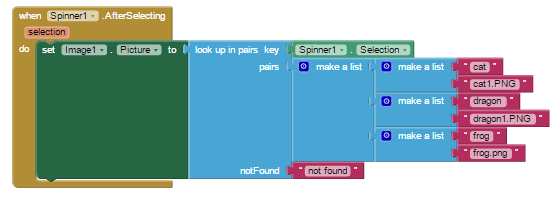
This is about the simplest method I could imagine for her purpose.
It stores the data in the app, but the app must be edited to add data.
Pictures are stored in the app's Media folder.
Uses the List 'lookup in pairs' block, the Image component and a Spinner component to hold the names of the animals.

These are the only blocks needed!
---
sf
Reply all
Reply to author
Forward
0 new messages