
Blinking screen
618 views
Skip to first unread message

aumandg
Jan 10, 2015, 8:43:51 PM1/10/15
to mitappinv...@googlegroups.com
I would like to have the background color of the screen to flash from yellow to red when the screen is loaded. I have searched for a sample .aia with no luck. Any help would be great.

Don Merchant
Jan 11, 2015, 8:56:38 AM1/11/15
to
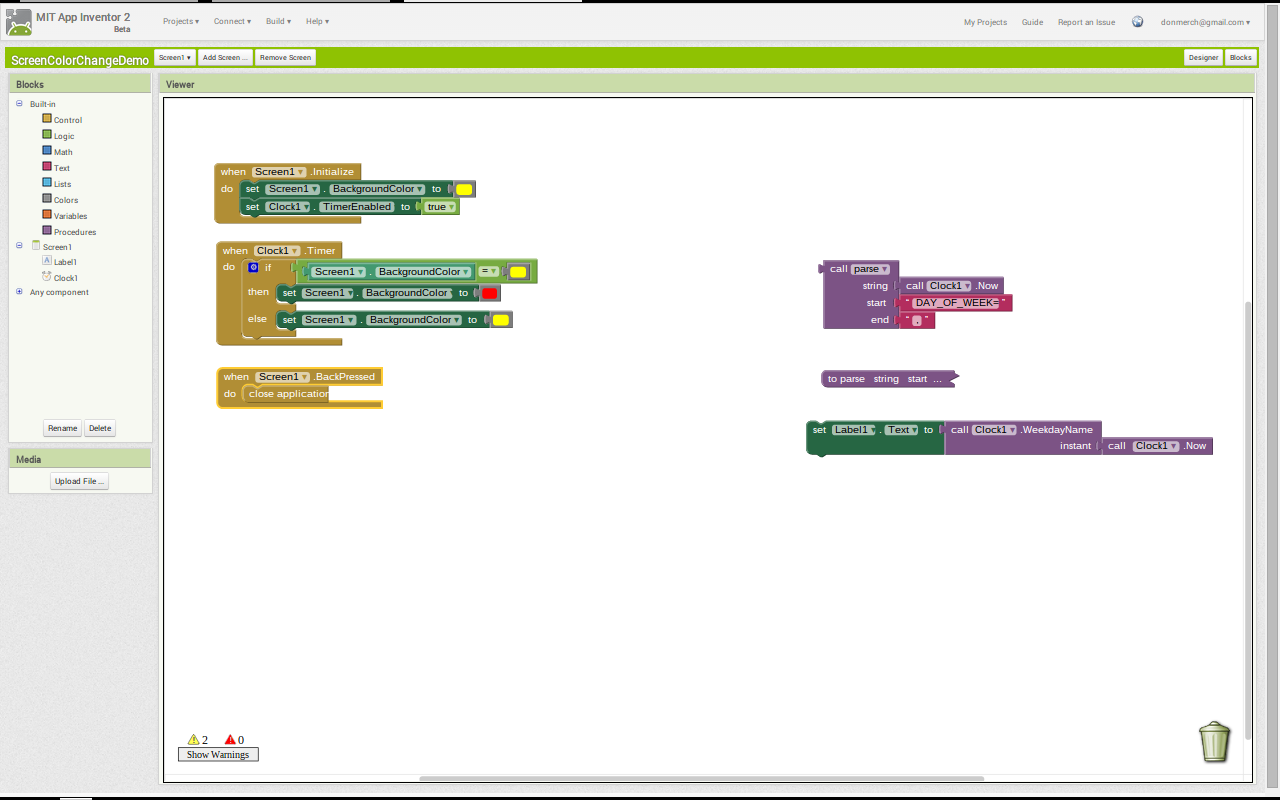
As I am just a novice in AI2 I would use the timer (clock) function set to the delay you want to change from first color to the second color...
Initialize your screen with your first color
Enable timer
When timer fires change screen color to second color
Disable timer


In my demo above the timer is set for 1500 mS (1.5 seconds). The screen initializes with yellow background then after timer fires it changes to red.
aumandg
Jan 11, 2015, 10:13:00 AM1/11/15
to mitappinv...@googlegroups.com
I put those blocks in and the sscreenonly changes color from yellow to red, it does not flash back and forth.

Taifun
Jan 11, 2015, 10:51:15 AM1/11/15
to mitappinv...@googlegroups.com
if you want the colors flashing, you have to
1. remove the Clock.TimerEnabled = false block
2. change the colors in the Clock.Timer event like this
if Screen.Backgroundcolor = yellow
then set Screen.Backgroundcolor to red
else set Screen.Backgroundcolor to yellow
first do the tutorials http://appinventor.mit.edu/explore/ai2/tutorials.html to learn the basics of App Inventor, then try something and follow the
Top 5 Tips: How to learn  App Inventor
App InventorTaifun
Trying to push the limits of App Inventor!
Snippets and
Tutorials from
Pura Vida Apps by
 Taifun.
Don Merchant
Jan 11, 2015, 10:52:43 AM1/11/15
to mitappinv...@googlegroups.com
Ooops... sorry. Didn't know you wanted it to flash back and forth. You'll need to build a repeat loop with the timer block and add some logic to change to red color if it's yellow and vice versa.
Don Merchant
Jan 11, 2015, 11:13:03 AM1/11/15
to mitappinv...@googlegroups.com
I added a second timer and set both timers to fire but not enabled and set both intervals to 1500.


Then I made a couple simple blocks that toggle the timers back and forth, on and off and change the screen colors at the same time. I'm sure there's a better way of doing this.

There's also some additional blocks in there as I was playing with the Day Of Week. But the screen flashes back and forth every 1.5 seconds.
Don Merchant
Jan 11, 2015, 11:26:05 AM1/11/15
to mitappinv...@googlegroups.com
I knew there would be a simpler way... yes that works too.
aumandg
Jan 12, 2015, 9:12:23 AM1/12/15
to mitappinv...@googlegroups.com
Don, perfect thank you!
Reply all
Reply to author
Forward
0 new messages