
App crashes after going back and forth between screens
2,257 views
Skip to first unread message
 Assigned to scottfr...@gmail.com by me
Glassy
Mar 20, 2014, 1:21:59 AM3/20/14
to mitappinv...@googlegroups.com
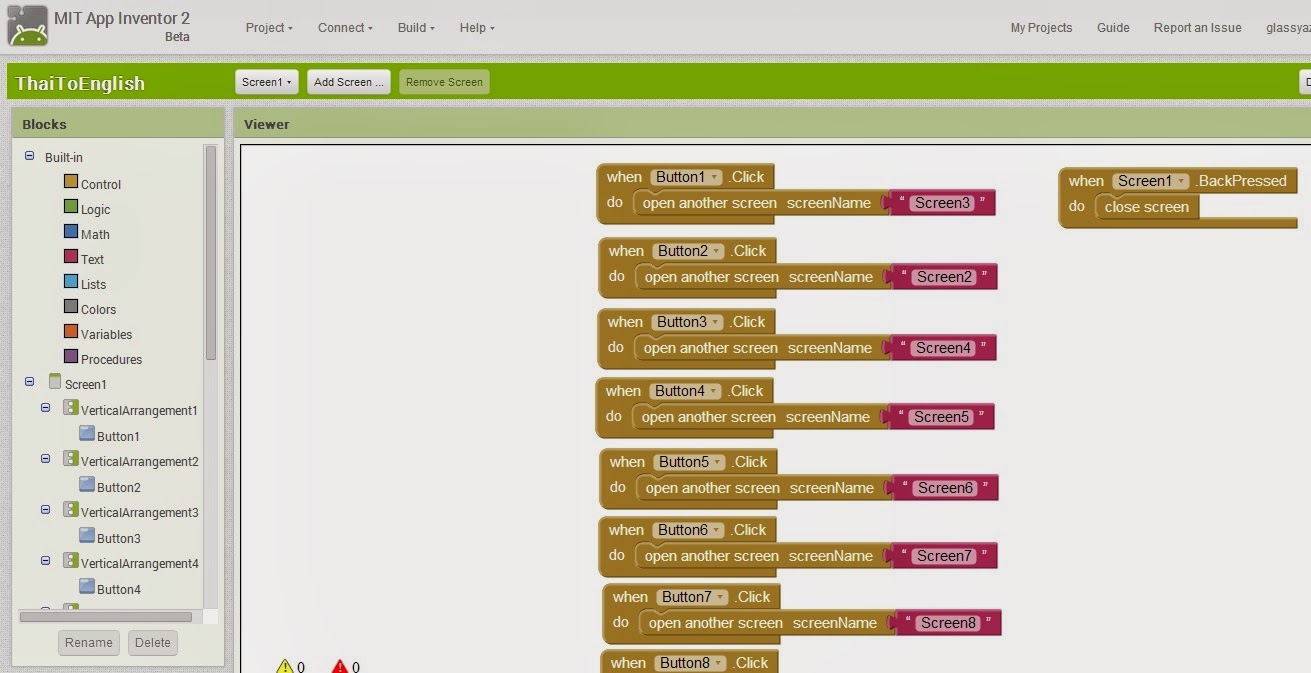
I have created a test app with about 10 different screens and if I navigate back and forth between each screen and the home screen, the app crashes after clicking back and forth 7 times. It doesn't seem to matter the order or which screens I navigate back and forth to the home page, it always seems to crash after attempting to visit a screen after visiting more than 6 other screens and I get the "Unfortunately this app has stopped" message each time.
I want the app to be able to click from home to another screen and back an unlimited amount of times without it crashing.
Any ideas on what might be happening here?
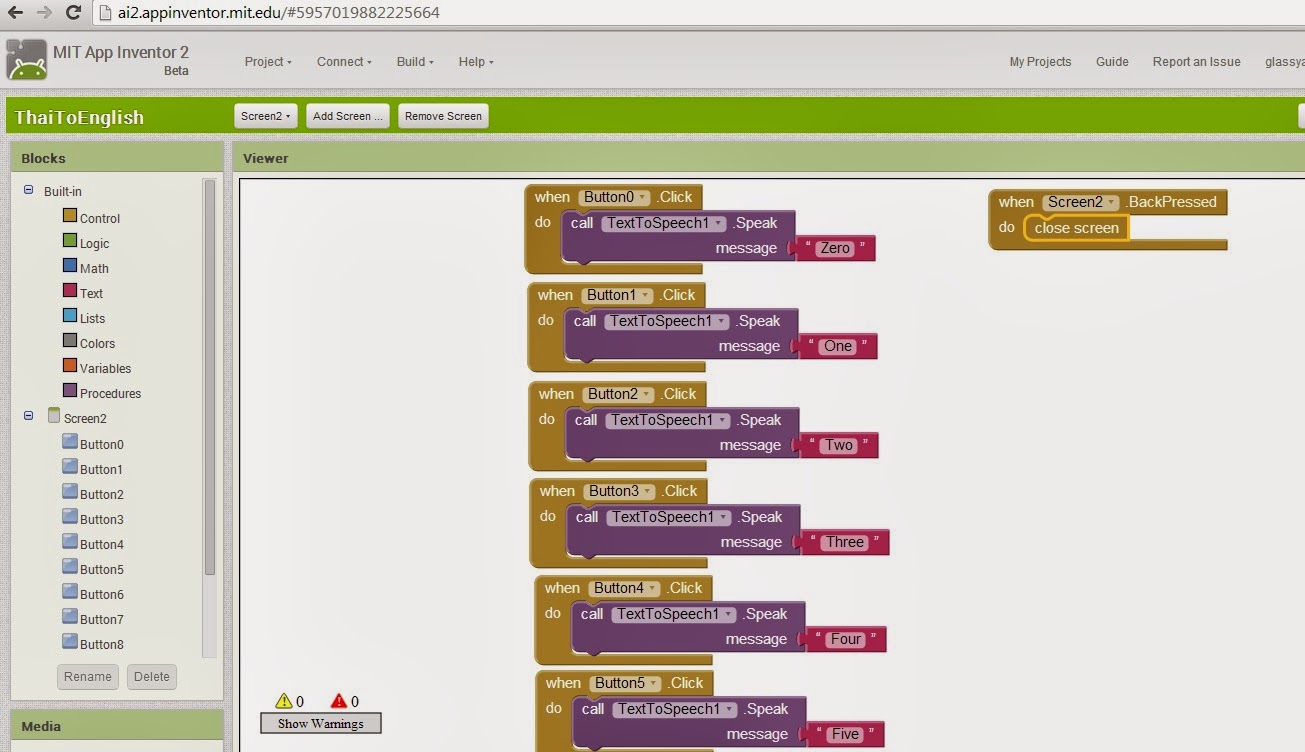
I have attached some screenshots. I am new to this so it is obviously something I am missing in the code.
Cheers.

Scott Ferguson
Mar 20, 2014, 5:48:33 AM3/20/14
to mitappinv...@googlegroups.com, glas...@gmail.com
Does this only happen during development?
If you package the app on the device does it work properly?
I don't know of a specific way to 'fix' this when working with the Companion app during development and it has happened to me on occasion as well.
You may have to limit the amount of switching for each session with the Companion app and do your extensive testing with a packaged app periodically.
---
Scott
glas...@gmail.com
Mar 20, 2014, 8:16:58 AM3/20/14
to mitappinv...@googlegroups.com, glas...@gmail.com
Hi,
Sorry I didn't mention this but it happens after I compile the app into an APK file and put it on my phone, tablet and my PC emulator. It always seems to crash after I click back and forth between the screens 7 times. I don't know why it happens like this but it does.
Would having 10 images on the one screen have anything to do with this? Each screen other than the main screen has 10 images which have the talking text when you click on them.

SteveJG
Mar 20, 2014, 8:49:18 AM3/20/14
to mitappinv...@googlegroups.com, glas...@gmail.com
When you change screens, do you use a closescreen block? This could me a memory issue. Every time you open a screen Android saves it in memory... too many 'saves' to memory and you may be
using up your device's memory. When you use the closescreen block, Android releases (frees) memory.
I see from your blocks you are closing screens on using the .BackePressed., not with a button. Doing the screen close this way might be an issue.
Do you think this could be your issue?
This method works well with a button http://puravidaapps.com/tribblehunter.php and you might use the gotoscreen procedure in your buttons; if you are changing screens after each text to speech block.
Another possibility might be that the Andorid's speaking is interfering with the closescreen block . I do not know but offering
some suggestions since I can not test..
@ Taifun, you usually are the expert on closing screens, what do you think.
Regards,
Steve

Taifun
Mar 20, 2014, 9:23:39 AM3/20/14
to mitappinv...@googlegroups.com, glas...@gmail.com
what we can see from the screenshots you go back from Screen2 to Screen1 with close screen, that looks good
do the same in all other screens and never go from a Screen to another Screen with the open another screen block except of Screen1 (the manager screen)
Glassy
Mar 20, 2014, 10:01:13 PM3/20/14
to mitappinv...@googlegroups.com, glas...@gmail.com
OK Steve,
I tried your suggestion and followed the blocks exactly how they were set out on this page - http://puravidaapps.com/tribblehunter.php and when the back button is pressed from any screen -the app closes instead of going back to the main screen. I tried the same blocks without the "close screen" - connected to the - "then" part of the block and it goes back to the main screen but still after I attempt to go back and forth to 7 screens, it crashes.
Any other suggestions on what might be causing this?
I have made a few blank screens with nothing on them except for the blocks that tell the app when the back button is pressed to close the screen and I can go back and forth between these screens an unlimited amount of times without any crashes so it must be something on the screens that is causing them to crash.
Can having a heap of images that are too wide cause too much memory use and make an app crash? I made images that are clickable bars that fit the whole size of the screen across ways and they are 3000px wide so they can fit on all screen resolutions. If I use "fill parent" the images stretch and go blurry. The images are only 4kb in size and are png files so they are small in size.
The reason why I am using images for the clickable bars is because I am trying to use a different language than English for the text with English words being spoken, like a translator.
If there is a way to use other languages in the buttons, then I might not have this problem but as far as I can see, there is no way to change the language right?
Cheers,
Glassy.
Taifun
Mar 20, 2014, 10:05:10 PM3/20/14
to mitappinv...@googlegroups.com, glas...@gmail.com
- http://puravidaapps.com/tribblehunter.php and when the back button is pressed from any screen -the app closes instead of going back to the main screen.
use the Screen.BackPressed event to go to the main menu
The reason why I am using images for the clickable bars is because I am trying to use a different language than English for the text with English words being spoken, like a translator.
??? you can use any language as text on the buttons
Taifun
SteveJG
Mar 20, 2014, 10:55:20 PM3/20/14
to
Hmm. Sorry the way closing the screens did not work. Your images are not large by your account. You probably can discount that as the switching issue.
But blank screens switching without the crash makes me wonder what else is going on.
You can change the language. This was suggested on another thread:
Regards,
Just add the component TextToSpeech and leave the fields Country and Language blank,
then call the function TextToSpeech1.language or TextToSpeech1.counry.
then call the function TextToSpeech1.language or TextToSpeech1.counry.
The thread is here: https://groups.google.com/forum/#!searchin/programming-with-app-inventor/multilanguage$20auto$20detect/programming-with-app-inventor/i9avlnWlhco/12e4T7XfswkJ That might help.
I am not sure what this does, change the display language or what.
Something you can try for captions on the buttons for the language text is this: Write the phrases you want in English... go to Google Translate and use it to translate the language you want . In the box to the right on Translate will be a phrase that might correctly translate the English. Select and copy the words .. then drag and drop them as the button text. I am pretty certain this will allow you to capture the diacritical marks etc and special characters in the language. Paste them into the blocks you use for the button captions. Then you should be able to use the actual words rather than an image.
for instance: what is your name .... ono što je vaše ime or 당신의 이름은 무엇입니까
Did that work?
Another way to do it would be to use Windows and change the language keyboard of your PC to say Norwegian.... then you can type in notepad or a word processor using the special characters of that keyboard; then save the notepad file and switch back to English. Once in Notepad, copy and paste the 'Norwegian' into the Text blocks or whatever. This can be done, but is messy.
Regards,
Steve
glas...@gmail.com
Mar 20, 2014, 10:33:20 PM3/20/14
to mitappinv...@googlegroups.com
I will try these suggestions and see how that goes and report back here.
Thanks guys.
On Friday, March 21, 2014 1:19:50 PM UTC+11, SteveJG wrote:
Hmm. Sorry the way closing the screens did not work. Your images are not large by your account. You probably can discount that as the switching issue.
But blank screens switching without the crash makes me wonder what else is going on.
You can change the language. This was suggested on another thread:Just add the component TextToSpeech and leave the fields Country and Language blank,
then call the function TextToSpeech1.language or TextToSpeech1.counry.The thread is here: https://groups.google.com/forum/#!searchin/programming-with-app-inventor/multilanguage$20auto$20detect/programming-with-app-inventor/i9avlnWlhco/12e4T7XfswkJ That might help.I am not sure what this does, change the display language or what.Something you can try for captions on the buttons for the language text is this: Write the phrases you want in English... go to Google Translate and use it to translate the language you want . In the box to the right on Translate will be a phrase that might correctly translate the English. Select and copy the words .. then drag and drop them as the button text. I am pretty certain this will allow you to capture the diacritical marks etc and special characters in the language. Paste them into the blocks you use for the button captions. Then you should be able to use the actual words rather than an image.
for instance: what is your name .... što je vaš naame
Did that work?Another way to do it would be to use Windows and change the language keyboard of your PC to say Norwegian.... then you can type in notepad or a word processor using the special characters of that keyboard; then save the notepad file and switch back to English. Once in Notepad, copy and paste the 'Norwegian' into the Text blocks or whatever. This can be done, but is messy.
Regards,
Steve
Glassy
Mar 20, 2014, 10:49:59 PM3/20/14
to mitappinv...@googlegroups.com, glas...@gmail.com
OK,
The dragging of text in another language to the text field seems to work so that's great!
Now I will have to see if filling the app up with the talk to text without using images will prevent it from crashing.
I will post back here once I have tested this out properly.
Cheers,
Glassy.
SteveJG
Mar 20, 2014, 11:01:24 PM3/20/14
to mitappinv...@googlegroups.com, glas...@gmail.com
Good luck and thanks for reporting on progress.
I suspect the issue may be the talk to text block. Something may not be completing or cleaning itself up before the screen change. Something you might try if the issue persists
is to use a clock block to close the screen. Have the clock.enabled = false then enable it and have the close screen block in the clock, then set the clock enabled to false. The
idea is to build in some delay into the closing routine. You would have to experiment with different timer intervals.... the default 1000ms (1 second) might not be long enough.
...another untried idea. Keep at it and good luck.
-- Steve
Glassy
Mar 21, 2014, 2:32:18 AM3/21/14
to mitappinv...@googlegroups.com, glas...@gmail.com
Thanks again for the info.
I tried the talk to text again but this time with no images and I was able to navigate back and forth as many times as I liked without it crashing, however I have only built 2 screens as I started again from scratch and I will report back here again once I get as many screens done as I had before and state if it all works or not.
What is the best way to do the text to speech if I have 10 buttons on a screen, is it OK to call only one text to speech to use for all the different buttons on a screen or is it best to have 10 different text to speech blocks for each button on that screen?
Thanks,
Glassy.
On Thursday, March 20, 2014 4:21:59 PM UTC+11, Glassy wrote:
SteveJG
Mar 21, 2014, 8:31:26 AM3/21/14
to
One text to speech is going to be best.
Some thoughts, I believe if you change screens, you need a separate text to speech for each screen.
However, if you use a single screen, with lots of buttons, you can use a single text to speech to control the activities of all the buttons on the screen. For example
In the Button1.Click
Text to speech1.Speak
message Button1.Text
In the Button2.Click
Text to speech1.Speak
message Button2.Text or what you want
or something like that. Have you experiments with setting set TextToSpeech1.Country to and Language to blocks? You might be able to get some interesting results. You have to use the language/country codes here: http://ai2.appinventor.mit.edu/reference/components/media.html#TextToSpeech I have not attempted this. It won't provide a translation, but it might allow the Speak to speak in the language of the text too? Does it? I actually do not know.
If there are still changing screen issues, consider using a SINGLE screen, many buttons and a screen layout, sometimes, hide buttons, other times display buttons. You might not have to use multiple screens to get your app to make language flash cards or whatever you are attempting.
What do you put in your when TexttoSpeech1.AfterSpeaking block? perhaps the close screen block should go here? ...something to think about if you have to have multiple screens.
Have fun. Please share the results of your experiments.
Regards,
Steve
glas...@gmail.com
Mar 22, 2014, 7:12:09 AM3/22/14
to mitappinv...@googlegroups.com
Hi Steve,
Sorry for my slow reply but I have only just finished putting in all the stuff that I had in the previous app.
Well, it all works now without crashing so the only difference between the app I have now and the one I had before was - no images. I guess having too many images as well as text to speech and multiple windows can cause it to crash when navigating back and forth between the screens.
And yes I have the text to speech setup the same way as your first example and it seems to work just fine cheers.
So this problem I had seems to be solved and I want to thank you guys for your help.
Thanks,
Glassy.
SteveJG
Mar 22, 2014, 9:34:31 AM3/22/14
to
Excellent. Very glad the issue is solved. I appreciate that you posted your results so that others can learn from your experience.
Your observation "I guess having too many images as well as text to speech and multiple windows can cause it to crash when navigating back and forth between the screens." is worth posting and sharing because the statement is absolutely correct. The developers are working to make AI2 more friendly to more images, sound etc. but in the mean while, AI2 developers need to be aware of AI2's limitations.
Thank you.
Regards,
Steve

Enis
Mar 22, 2014, 1:31:31 PM3/22/14
to mitappinv...@googlegroups.com, glas...@gmail.com
Glassy... You can check out Taifun's and Hossein's methods for dealing with the 5MB limit in AI by downloading images from the web, a server or something, upon first run...
Here are some solutions from Hossein & Taifun on Taifun's pages: http://puravidaapps.com/filebyfile.php. That way, you're getting your images after the app has already been installed on the device.
Here are some solutions from Hossein & Taifun on Taifun's pages: http://puravidaapps.com/filebyfile.php. That way, you're getting your images after the app has already been installed on the device.
glas...@gmail.com
Mar 22, 2014, 8:17:48 PM3/22/14
to mitappinv...@googlegroups.com, glas...@gmail.com
Thanks again guys and thanks for the info about downloading images from a server and the limitations of app size.
Cheers,
Glassy.
On Thursday, March 20, 2014 4:21:59 PM UTC+11, Glassy wrote:
Enis
Mar 22, 2014, 10:47:39 PM3/22/14
to mitappinv...@googlegroups.com, glas...@gmail.com
Glad you're on track Glassy... I'm closing this issue, but if you have other concerns, feel free to add to this or start a new thread!
Cheers!
Cheers!
Reply all
Reply to author
Forward
0 new messages