
stopwatch
874 views
Skip to first unread message

ioannapa...@gmail.com
Apr 6, 2014, 6:57:49 PM4/6/14
to mitappinv...@googlegroups.com
Can i have a simlpe method to make a stopwatch in appinventor 2 ?
Thanks

SteveJG
Apr 6, 2014, 8:19:18 PM4/6/14
to mitappinv...@googlegroups.com
Elapsed time is what a stop watch measures. Look at this thread; there is even the correct blocks to get you started. So, the answer is yes.
Good luck with your Stop Watch.
Regards,
Steve

Scott Ferguson
Apr 8, 2014, 8:29:48 PM4/8/14
to
I just made this simple demo stopwatch.
It does not include hundreths of a second as App Inventor cannot reliably track or display values that small as far as I can tell.
So this would be a toy stopwatch at best.
Update: I have found another way to get a more accurate output to the 1/10th second.
See my post later in this thread...


---
Scott
ioannapa...@gmail.com
Apr 7, 2014, 3:35:53 AM4/7/14
to mitappinv...@googlegroups.com, ioannapa...@gmail.com
hello thanks
i don't have the call number limit where we hind
Scott Ferguson
Apr 8, 2014, 8:23:27 PM4/8/14
to
ioannapa-
I have been struggling with getting the stopwatch to be more accurate.
I find that using a counter variable and setting the Clock to a specific Interval does not work as it loses time.
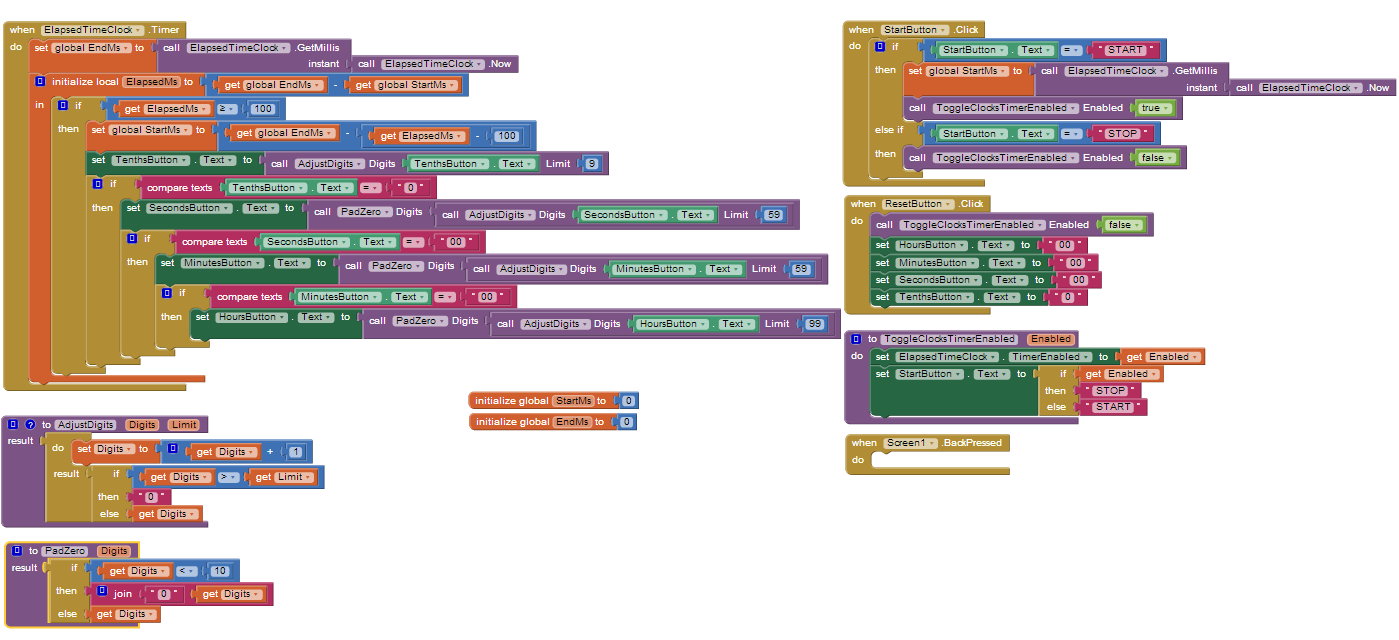
Instead I found that you can get accuracy to the tenth of a second by creating a clock with zero 0 Interval.
Then use the Clock getMillis block along with the Clock Now block to get a starting and ending time.
Calculate an elapsed time with end ms - start ms inside the Clock Timer block.
If this value is >= to 100 (1/10th second has elapsed) then the clock display is updated.
But the elapsed time may vary from exactly 100ms to 105ms as I have seen by experimentation with my tablet during development with the AI Companion app.
If it is over 100ms this value needs to be subtracted from the new start ms.
This is done with end ms - (elapsed ms - 100)
So if the elapsed time was 104 ms then the new start ms would be end ms - 4 ms.
This keeps the display on track with the actual elapsed time so the display does not lose time.
I have tested this over a 30 minute period and there was no perceptible variation from the system clock reading on my pc.
I cannot, however, guarantee that this will be accurate for much longer periods of time.
The stopwatch can measure time intervals from 00:00:00.0 to 99:59:59.9.
Adding 1/10 second to 99:59:59.9 rolls the clock over to 00:00:00.0
Perhaps someone will be able to simplify this without losing accuracy.

---
Scott
.
On Sunday, April 6, 2014 5:57:49 PM UTC-5, ioannapa...@gmail.com wrote:
Reply all
Reply to author
Forward
0 new messages