
How to send email from mit ai2?
1,898 views
Skip to first unread message

XXX
Feb 10, 2016, 10:29:22 AM2/10/16
to MIT App Inventor Forum
I wanted to set up a forgot password button which when clicked on
would ask for ur mob number and click on submit.. So is there a way that
I could extract the password for the corresponding mobile number and
send a mail from within MIT ai2, is it possible?? I did check https://puravidaapps.com/sendmail.php this website before posting this question, here are the few doubts i got after going through it..
1) How do we setup a php server for the php script?
2)Is the script configured bfr by mit or do we have to configure it?
1) How do we setup a php server for the php script?
2)Is the script configured bfr by mit or do we have to configure it?

Taifun
Feb 10, 2016, 10:58:28 AM2/10/16
to MIT App Inventor Forum
which means, you stored the mobile phone number, email and password in a fusiontable
user clicks a button "Forgot password", enters the mobile phone number and the app automatically sends an email to the stored email address together with the password?
yes, that's possible
this is your select statement to get the email and password
SELECT Email, Password FROM <tableid> WHERE Mobile = 'entered phone number in textbox'
you might be interested in the Gmail solution instead, which does not require a php server
 Gmail Interface
Taifun
XXX
Feb 11, 2016, 11:51:12 AM2/11/16
to mitappinv...@googlegroups.com
From where do we get the client id and ?? Is client secret a sort of verification from the dev end?? Also where do we find the access token?
Taifun
Feb 11, 2016, 12:47:11 PM2/11/16
to MIT App Inventor Forum
you will get the client id and client secret after registering your project in the Google Dev Console, see also the large green box on the bottom of that page https://puravidaapps.com/gmail.php
Taifun

XXX
Feb 13, 2016, 12:33:25 PM2/13/16
to MIT App Inventor Forum
I read one of the tutorials from https://eixerits.wordpress.com/2013/03/14/371/ and I've coded accordingly. From where do we get the APPENGINE_ADDRESS??
And if I put the apt URI will that block of code be able to send the mail to the specified email address?
And if I put the apt URI will that block of code be able to send the mail to the specified email address?

Taifun
Feb 13, 2016, 2:47:06 PM2/13/16
to MIT App Inventor Forum
I copied the relevant part for you from the tutorial
Create and deploy the TinyWebDB service as explained in the tutorial Creating a Custom TinyWebDB Service
and concerning your screenshot: below the SendQuery block there should not be any other block
everything you like to do after having sent a query to the table should be done in the FusiontabelCOntrol.GotTExt event
Taifun

Taifun
Feb 14, 2016, 2:46:09 PM2/14/16
to MIT App Inventor Forum
try my new simple solution, which uses IFTTT, see also my announcement here https://groups.google.com/d/msg/mitappinventortest/CxDnsr2Mzy0/5PyLt_FYEwAJ
Taifun
XXX
Feb 15, 2016, 12:31:31 AM2/15/16
to MIT App Inventor Forum
When I click on the submit button, I get a bad request error. Can't we use a join operation in order to get the value3 component??
Also I installed the ifttt.apk after entering my key value, it runs successfully and says successfully fired trigger. But when i check the mail for which the to address was specified, there's no email in my inbox..Why is that so??
Also I installed the ifttt.apk after entering my key value, it runs successfully and says successfully fired trigger. But when i check the mail for which the to address was specified, there's no email in my inbox..Why is that so??


XXX
Feb 15, 2016, 2:05:25 AM2/15/16
to mitappinv...@googlegroups.com
UPDATE: I have modified the blocks as shown in the figure now and it successfully fired the sendmail event. But if i click on the submit button again it shows me an error saying bad request. If i close the app again open and re-enter the email id it'll show fired sendemail event. Y does it happen so??
Also I'm still not able to receive the message the sent from the sendmail event.
EDIT : The trigger name was mistyped. It was sendmail and I had specified it as Sendmail in the blocks. Now I'm able to send and receive the mail, but it does not have the password content it it.
Also I'm still not able to receive the message the sent from the sendmail event.
EDIT : The trigger name was mistyped. It was sendmail and I had specified it as Sendmail in the blocks. Now I'm able to send and receive the mail, but it does not have the password content it it.


Taifun
Feb 15, 2016, 9:26:19 AM2/15/16
to MIT App Inventor Forum
great! congratulations! you worked hard and also found out, that the correct sequence must be
1. try to get the password
2. receive the password in the fusiontable controls got result event
3. send the email
a bracket pair represents a list, just use the select list item block to select the first item of that list
Taifun


XXX
Feb 15, 2016, 10:55:03 AM2/15/16
to MIT App Inventor Forum
No there's something wrong. It works one time and doesn't work some other time. It shows Bad request. And some other time it works fine. The code blocks are similar except that I've removed the mail sent block. Do you know why it's happening like that?
Taifun
Feb 15, 2016, 11:48:52 AM2/15/16
to MIT App Inventor Forum
unfortunately your sequence still is not correct
correct is
1. try to get the password
2. receive the password in the fusiontable controls got result event
3. send the email
what you are doing is
1. try to get the password
2. send the email
3. receive the password in the fusiontable controls got result event
Taifun


Taifun
Feb 15, 2016, 12:16:02 PM2/15/16
to mitappinv...@googlegroups.com
you have to find out, if the error occurs in the fusiontable control got result event or in the web.got text event
we already talked about how you can debug your blocks...
the first thing you should do is to display the result from the fusiontable in a label to check, if the query is correct, the result should be
Password
12345
also check, if the label textpwd is correct, this should be 12345
also use Do it to debug your Web.Url and your post text value...
Taifun

Taifun
Feb 15, 2016, 1:26:52 PM2/15/16
to mitappinv...@googlegroups.com
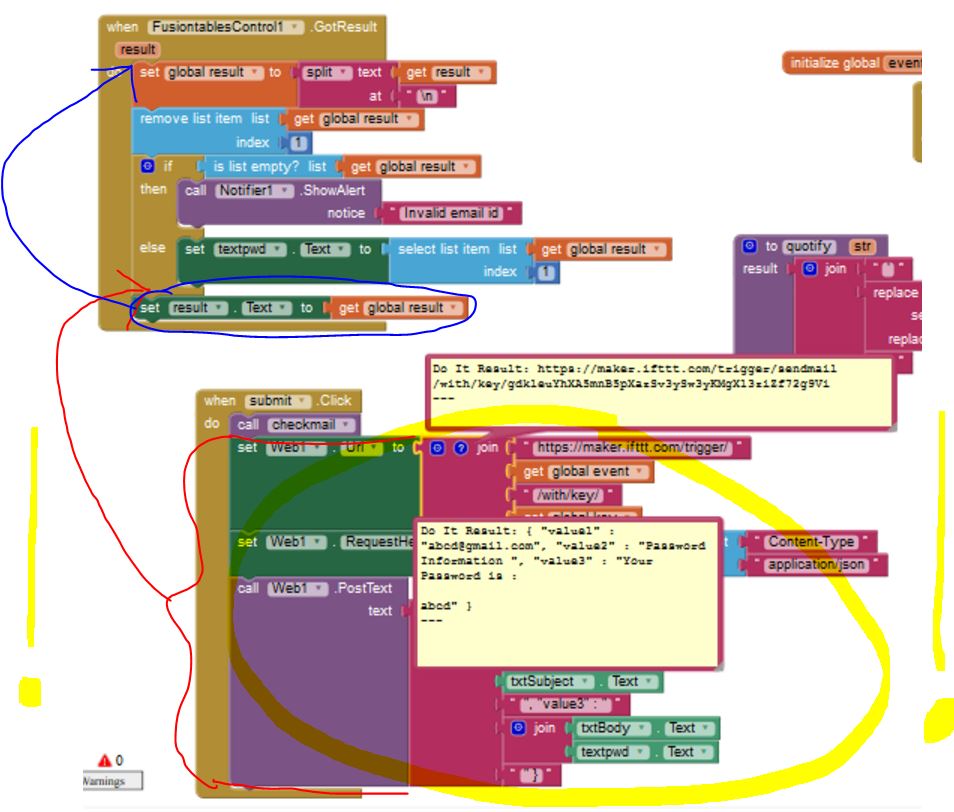
what's that? why don't you change the sequence as already suggested several times? you have a timing issue...
read again my previous answer
Taifun
XXX
Feb 15, 2016, 1:29:27 PM2/15/16
to MIT App Inventor Forum
My bad I've sent the wrong screen shot. I'll send the right one shortly.


Taifun
Feb 15, 2016, 3:03:31 PM2/15/16
to MIT App Inventor Forum
so it seems to be you get a reasonable result back from the fusiontable...
instead of using \n for new line you should use HTML tags, which is <br> for new line
what happens, if you use a valid email address instead of ab...@gmail.com?
try to set the values value1, value2, value3 to reasonable values, then try to send the email manually (just click Do it onto the PostText block)
Taifun
XXX
Feb 16, 2016, 10:28:49 AM2/16/16
to MIT App Inventor Forum
If I give <br> instead of \n then it throws me an error saying invalid email id, so i assume it is not going to work.
The txtBody has "Your password information is". Also suddenly the value retrieved by the fusion tables is also changed . Still it says bad request only..
The txtBody has "Your password information is". Also suddenly the value retrieved by the fusion tables is also changed . Still it says bad request only..


Taifun
Feb 16, 2016, 10:48:38 AM2/16/16
to MIT App Inventor Forum
you might want to step back and
1. get the simple email app running as described here https://groups.google.com/d/msg/mitappinventortest/CxDnsr2Mzy0/5PyLt_FYEwAJ
2. get the fusiontable example returning a password
and if these 2 tasks work separately, then put them together
also you should learn how to debug your blocks yourself, several tips about that you can find in this thread
Taifun
XXX
Feb 16, 2016, 10:52:33 AM2/16/16
to MIT App Inventor Forum
but what i don't understand is, I was successfully able to send the email with the same piece of code but in this order:
1. try to get the password
2. send the email
3. receive the password in the fusiontable controls got result event
now everything is messed up. Alright I'll look into it.
XXX
Feb 16, 2016, 1:45:44 PM2/16/16
to mitappinv...@googlegroups.com
Alright everything is working fine again. I encrypted the password using this tutorial http://puravidaapps.com/encrypt.php and now if i send the pwd information it is blank since d pwd is encrypted in the fusion table. How do i decrypt the pwd so that it is understandable by the app inventor and thus seen in d frgt pwd mail.
I also coded 2 more fusion tables send query which would check if the email and mobile already exists or not and show an appropriate error msg, but that block of code is not doing anything.. Kindly lemme know if there's anything that I've to modify in it.
P.S : If I should have created a new thread sorry about it, let me know I'll create a new thread.
I also coded 2 more fusion tables send query which would check if the email and mobile already exists or not and show an appropriate error msg, but that block of code is not doing anything.. Kindly lemme know if there's anything that I've to modify in it.
P.S : If I should have created a new thread sorry about it, let me know I'll create a new thread.


Taifun
Feb 16, 2016, 2:29:13 PM2/16/16
to MIT App Inventor Forum
you might want to tell us, how you fixed your problem...
I don't know what you are trying to tell us with your blocks screenshot...
my suggestion for you is to keep it simple and refrain from using password hashes...
but if you like to follow that path, then you first should understand, how this is working: you store hash values in the table and after the user enters his password, it will be converted into the hash value, then compare the converted hash value with the hash value stored in the table, a hash value is a one way conversion, it is not possible to get the password back from the stored hash value
a probably easier method is to use my Tools Extension https://puravidaapps.com/tools.php, which offers a HmacSha1 and HmacSha256 block...
The App Inventor Extensions are currently in testing. See the announcement for more information about how to use an App Inventor Extension.
Taifun
XXX
Feb 17, 2016, 11:57:40 AM2/17/16
to MIT App Inventor Forum
The order in which I had coded was only right i.e
1. try to get the password
2. send the email
3. receive the password in the fusiontable controls got result event
but the problem occurred when I attached another join operation stating send mail once I removed it, it was working fine. Also I refreshed the ifttt maker key and forgot to update it so that was also one of the reason it was showing bad request error. Once I corrected them it is working fine(tested almost 15-20 times).
Now coming to the password encryption, how do I use those functions ?
Now coming to the password encryption, how do I use those functions ?

Taifun
Feb 17, 2016, 1:04:15 PM2/17/16
to MIT App Inventor Forum
The order in which I had coded was only right i.e
1. try to get the password
2. send the email
3. receive the password in the fusiontable controls got result event
ok, this is actually very funny: at the beginning you do not have the password, then you try to get it and before having received the password you already are sending it by email...
if this works for you, this is fine for me...
Now coming to the password encryption, how do I use those functions ?
the message is the password of the user.The secret key is a unique piece of information that is used to compute the HMAC
for more inforamation see https://en.wikipedia.org/wiki/Hash-based_message_authentication_code
Taifun
XXX
Feb 18, 2016, 10:04:53 AM2/18/16
to MIT App Inventor Forum
Ok I understood how it basically works so now do we have to use it as a procedure or directly use it?
XXX
Feb 18, 2016, 10:09:23 AM2/18/16
to MIT App Inventor Forum
Also is the key generated or do we have to specify it?
Taifun
Feb 18, 2016, 11:04:18 AM2/18/16
to MIT App Inventor Forum
do we have to use it as a procedure or directly use it?
use it as you like to use it
you might want to show us how you used it in the end...
Also is the key generated or do we have to specify it?
this is a key you have to specify
Taifun

Taifun
Feb 18, 2016, 11:09:54 AM2/18/16
to MIT App Inventor Forum
or the pwd shld be there next to = ??
sorry, I do not understand your question...
your password hash value looks reasonable
Taifun
XXX
Feb 18, 2016, 11:45:43 AM2/18/16
to mitappinv...@googlegroups.com
While retrieving the password(pwd) how do we decrypt it?
Here's the ss of how I've used it, plz let me know if its right. Also I wanted to check if particular user's mobile number and email exists in the fusion table for which I added 2 more fusion tables and sent query to it.
Edit: It is fusiontable control2.query and fusiontable control3.query
Here's the ss of how I've used it, plz let me know if its right. Also I wanted to check if particular user's mobile number and email exists in the fusion table for which I added 2 more fusion tables and sent query to it.
Edit: It is fusiontable control2.query and fusiontable control3.query


Taifun
Feb 18, 2016, 12:23:18 PM2/18/16
to MIT App Inventor Forum
While retrieving the password(pwd) how do we decrypt it?
the password never will be decrypted, it seems to be, you did not understand how this works...
I already explained it above and for your convenience, I repeat it here again:
you store hash values in the table and after the user enters his password, it will be converted into the hash value, then compare the converted hash value with the hash value stored in the table, a hash value is a one way conversion, it is not possible to get the password back from the stored hash value
Taifun
XXX
Feb 18, 2016, 12:27:17 PM2/18/16
to MIT App Inventor Forum
So I suppose there's no way that the password is encrypted in the table , and if someone forgets their password and requests for their password that it'll be not be possible within mit app inventor to decrypt the password stored in Fusion table and send it as a mail to the user . Right??
Taifun
Feb 18, 2016, 12:36:39 PM2/18/16
to MIT App Inventor Forum
this is correct
but you could create a new random password, generate its hash value, update that in the table and send the new password to the user
and the better approach would be, if the user is able to change the password himself/herself
Taifun
XXX
Feb 18, 2016, 1:08:29 PM2/18/16
to MIT App Inventor Forum
So u mean to say if X clicks on forgot password I'll be sending a link (assume) which will direct the user to a website where they can reset the password. And the password has to be updated in my table right?
If yes then it would require me to have a website to which the link would be redirecting me to.
If yes then it would require me to have a website to which the link would be redirecting me to.
I also thought of other way of authenticating would be through text msg since mobile number is my key value.
Is there a way to send a random 6 digit number as verification code to the specified number and then within the app I can provide a screen to enter new password?
This way I'll not be in need of a website.
Please let me know which would be an appropriate solution.
Taifun
Feb 18, 2016, 3:08:52 PM2/18/16
to MIT App Inventor Forum
my suggestion for you is to keep it simple and refrain from using password hashes...
So u mean to say if X clicks on forgot password I'll be sending a link (assume) which will direct the user to a website where they can reset the password. And the password has to be updated in my table right?
no
X clicks on "forgot password", then your app creates a new random password, generates its hash value, updates that in the table and sends the new created random password to the user
Is there a way to send a random 6 digit number as verification code to the specified number and then within the app I can provide a screen to enter new password?
sure, why not...
Taifun
XXX
Feb 18, 2016, 5:30:05 PM2/18/16
to MIT App Inventor Forum
Can you please give me the link of the mobile verification tutorial?
Taifun
Feb 18, 2016, 7:28:17 PM2/18/16
to MIT App Inventor Forum
Can you please give me the link of the mobile verification tutorial?
sorry, I don't think there is a tutorial like that
but I can give you these links:
A very good way to learn App Inventor is to read the free Inventor's Manual here in the AI2 free online eBook http://www.appinventor.org/book2 ... the links are at the bottom of the Web page. The book 'teaches' users how to program with AI2 blocks.
There is a free programming course here http://www.appinventor.org/content/CourseInABox/Intro and the aia files for the projects in the book are here: http://www.appinventor.org/bookFiles
How to do a lot of basic things with App Inventor are described here: http://www.appinventor.org/content/howDoYou/eventHandling .
Also do the tutorials http://appinventor.mit.edu/explore/ai2/tutorials.html to learn the basics of App Inventor, then try something and follow the
Top 5 Tips: How to learn  App Inventor
App InventorYou will not find a tutorial, which does exactly what you are looking for. But doing the tutorials (not only reading a little bit) help you to understand, how things are working. This is important and this is the first step to do.
Taifun
Trying to push the limits of App Inventor! Snippets and Tutorials from Pura Vida Apps by  Taifun.
Reply all
Reply to author
Forward
0 new messages