
TRIMMING TEXT AT A CHARACTER
1,081 views
Skip to first unread message

Jason McKenna
Jul 27, 2014, 1:01:35 AM7/27/14
to mitappinv...@googlegroups.com
Hello,
I am trying to store abbreviated versions of the choices in my list pickers to be stored in the tinydb and to be sent to a fusion table.
Example: "621=Shop" to "621", "005983=Ashley Valley" to "005983", "130023=Blawknox 5510" to "130023".
I started using the "Segment text: start: length" block but unfortunately the desired codes are not all the same length in 2 of my lists.
All of my lists contain an "=" sign after the desired code. I can split the string, but I need to delete everything from the "=" sign to the end before storing the code in the tinydb.
Is there a way to do this?
Thanks.

Stephen Zipprich
Jul 27, 2014, 2:13:31 AM7/27/14
to
This would do it
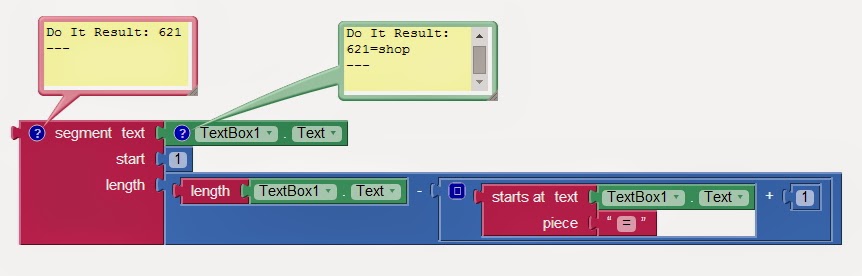
Edit:
If I were you, I might consider putting this into a procedure with result like the following to make your blocks less cumbersome if you are doing this in multiple spots in your app
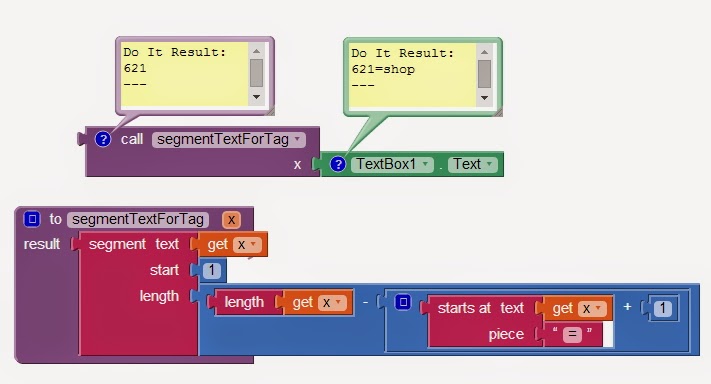
Jason McKenna
Jul 27, 2014, 2:53:01 PM7/27/14
to mitappinv...@googlegroups.com
Thank you. That worked very well.
Jason McKenna
Jul 27, 2014, 7:05:31 PM7/27/14
to mitappinv...@googlegroups.com
It appears that I may have spoken too soon. I am unable to get consistent results.
Example: 621=Shop result 612, 666=Training result 666=Tra, 006154=Rap System result 006154=R, 005983=Ashley Valley result 005983=Ashl.
I have made a few changes since getting these results. 1. I have removed any spaces in the text strings following the code, 2. I have substituted the "=" sign as the "piece" for a space.
I now get 005983 Ashl from 005983 Ashleyvalley.


Taifun
Jul 27, 2014, 8:37:35 PM7/27/14
to mitappinv...@googlegroups.com
use Do it to debug your code as Stephen showed it to you
Taifun
Stephen Zipprich
Jul 27, 2014, 11:08:28 PM7/27/14
to mitappinv...@googlegroups.com
As Taifun says, use the Do it on your blocks to debug them (right click on a block and choose Do it - must be connected to emulator or phone).
It looks like you're segmenting the text twice. In your first procedure, I'm not sure why you have the 2 in there for the start position...I thought your listpicker elements were all of different lengths and inconsistent values? Also, make sure there really is a space in that text block for the start position...if there's not AI will probably interpret that either as an error (or it just might not work right) or before the actual word.
Jason McKenna
Jul 28, 2014, 12:21:43 AM7/28/14
to mitappinv...@googlegroups.com
Stephen and Taifun,
First of all, thanks for your help.
Here is what I found. Stephen your procedure was counting to the "=" sign and then adding one, then taking that number from the entire string. that is why 621=shop worked. To look at it another way 123=5679. If the "=" sign is at position 4, the the result would subtract 5 from 9 giving you 123. Or given 12=456789 the "=" sign is at position 3, the result would subtract 4 from 9 giving you 12=45.
The way that I got it to work was to use the value of the starting index of the "=" sign, the subtracting 1 to determine the resulting string length.
I really do appreciate all your help, and especially letting me find the solution on my own. "Teach a man to fish" and all that.

Stephen Zipprich
Jul 28, 2014, 12:36:20 AM7/28/14
to mitappinv...@googlegroups.com
Jason, thanks for showing us your solution. I didn't test that example on more than the one string in the textbox, so I didn't discover that I had set the blocks up incorrectly. Nice catch. We were both taught how to catch the proverbial fish today. :)
Reply all
Reply to author
Forward
0 new messages