
Export List to CSV FIle
1,455 views
Skip to first unread message

Muhaasibah
Dec 1, 2016, 7:30:54 AM12/1/16
to MIT App Inventor Forum
Hi, I am new to App Inventor, trying to export list of form fields to .csv file. I have tried the ffg code, but the result returns the same record for both

I have also tried, saving to file after saving the data, and result is as follows. I require it to be a table with rows. Could someone please assist, or provide a similar example. Thanks


Taifun
Dec 1, 2016, 9:28:11 AM12/1/16
to mitappinv...@googlegroups.com
what about using a list of lists to store your data and only one tag to store the complete list of lists in TinyDB?
the list of lists you can convert very easily into a csv table using the list to csv table block...
Taifun
Trying to push the limits of App Inventor!
Snippets,
Tutorials and
Extensions from
Pura Vida Apps by

Muhaasibah
Dec 1, 2016, 1:21:29 PM12/1/16
to MIT App Inventor Forum
Do you have an example of this. Thanks

Hossein Amerkashi
Dec 1, 2016, 1:45:37 PM12/1/16
to MIT App Inventor Forum
@Muhaasibah,
The data that you have saved into TinyDB, are they List or CSV?
The data that you have (1,12345,200,Yellow,Yes), is this what is stored in TinyDB? Is it list or csv

Muhaasibah
Dec 1, 2016, 1:55:01 PM12/1/16
to MIT App Inventor Forum
@Hossein.
The 2nd screenshot shows the Save part. The example I have is a Form with fields the example response is = [1,12345,200,Yellow,Yes]. I save it to a list, with each field as an item.
The end result that I wish to achieve is to Export the Records to .csv
The example in csv should be:
Row 1: [1,12345,200,Yellow,Yes]
Row 2: [2, 766543, 400, Black, Yes]
etc.
Hossein Amerkashi
Dec 1, 2016, 1:59:50 PM12/1/16
to MIT App Inventor Forum
Muhaasibah,
For writing to TinyDB, why do you convert to list and then later wanting to convert list to csv? Why not initially save as csv into tinydb?
Muhaasibah
Dec 1, 2016, 2:31:47 PM12/1/16
to MIT App Inventor Forum
Thanks I will try that approach.
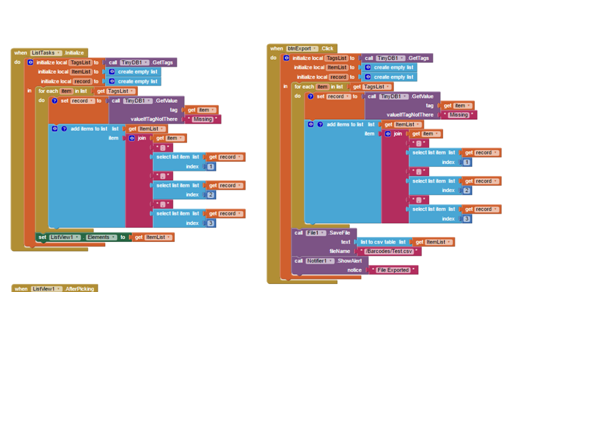
However I have played with E.Mitchells Code and added File Export List to CSV and it works (Attached screenshot).
Reply all
Reply to author
Forward
0 new messages