
Append to file or save file don't actually save the file.
686 views
Skip to first unread message

Roberto Rennó Sinohara da Silva Sousa
Dec 17, 2014, 6:25:47 PM12/17/14
to mitappinv...@googlegroups.com
Hello guys...
I'm having this problem at running my app on an Xperia Z2. The code doesn't actually create any file neither in the storage nor the sd card. I´ve tried in boths. I have also created a second, simpler, app with a code I´ve found on the net, but it didn't work too.
Does anyone have an idea of what I could be doing wrong?
Tks a lot.
Roberto Sinohara

Enis
Dec 17, 2014, 6:35:27 PM12/17/14
to
First thing I see is that there's NO csv file... You're using the wrong blocks there...
A CSV file is a COMMA SEPARATED VALUE file. That means that a line, for example, would be "A,B,C,D,1,2,3,4" If there were several lines of text, each line is treated as a row...
A,B,C,D,1,2,3,4
E,F,G,H,5,6,7,8
That's two lines of comma separated values.
You're making lists of lists so what you're doing there doesn't makes sense.
What do you actually want saved to the text file???
A CSV file is a COMMA SEPARATED VALUE file. That means that a line, for example, would be "A,B,C,D,1,2,3,4" If there were several lines of text, each line is treated as a row...
A,B,C,D,1,2,3,4
E,F,G,H,5,6,7,8
That's two lines of comma separated values.
You're making lists of lists so what you're doing there doesn't makes sense.
What do you actually want saved to the text file???
____________________________________________________________________

For our App Inventor Tips, visit TwoDogApps.com by clicking here!
Roberto Rennó Sinohara da Silva Sousa
Dec 17, 2014, 6:47:00 PM12/17/14
to mitappinv...@googlegroups.com
Ok Enis, Thank you for helping me. My real app need to save a table of 3 dinamic lists that I suppose will have abou 30 items each (all the 3 lists have the same size). That´s why I was trying to save the file in that way.
I have compiled the app and installed it to my phone, but this saving to file part is simply not creating the file nor prompting any messages. So I´m a little bit lost there. The table should be something like that:
date 1 number 1.1 number 1.2
date 2 number 2.1 number 2.2
date 3 number 3.1 number 3.2
date 4 number 4.1 number 4.2
date 5 number 5.1 number 5.2
date n number n.1 number n.2
I have to save it to a file so it could be shared to my computer. I thought I could open the csv file in excel and perhaps have this structure preserved.
Thanks for the help again.
Message has been deleted


Taifun
Dec 17, 2014, 7:04:17 PM12/17/14
to mitappinv...@googlegroups.com
see also the documentation http://ai2.appinventor.mit.edu/reference/components/storage.html#File
SaveFile(text text, text fileName)- Saves text to a file. If the filename begins with a slash (/) the file is written to the sdcard. For example writing to /myFile.txt will write the file to /sdcard/myFile.txt. If the filename does not start with a slash, it will be written in the programs private data directory where it will not be accessible to other programs on the phone. There is a special exception for the AI Companion where these files are written to /sdcard/AppInventor/data to facilitate debugging. Note that this block will overwrite a file if it already exists. If you want to add content to a file use the append block.
- try to save a simple text like "Hola" first before saving a complex list...
- Taifun
Trying to push the limits of App Inventor! Snippets and Tutorials from Pura Vida Apps by
 Taifun.
Enis
Dec 17, 2014, 7:08:34 PM12/17/14
to
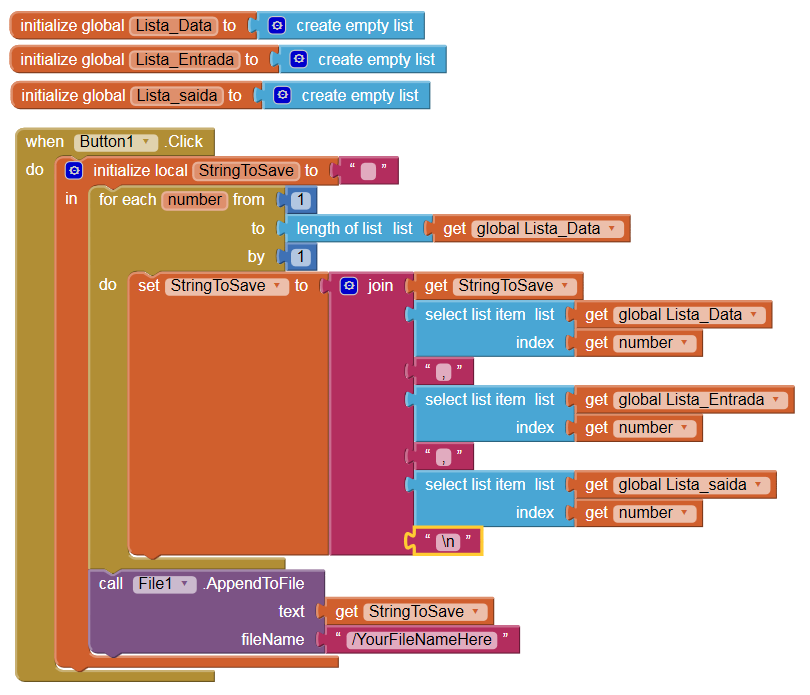
OK... so you have these three and you want to save them so you can read
them back later... Use a loop to create the string and save it to the
file... of course, you have to adapt this to your file name and you have to have the lists populated correctly:

Roberto Rennó Sinohara da Silva Sousa
Dec 17, 2014, 7:09:05 PM12/17/14
to mitappinv...@googlegroups.com
OK. I´ve tried that. By putting the slash, I got the file saved. But I could find it, this time, in the storage root. The problem now is for sending the file since the "share file with message" is returning a message error that the file can't be found.
I know it shouldn't be hard to fix, but i'm having a hard time with this one.
tks
Roberto Rennó Sinohara da Silva Sousa
Dec 17, 2014, 7:13:21 PM12/17/14
to mitappinv...@googlegroups.com
It looks much more well done then what I had, Enis. Trying it right now.
Do you have any tips for the sharing part? Now that I could find the file in the storage root, I don't know how to make the share message with file find it since it is not in the app inventor folder.
Tks
Enis
Dec 17, 2014, 7:20:17 PM12/17/14
to
OOPS... I made a small mistake... forgot the commas! This saves a CSV file to the text file. When you read it back in, you have a CSV file to read from. See below:
Reply all
Reply to author
Forward
0 new messages