
Receive Message App inventor
1,002 views
Skip to first unread message

kavi
Jul 17, 2015, 3:10:03 AM7/17/15
to mitappinv...@googlegroups.com
Hai,
I am useing app inventor 2, i am create SMS app now , message receive and send is nicely work.But i need help.
Help:-
The "Received message" (more than 10 lines) set to in Text Box correctly.
But i need, All text line From text box (Received Message) To set "Separate lable box"
For Example : (Received multi line message )
Apple - some text or numbers
Orange - some text or numbers
Banana - some text or numbers
I need the message display (Ans) Formate :
Apple - some text or numbers to set in "lable box 1"
Orange - some text or numbers to set in "lable box 2"
Banana - some text or numbers to set in "lable box 3"
Please help me, How is possible and How i am get message text individual line to set in lable box.
i am very interest develop apps in App inventor,
please please please help to me,
Thank you,
kavi
Jul 17, 2015, 6:38:15 AM7/17/15
to mitappinv...@googlegroups.com
Any one help pls.

Ghica
Jul 17, 2015, 10:36:53 AM7/17/15
to mitappinv...@googlegroups.com
Split the text at line-end characters and put into a list. Then, make a list of your labels, go through your lines and set the label text one-by-one.
Do some tutorials first (there are plenty of posts explaining how), then post some blocks if you are still stuck.
Cheers, Ghica.
Do some tutorials first (there are plenty of posts explaining how), then post some blocks if you are still stuck.
Cheers, Ghica.

Abraham Getzler
Jul 17, 2015, 10:57:10 AM7/17/15
to mitappinv...@googlegroups.com
Also, investigate the ListView component.
It looks like a stack of labels,
can handle any number of items,
and you don't have to activate its Select features
if you don't need them.
ABG
kavi
Jul 18, 2015, 12:29:43 AM7/18/15
to mitappinv...@googlegroups.com
can you send some examble block please,
kavi
Jul 18, 2015, 12:55:26 AM7/18/15
to mitappinv...@googlegroups.com
i am always check list view, but it not display individual line in individual list . two line display in one item.
examble:
list view ans to display : { Apple - some text or numbers
Orange - some text or numbers}------ first list
Banana - some text or numbers ------- second list
tank you
kavi
Jul 18, 2015, 2:59:05 AM7/18/15
to mitappinv...@googlegroups.com
I have no idea, so i send screen short, please see and get any idea to help me.
The screen short is my test app screen. Its content 11 label box and one Text box. The message received to set in Text box then the message to split line by line to set Label box.
Received message:
Title Name(some text)
Motor- Stoppped
R- 0V,0A
Y-0V,0A
Moto1- Any text
Moto2- Any text
.
.
(extra)
display the messsage to split this formate:
Title Name - label box1 -> Ans; Title Name
Motor- Stoppped -label box2 -> Ans: Stopped
R- 0V,0A -label box3 -> Ans: 0V,0A
Y-0V,0A -label box4 -> Ans: 0V,0A
Moto1- Any text -label box5 -> Ans: Any text
Moto2- Any text -label box6 -> Ans: Any text
.
.
(extra)
11 line in text box
Every received message default value Title, Motor-, R-, Y-, Moto1-, Moto2- (extr) . We need after ( - ) Any text or number to set individual label box..
(Note: Any text come after ( - ) no default value after (-) )
How i do this , please any example block or source file and give me solution,.
Sorry for my english
thank you.
kavi
Jul 18, 2015, 3:05:52 AM7/18/15
to mitappinv...@googlegroups.com
Thanks for "Ghica" reply.
But how find line- end characters?
any example block send me.
sorry my English
thank you.
Message has been deleted

Taifun
Jul 18, 2015, 10:14:43 AM7/18/15
to mitappinv...@googlegroups.com
the end of line character is \n
just use the split block and split at \n
It would really help if you provided a screenshot of your relevant
blocks, so we can see what you are trying to do, and where the problem
may be.
Taifun
Trying to push the limits of App Inventor!
Snippets and
Tutorials from
Pura Vida Apps by
 Taifun.
kavi
Jul 19, 2015, 12:47:45 AM7/19/15
to mitappinv...@googlegroups.com
Hai Taifun thanks,
but i am not understand theoretically any one, so please any example or block for split /n.
thank you.
Ghica
Jul 19, 2015, 5:10:47 AM7/19/15
to mitappinv...@googlegroups.com
Kavi,
Here is an example. There is a text file, with the text in you example:
Apple - some text or numbers
Orange - some text or numbers
Banana - some text or numbers
Threre is a textbox, that shows the text recieved, when you read the file, then the file is split into a list and each line is then put into a label.
These are the blocks:

Notice the use of min (length of list of lines, length of list of labels). This is to make sure that if you have more lines than labels, or more labels than lines, you will not get errors.
Now, promise me that you will do a tutorial which teaches how to use lists.
Cheers, Ghica.
Taifun
Jul 19, 2015, 9:51:45 AM7/19/15
to mitappinv...@googlegroups.com
please any example or block for split /n.
it is split at \n (backslash n)
btw. don't hesitate to do a search in the forum like this https://groups.google.com/forum/#!searchin/mitappinventortest/split$20%5Cn
Taifun
Advice: Before posting, it's a good idea to search in this forum. Many others have likely run into problems similar to yours. How to search see screenshot.
 App Inventor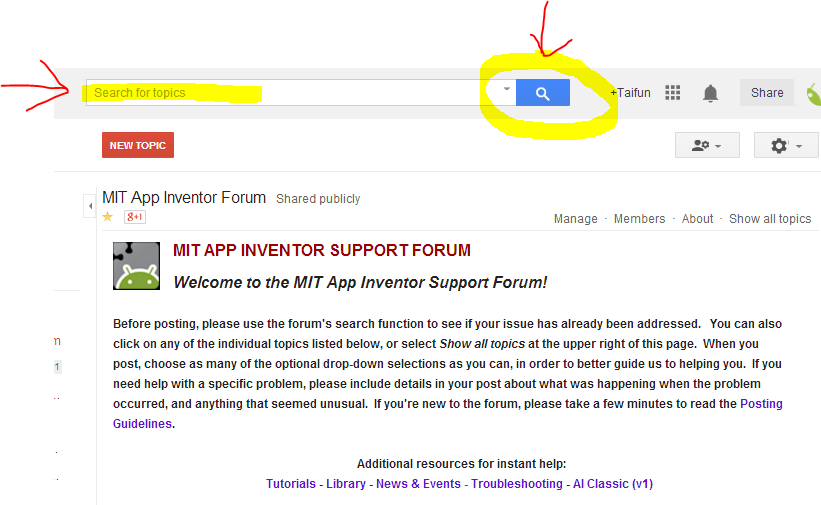

kavi
Jul 20, 2015, 7:42:03 AM7/20/15
to mitappinv...@googlegroups.com
Ghica, thanks to you. Your sample program Its perfectly use my APP.
A split block is very helpful and useful for my app. thank you so much . my doubt and problem is cleared.
Thank you Ghica,
Cheers,
Reply all
Reply to author
Forward
0 new messages