
Avoiding collision between a Ball and a Transparency Background of a Sprite.
37 views
Skip to first unread message

Shuan Wallashi
Aug 10, 2015, 4:43:04 AM8/10/15
to mitappinv...@googlegroups.com
Is there meanwhile a Solution how to avoid this? I have a Ball and a Sprite. The sprite has a pic of another Ball with a number inside and the edges are Transparency.
Its actually the same issue like in this Post Ball + IMAGE COLLISION still wrong! ...(with gif/png filse and empty background).
I was not sure if I could ask my question there since its written "This topic is no longer open for new replies due to inactivity. If you'd like to post a message, please search for a more recent topic above or post a new question."
I want the ball only stops if it hits the other Ball inside the Image sprite. But it should stop if it only hit the transparency part of the imagine sprite. If there is still no new Solution then I would really apreaciate it if someone could explain to me how to use the Get Pixel function. I know that one of you have done a great game names FlappyBat or something like this. In this game he used the GetPixel function to make collision inside the caves with the roof etc.
Is it somehow possible to load a pic inside a Ball. Since my pic looks like a ball, it would be better to use the Ball instead of Sprite...
Edit: I also found this post from me one year ago: Bouncing and Colliding doesn't work always and sometimes it looks weird
I think the GetPixel function wouldnt work for me since the Sprites are moving around and for the GetPixel Function you need a fixed X and Y value...

Abraham Getzler
Aug 10, 2015, 12:27:34 PM8/10/15
to MIT App Inventor Forum
You could use two balls, and make a small sprite track the second ball under control of a fast clock.
To make the small sprite appear on top of the ball, give it a higher z value.
If you want ball on ball collision, see this doc ...
ABG
Shuan Wallashi
Aug 11, 2015, 3:02:20 AM8/11/15
to MIT App Inventor Forum
Hmm that is an amazing idea. Thank you. Either you gave me the Solution or in case I misunderstood you then at least you gave me a great idea.
I will put a Ball under the Sprite. The Ball should have the same size like the picture of a ball of the Sprite. So whenever my Ball hits the Ball under the Sprite than something should happen.
Is the radius of the Ball measured in Pixel?
Shuan Wallashi
Aug 11, 2015, 3:33:34 AM8/11/15
to MIT App Inventor Forum
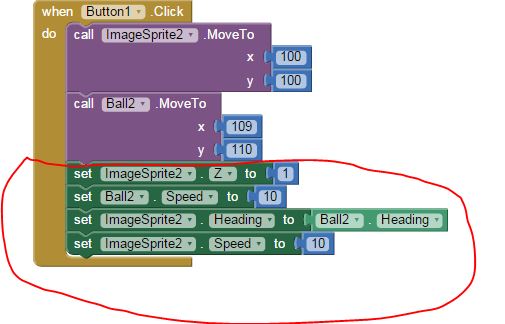
I did it this way. Not really brilliant but at least its the only way to deal with this problem.
Abraham Getzler
Aug 11, 2015, 11:42:48 AM8/11/15
to MIT App Inventor Forum
The original idea came from Scott Ferguson's Developer Library.
I prefer to set my Ball radius as a set fraction of Canvas size,
to allow for different device sizes and densities and for the upcoming
graphics earthquake.
Your implementation will work until the Ball hits something.
Use Clock-based tracking if that's a problem.
ABG
I prefer to set my Ball radius as a set fraction of Canvas size,
to allow for different device sizes and densities and for the upcoming
graphics earthquake.
Your implementation will work until the Ball hits something.
Use Clock-based tracking if that's a problem.
ABG
Reply all
Reply to author
Forward
0 new messages