
Bluetooth Error 507
332 views
Skip to first unread message

1446406
Apr 25, 2019, 8:26:01 AM4/25/19
to MIT App Inventor Forum
I created an app that connects to BlueTooth then detects whether or not the device is still connected, and gives a signal if it isn't. I have been repeatedly testing it, but I can't get the app itself to connect to Bluetooth. Using the default phone settings I can connect to BlueTooth, but the app itself won't search for and connect to devices on it's own. It only displays devices that are already paired, and then it still can't connect to them.
Here is my code for the app.


Chris Ward
Apr 25, 2019, 8:49:13 AM4/25/19
to MIT App Inventor Forum
Hi 1446406
Got your code a bit twisted........ in the After Picking Block, delete everything after "Set Clock 1 Timer Enabled to true".
In Clock 1 Timer, delete "If Connect Timer Count = 1 Then".
Why are you playing music in the background? Isn't that an unnecessary complication/use of memory/App Size issue?
Note also that, whilst Bluetooth Classic can List devices found, it can only connect to them if they use the same Bluetooth. See my website about Bluetooth, note the different Bluetooth versions (BLE exchanges data in an entirely different way) in the chart, and read about the other potential gotchas. The devices in the list have not been "paired", they have simply been "found".
1446406
Apr 25, 2019, 9:51:07 AM4/25/19
to MIT App Inventor Forum
The reason I have the ConnectTimerCount set to one is so that the phone doesn't send the disconnect signal if the BlueTooth device was never connected. I took it out and tried to use the app and now it just non-stop vibrates (what I was preventing). Also I have tried using BLE but after scanning for a while I couldn't find my device.
Chris Ward
Apr 25, 2019, 10:27:31 AM4/25/19
to MIT App Inventor Forum
Hi 1446406
The ConnectTimerCount was being set after the Timer was fired..... If the device is not connected, you want to know that, right? To prevent a non-stop notice, the Timer should disable itself.
Look what's wrong:

Concerning the versions of Bluetooth, you need to read-up as I suggested before. You say some of the devices cannot be connected to? The very first thing you need to know is - what bluetooth version does each device use? My chart will tell you if that version is compatible with the App, notwithstanding the version of Bluetooth your phone has itself.
For future reference, please use App Inventor's built-in image capture for the Blocks, so we can see them more clearly:
https://www.professorcad.co.uk/appinventortips#TipsBlocks How to create an image of your Blocks and add it to your Forum Post
1446406
Apr 25, 2019, 11:20:54 AM4/25/19
to MIT App Inventor Forum
The earbuds I tried to connect are Version 3 BR BlueTooth so they should be able to connect. I also created another app that uses BLE instead of the classic Bluetooth, and with this app I can scan available BlueTooth devices. When I press scan a lot of adresses or names pop up in a format that I don't recognize, Currently I am in school so these are probably other computers, but none of the names matched the format for my computer. The earbuds themselves aren't showing on the scan list, so that is also a problem, unless it is and I just can't read what it is saying.
.png?part=0.1&view=1)
1446406
Apr 26, 2019, 8:34:03 AM4/26/19
to MIT App Inventor Forum
bump

Ghica
Apr 26, 2019, 10:04:05 AM4/26/19
to MIT App Inventor Forum
If your earbuds use BT 3, then you must use the BluetoothClient component. You will not be able to use BLE, because its protocols are very different.
Cheers, Ghica.
1446406
Apr 26, 2019, 10:14:16 AM4/26/19
to MIT App Inventor Forum
But with the app I made prior I used the Bluetooth Client and it kept giving me the error 507 message
Here is the code for the BlueTooth Client app.
.png?part=0.1&view=1)
Chris Ward
Apr 26, 2019, 11:22:22 AM4/26/19
to MIT App Inventor Forum
Hi 1446406
With those corrections, your App will at least do it's best to connect. How often does Clock 1 Timer fire? You could speed that up and halt it after a duration of, say, 10 seconds, instead of using the Counter.
You can also experiment with the proximity of the phone - if too far away, or too near, the radio signal will not be optimum.
Another question - what phone are you using? Make/Model/Bluetooth Version. Have you got a different phone you could try?
1446406
Apr 28, 2019, 3:47:12 PM4/28/19
to MIT App Inventor Forum
What is the optimal distance for connecting to BlueTooth?
1446406
Apr 28, 2019, 3:56:59 PM4/28/19
to MIT App Inventor Forum
I tried what you said even using a different device and i still get error 507?
This is just never going to work is it
1446406
Apr 28, 2019, 4:07:18 PM4/28/19
to MIT App Inventor Forum
Also how would I add a 10 second delay?
1446406
Apr 28, 2019, 4:22:52 PM4/28/19
to MIT App Inventor Forum
Just to clarify, I am not connecting to an arduino or another phone that is running a server, I am trying to connect to a set of wireless bluetooth headphones, is MIT App Inventor capable of this?
Ghica
Apr 28, 2019, 4:43:11 PM4/28/19
to MIT App Inventor Forum
The problem is not that app Inventor would not be able to connect, but the headphone being able to be connected.
Did you investigate what the headphone expects as messages? Does it have an API you can use?
Without knowledge about the protocol needed to communicate with the headphone, there is nothing you can do. It would be like talking Chinese to someone who only understands English.
Cheers, Ghica.
Did you investigate what the headphone expects as messages? Does it have an API you can use?
Without knowledge about the protocol needed to communicate with the headphone, there is nothing you can do. It would be like talking Chinese to someone who only understands English.
Cheers, Ghica.
1446406
Apr 28, 2019, 4:49:19 PM4/28/19
to MIT App Inventor Forum
Are there Bluetooth headphones on the market that have already been used in conjunction with app inventor?
Chris Ward
Apr 28, 2019, 5:16:06 PM4/28/19
to MIT App Inventor Forum
Hi
There might well be headphones already in use with an App Inventor App but I do not know.
Do you have the manufacturer's name/headphones model name/number for your headphones?
With regards to optimal Bluetooth distance, that is the type of information we would expect the headphones manufacturer to provide.
1446406
Apr 28, 2019, 10:08:04 PM4/28/19
to MIT App Inventor Forum
they are the GEMS wireless earbuds
As for their specifications I honestly haven't been able to find anything online
Chris Ward
Apr 29, 2019, 5:21:18 AM4/29/19
to MIT App Inventor Forum
Seem to be a few different types by GEM is it these ones:

Can you post a link to yours?
1446406
Apr 29, 2019, 6:39:02 AM4/29/19
to MIT App Inventor Forum
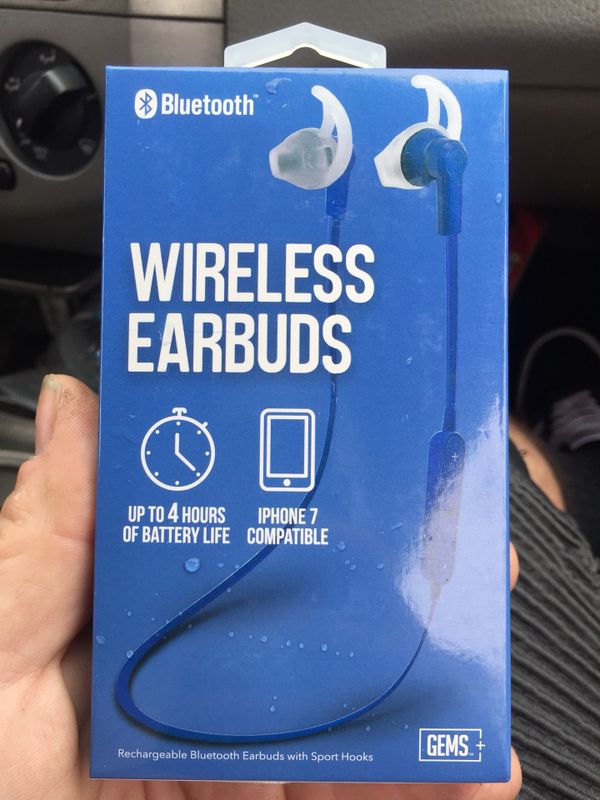
1446406
Apr 29, 2019, 6:42:46 AM4/29/19
to MIT App Inventor Forum
https://fccid.io/2AGR43260B/User-Manual/user-manual-3246196
I have found the specifications online :)
Chris Ward
Apr 29, 2019, 12:01:32 PM4/29/19
to MIT App Inventor Forum
Hi
That is good :)
Their instructions:
BLUETOOTH OPERATION
1. Please ensure that the Bluetooth function has been turned
on in the settings of your Bluetooth enabled device.
2. Turn the earbuds on by pressing the power button for 4
seconds. The indicator light will flash to detect Bluetooth
enabled devices near you and will enter pairing mode.
When pairing, remain within 3 feet of the earbuds. The
indicator light will go off if no Bluetooth devices are detected
within 5 minutes.
3. “GEMLINE EB” will appear on the Bluetooth device list,
select “GEMLINE EB” to establish pairing. If instructed to
enter a PIN code, please enter ‘0000’.
4. Once the earbuds have been paired to the desired mobile
device, the indicator light will turn blue to confirm successful
pairing.
5. When you want to play audio from another Bluetooth device,
disconnect the earbuds from the original device and follow
steps 1-3 to re-pair the earbuds with a new Bluetooth
enabled device.
This suggests to me that the ear buds are going to pair directly with the phone. Once that has succeeded, you can use any App that emits sound, such as a music player or an App of your own making, and the sound will be directed to Bluetooth instead of the speakers. If I'm right, your App does not need any Bluetooth functionality.
1446406
Apr 29, 2019, 12:26:14 PM4/29/19
to MIT App Inventor Forum
My app is not for connecting to BlueTooth, but for detecting and alarming whenever the BlueTooth connection is lost. So yeah I get that the earbuds work perfectly fine with the phone, but I need them to connect with the app
Chris Ward
Apr 29, 2019, 1:05:30 PM4/29/19
to mitappinv...@googlegroups.com
I see - but if you are using ear buds and the sound cuts off, wouldn't that indicate BT connection loss anyway?
One way your App might work would be to only list all available devices, not try to connect. The code would check that the ear buds are a member of the list. Update the list say every 10 seconds and check if the ear buds are still members of the list. Not sure the idea would work, but you can try.
Edit: Still members of the list
1446406
Apr 29, 2019, 3:02:13 PM4/29/19
to MIT App Inventor Forum
wait that's actually really good how would I do that?

1446406
May 3, 2019, 7:03:17 AM5/3/19
to MIT App Inventor Forum
What does the break command do?

TimAI2
May 3, 2019, 7:10:12 AM5/3/19
to MIT App Inventor Forum
Breaks out of the list iteration once the correct value is found, otherwise the iteration will continue and you get back the value from the last item in the list being iterated
1446406
May 5, 2019, 2:25:50 PM5/5/19
to MIT App Inventor Forum
is the extension required in order for the code to work?
Chris Ward
May 5, 2019, 3:36:51 PM5/5/19
to MIT App Inventor Forum
Hi
Which extension? BLE? Does the address "GEMLINE EB" get listed with the code as-is?
1446406
May 6, 2019, 8:51:41 AM5/6/19
to MIT App Inventor Forum
Oh nevermind that's the code file. My bad.
1446406
May 9, 2019, 11:21:05 AM5/9/19
to MIT App Inventor Forum
In order to test if the connection test works I played music through the earbuds from my phone and walked away from the earbuds holding my phone (my friend held the earbuds). But even though the earbuds eventually stopped playing music (connection lost), the list of devices never updated and the phone didn't vibrate.
1446406
May 9, 2019, 11:24:33 AM5/9/19
to MIT App Inventor Forum
Just as a note I added a player that virabtes when TargetDeviceConnected returns false
Chris Ward
May 9, 2019, 11:52:36 AM5/9/19
to MIT App Inventor Forum
Hi
That might be an issue with the Bluetooth address listing function itself if not updating - i.e., the memory buffer used to store the list of devices might not be cleared before a re-list is made. I will have to ask MIT about that, looks like in the end we have failed to get your project to work unfortunately.
1446406
May 9, 2019, 1:36:34 PM5/9/19
to MIT App Inventor Forum
could I disable and then enable bluetooth using the app in order to clear the list of devices
1446406
May 9, 2019, 2:13:17 PM5/9/19
to MIT App Inventor Forum
and could I manually clear the memory?
Chris Ward
May 9, 2019, 3:00:08 PM5/9/19
to MIT App Inventor Forum
You can try disable/enable, not sure that will work.
You can't clear the memory buffer, that's used by the extension.
1446406
May 11, 2019, 4:38:19 PM5/11/19
to MIT App Inventor Forum
any luck with MIT?
1446406
May 11, 2019, 8:06:08 PM5/11/19
to MIT App Inventor Forum
can MIT app inventor turn off bluetooth by itself?
Chris Ward
May 12, 2019, 5:37:53 PM5/12/19
to MIT App Inventor Forum
Hi
We are not going to get a fix by MIT very quickly, there is already a huge todo list and the team is small.
Chris Ward
May 12, 2019, 5:39:52 PM5/12/19
to MIT App Inventor Forum
Turn off Bluetooth on your Phone - probably, since we can already turn it on via Activity Starter. That won't make a positive difference to your project though?
Reply all
Reply to author
Forward
0 new messages