
Skip to first unread message

ryanj...@gmail.com
Mar 13, 2014, 11:38:57 AM3/13/14
to mitappinv...@googlegroups.com
Is it possible to have a button bring a popup instead of a completely new screen?
I thought I had seen a block for this, but I'm not finding it anywhere now.

Taifun
Mar 13, 2014, 12:36:25 PM3/13/14
to mitappinv...@googlegroups.com, ryanj...@gmail.com
are you talking about the notifier?
http://ai2.appinventor.mit.edu/reference/components/userinterface.html#Notifier
Taifun
Trying to push the limits of App Inventor!
Snippets and
Tutorials from
Pura Vida Apps by
 Taifun.
ryanj...@gmail.com
Mar 13, 2014, 1:10:57 PM3/13/14
to mitappinv...@googlegroups.com
I think that might do what I am looking for, but I can't find the Notify (or ShowMessage) block...

Enis
Mar 13, 2014, 1:12:26 PM3/13/14
to mitappinv...@googlegroups.com, ryanj...@gmail.com
Ryan:
All App Inventor screens open as full screens. You cannot make your own popup dialog boxes. You can use Notifiers as Taifun pointed out, or your could make another arrangement way below on the screen, have it invisible, and when you need it, pop it up by making it visible and others non-visible.
All App Inventor screens open as full screens. You cannot make your own popup dialog boxes. You can use Notifiers as Taifun pointed out, or your could make another arrangement way below on the screen, have it invisible, and when you need it, pop it up by making it visible and others non-visible.
ryanj...@gmail.com
Mar 13, 2014, 1:18:04 PM3/13/14
to mitappinv...@googlegroups.com, ryanj...@gmail.com
How do I create a notifier?
Enis
Mar 13, 2014, 1:20:11 PM3/13/14
to mitappinv...@googlegroups.com, ryanj...@gmail.com
You have to add a Notifier Component to your project. It's an invisible component, so when you drag it to your screen in the designer and drop it on the screen mockup, it'll show up underneath,
ryanj...@gmail.com
Mar 13, 2014, 1:36:37 PM3/13/14
to mitappinv...@googlegroups.com, ryanj...@gmail.com
This is one of those "well, I'm stupid" moments. Of course I looked everywhere except for the design section!
One last thing (hopefully). I tried using the "call TinyDB.GetValue" block (with the tag of a table I want to display) as the message component, but it apparently doesn't work that way.
Enis
Mar 13, 2014, 2:06:02 PM3/13/14
to mitappinv...@googlegroups.com, ryanj...@gmail.com
I don't understand what you're trying to do with the TinyDB. What are you trying to say in the notification box? If you know what the tag is already, why go to the TinyDB? Your best bet is to build your message with Joins until it's complete.
ryanj...@gmail.com
Mar 13, 2014, 2:10:04 PM3/13/14
to mitappinv...@googlegroups.com, ryanj...@gmail.com
So sorry for the confusion!
I have a list already created and saved with the "DATES" tag in a TinyDB.
I want to have that list be shown in the notifier message popup.
I thought in order to pull a list from the TinyDB that I would have to use the tag I assigned to the table?
Enis
Mar 13, 2014, 2:15:10 PM3/13/14
to mitappinv...@googlegroups.com, ryanj...@gmail.com
No... you need to extract the list first, format it and add it to the message text you then display in the notifier.
There are several notifier possibilities... one is just to display a dismissible message, others display a Toast Message, and the other is a display with buttons so you can let the user decide what to do next...
There are several notifier possibilities... one is just to display a dismissible message, others display a Toast Message, and the other is a display with buttons so you can let the user decide what to do next...
Message has been deleted
ryanj...@gmail.com
Mar 14, 2014, 2:41:44 PM3/14/14
to mitappinv...@googlegroups.com, ryanj...@gmail.com
Thanks a lot for all the help! I've almost got it looking and working how I want!
My only issue now is having each entry in the table be on it's own line...

Taifun
Mar 14, 2014, 3:02:26 PM3/14/14
to mitappinv...@googlegroups.com, ryanj...@gmail.com
see if this helps: Displaying a List
ryanj...@gmail.com
Mar 14, 2014, 3:20:58 PM3/14/14
to mitappinv...@googlegroups.com
Sorry, I'm just not seeing what I'm doing wrong.
I understand the premise behind using \n, I just don't get how I need to organize the blocks to make it work.
Enis
Mar 14, 2014, 4:31:50 PM3/14/14
to mitappinv...@googlegroups.com, ryanj...@gmail.com
Ryan:
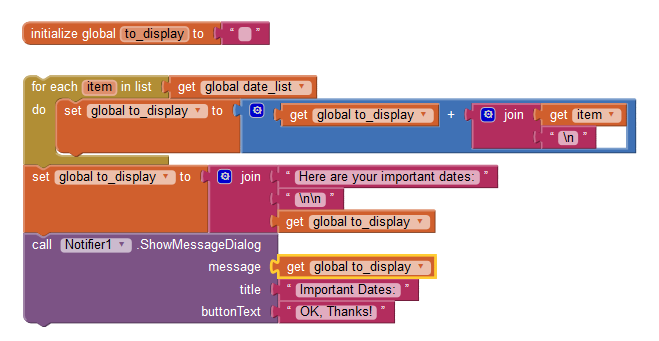
You're trying to assign a list to the message text... That won't work. You need to get the list from the TinyDB, and in a loop, read every date and add it to a growing global or local variable with "\n" between each.
Be careful though... if you have a lot of dates, they'll take up too much room in the message and make the message too big to display on the screen, especially if the device is in landscape mode.
You're trying to assign a list to the message text... That won't work. You need to get the list from the TinyDB, and in a loop, read every date and add it to a growing global or local variable with "\n" between each.
Be careful though... if you have a lot of dates, they'll take up too much room in the message and make the message too big to display on the screen, especially if the device is in landscape mode.
ryanj...@gmail.com
Mar 14, 2014, 4:48:47 PM3/14/14
to mitappinv...@googlegroups.com
Things are slowly starting to make sense! Very slowly...but still.
After re-arranging and fixing things, I get an error after building and trying it out:
"Bad list argument to foreach"
"The second argument to foreach is not a list. The second argument is: DATES"

Enis
Mar 14, 2014, 5:37:28 PM3/14/14
to
Ryan...
You're using a global variable which is a text variable for the loop... that's not correct.
You need to build your list from the TinyDB retrievals, and once you have the list, use THAT list in the loop. Then the loop extracts elements of the list and makes a big text string from it, which should be global to_display. That's why I created an extra global called to_display in the example I posted.
What you're doing there is trying to go through a list, but you're giving the loop a string, not a list. There's nothing to go through, so the error message is exact.
You're using a global variable which is a text variable for the loop... that's not correct.
You need to build your list from the TinyDB retrievals, and once you have the list, use THAT list in the loop. Then the loop extracts elements of the list and makes a big text string from it, which should be global to_display. That's why I created an extra global called to_display in the example I posted.
What you're doing there is trying to go through a list, but you're giving the loop a string, not a list. There's nothing to go through, so the error message is exact.
Enis
Mar 14, 2014, 5:46:14 PM3/14/14
to mitappinv...@googlegroups.com
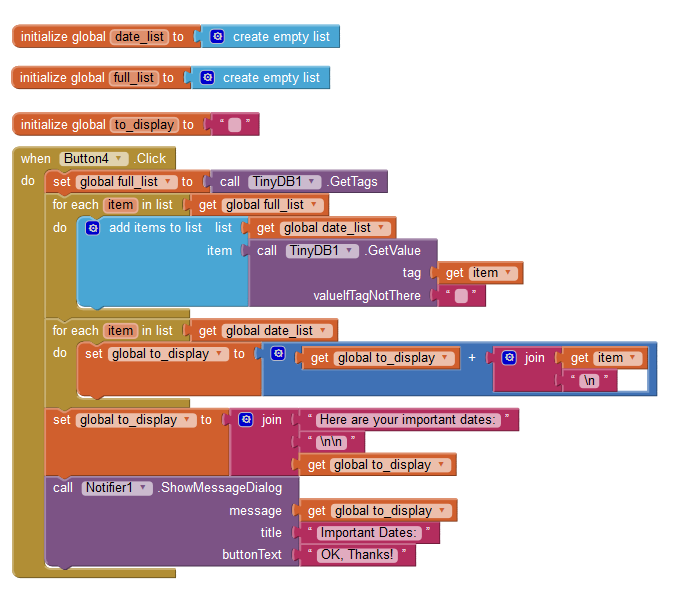
Ryan... Like this!
ryanj...@gmail.com
Mar 14, 2014, 6:28:31 PM3/14/14
to mitappinv...@googlegroups.com
Thanks a lot!
I'm not seeing where I would specify the tag to be pulled though (in this case, the info was stored with the "DATES" tag in TinyDB).
As of right now, I get a "Bad arguments to +" error - cannot accept the arguments: *empty-string*.
On Friday, March 14, 2014 2:46:14 PM UTC-7, Enis wrote:
On Friday, March 14, 2014 2:46:14 PM UTC-7, Enis wrote:
Ryan... Like this!
Enis
Mar 14, 2014, 6:43:27 PM3/14/14
to mitappinv...@googlegroups.com, ryanj...@gmail.com
Ryan... Where are you getting the dates? Do you have a list stored for the value of a single tag?
What's in the TinyDB database?
What's in the TinyDB database?
ryanj...@gmail.com
Mar 14, 2014, 10:02:48 PM3/14/14
to mitappinv...@googlegroups.com, ryanj...@gmail.com
I have another screen with a text-box, a button, and a list set up to save to TinyDB with the "DATES" tag.
They would go there first, enter in the dates.
Then be able to come to this screen, click the button, and have the dates show up in the popup.
That's the hope, at least.

appguytry2
Mar 15, 2014, 3:24:20 AM3/15/14
to mitappinv...@googlegroups.com, ryanj...@gmail.com
You can make your own notifiers. You can use sprites or layout background images and buttons. You could also use a clock a make a custom notifier that appears and goes away just like the system notifier.
Enis
Mar 15, 2014, 10:21:13 AM3/15/14
to mitappinv...@googlegroups.com, ryanj...@gmail.com
Ryan... If you're saving the list to the TinyDB with the tag DATES, then this would be your block set:

ryanj...@gmail.com
Mar 15, 2014, 10:41:28 AM3/15/14
to mitappinv...@googlegroups.com
I don't know what is happening now... This is what happens on Screen1.

This is what happens on Screen 2:

Enis
Mar 15, 2014, 11:17:17 AM3/15/14
to
Ryan...
Please send me your AIA file and I'll fix it for you... You've got many open blocks, not using the right ones etc... Email me the AIA file, i'll tinker with it for a few minutes and send it back.
Please send me your AIA file and I'll fix it for you... You've got many open blocks, not using the right ones etc... Email me the AIA file, i'll tinker with it for a few minutes and send it back.
Enis
Mar 15, 2014, 5:30:56 PM3/15/14
to mitappinv...@googlegroups.com
Sent you an aia file back Ryan...
Reply all
Reply to author
Forward
0 new messages