
Sprite collision help?
1,056 views
Skip to first unread message
 Assigned to scottfr...@gmail.com by taifu...@gmail.com
thai...@gmail.com
May 26, 2014, 11:58:45 AM5/26/14
to mitappinv...@googlegroups.com
Hey guys,
I am working on a college project for a small pool game but my problem is colliding the sprites.
Basically i want (Sprite Image A) to hit into (Sprite Image B), (Sprite Image B) will move into the opposite direction that (Sprite Image A) has hit into.
What i have been trying -
- List of directions for the sprite to direct to when collide.
- Random integers setting various places which became a mess.
- Move To X and Y procedures.
- Point in direction procedures.
- Edge Bounce.
- Various of if statements ideas (One of them worked a little but developed edge bounce problems even i do have edge bouncing code blocks on the screen).
Could anyone help me with any other round this collision problem/issue?
Any help is much appreciated.

Abraham Getzler
May 26, 2014, 6:38:51 PM5/26/14
to mitappinv...@googlegroups.com
You need to deal with conservation of momentum and kinetic energy.
Here's a wide ranging discussion, with some college level math ...
http://www.colorado.edu/physics/TZD/DubsonStuff/McGrawHillSymp/Ch10%20Momentum%20and%20Collisions.pdf
See the section starting at page 220.
ABG
Here's a wide ranging discussion, with some college level math ...
http://www.colorado.edu/physics/TZD/DubsonStuff/McGrawHillSymp/Ch10%20Momentum%20and%20Collisions.pdf
See the section starting at page 220.
ABG
Abraham Getzler
May 26, 2014, 6:57:15 PM5/26/14
to mitappinv...@googlegroups.com
Here's a straightforward billiard ball collision example...
http://www.aplusphysics.com/courses/honors/momentum/collisions.html
ABG
http://www.aplusphysics.com/courses/honors/momentum/collisions.html
ABG
thai...@gmail.com
May 26, 2014, 10:03:02 PM5/26/14
to mitappinv...@googlegroups.com
Thanks for some of the useful information about collisions Abraham but i'm still a little confused (Sorry! I'm a new learner into this).
is there any way of showing me what kind of blocks to use to create these collisions or if there is any other way of explaining about the blocks to use when creating a collision of the balls.
i'm still trying to figure out the use of the "Modulo" blocks but doesn't seem to work what i use.
Abraham Getzler
May 26, 2014, 11:04:06 PM5/26/14
to mitappinv...@googlegroups.com
App Inventor has all the math blocks you need, for sine, cosine, algebra.
Look in the math blocks section.
The ball and Sprite components have direction and speed values you can test and set,
and a collided event that will trigger when two of them touch.
Hover your cursor over the relevant blocks in their drawer to see details over
how they work, taking particular attention to their ranges of values.
Here's one last link I'll give you to a book section with the angle
calculations you will need.
http://www.ifi.unicamp.br/~coluci/f129i/wallace.pdf
If that gives you problems, there are math and physics tutor sites on the web.
This is a programming site.
ABG
Look in the math blocks section.
The ball and Sprite components have direction and speed values you can test and set,
and a collided event that will trigger when two of them touch.
Hover your cursor over the relevant blocks in their drawer to see details over
how they work, taking particular attention to their ranges of values.
Here's one last link I'll give you to a book section with the angle
calculations you will need.
http://www.ifi.unicamp.br/~coluci/f129i/wallace.pdf
If that gives you problems, there are math and physics tutor sites on the web.
This is a programming site.
ABG
thai...@gmail.com
May 27, 2014, 4:43:47 AM5/27/14
to mitappinv...@googlegroups.com
Yes i know there is but what i was asking was - If you were doing something like this what would be ideal maths blocks to use to make something work? (I'm not much physics guy, im basically a new learner working on a small gaming project for my course)
i'm using something like this for ball collision -
When CueBall.Collided With
i'm using something like this for ball collision -
When CueBall.Collided With
IF Other = RedBall
Then Set RedBall.Heading to Modulo of [ Then whatever maths blocks i try use like sin, cos, tan, atan2 etc.] / 360
But nothing, so i just need to know where is i go wrong or what is the useful blocks to use during this kind of build up.
Abraham Getzler
May 27, 2014, 12:08:51 PM5/27/14
to mitappinv...@googlegroups.com
The modulo block is like a math remainder block. It cuts off multiples of 360 from
the heading angle. I added it because I was afraid of what might happen in AI2
if I were to set a direction outside the range of 0-360.
Unfortunately, the web page with the help info for balls does not state the expected range of directions.
For all I know, it might be expecting a range of -180 to +180 degrees.
Here's a short tutorial on AI2 advanced sprites, that should work with balls too.
http://www.appinventorblocks.com/appinventor-tutorials-tips/appinventor-advanced-sprites
ABG
the heading angle. I added it because I was afraid of what might happen in AI2
if I were to set a direction outside the range of 0-360.
Unfortunately, the web page with the help info for balls does not state the expected range of directions.
For all I know, it might be expecting a range of -180 to +180 degrees.
Here's a short tutorial on AI2 advanced sprites, that should work with balls too.
http://www.appinventorblocks.com/appinventor-tutorials-tips/appinventor-advanced-sprites
ABG

Taifun
May 27, 2014, 12:31:45 PM5/27/14
to mitappinv...@googlegroups.com
The modulo block is like a math remainder block. It cuts off multiples of 360 from
the heading angle. I added it because I was afraid of what might happen in AI2
if I were to set a direction outside the range of 0-360.
no worries, it just works also for directions outside the 0-360 range
see this example (taken from http://puravidaapps.com/filebyfile.php)

Taifun


Scott Ferguson
May 28, 2014, 5:44:52 PM5/28/14
to mitappinv...@googlegroups.com
You might try when the cue ball collides with the other ball, then set the other ball's heading and speed to that of the cue ball initially, then set the cue ball speed to zero.
For realism, you could at that point start a clock timer to reduce the speed gradually to zero for the collided ball.
And the ball could also have an EdgeReached block that contains a Bounce block.
---
Scott
thai...@gmail.com
May 30, 2014, 6:34:58 AM5/30/14
to mitappinv...@googlegroups.com
Scott Ferguson,
Do you know what i might be doing wrong?
Thanks.
Scott Ferguson
Jun 2, 2014, 6:46:40 AM6/2/14
to mitappinv...@googlegroups.com
Hi thai-
This was more complicated than I initially thought.
My current solution works OK but is not completely realistic. in that you cannot put 'english' on the ball that is hit by another ball when it is hit off center.
I may figure a way to simulate that later.
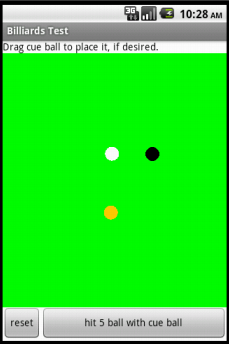
Try it out to see if it is what you are looking for.
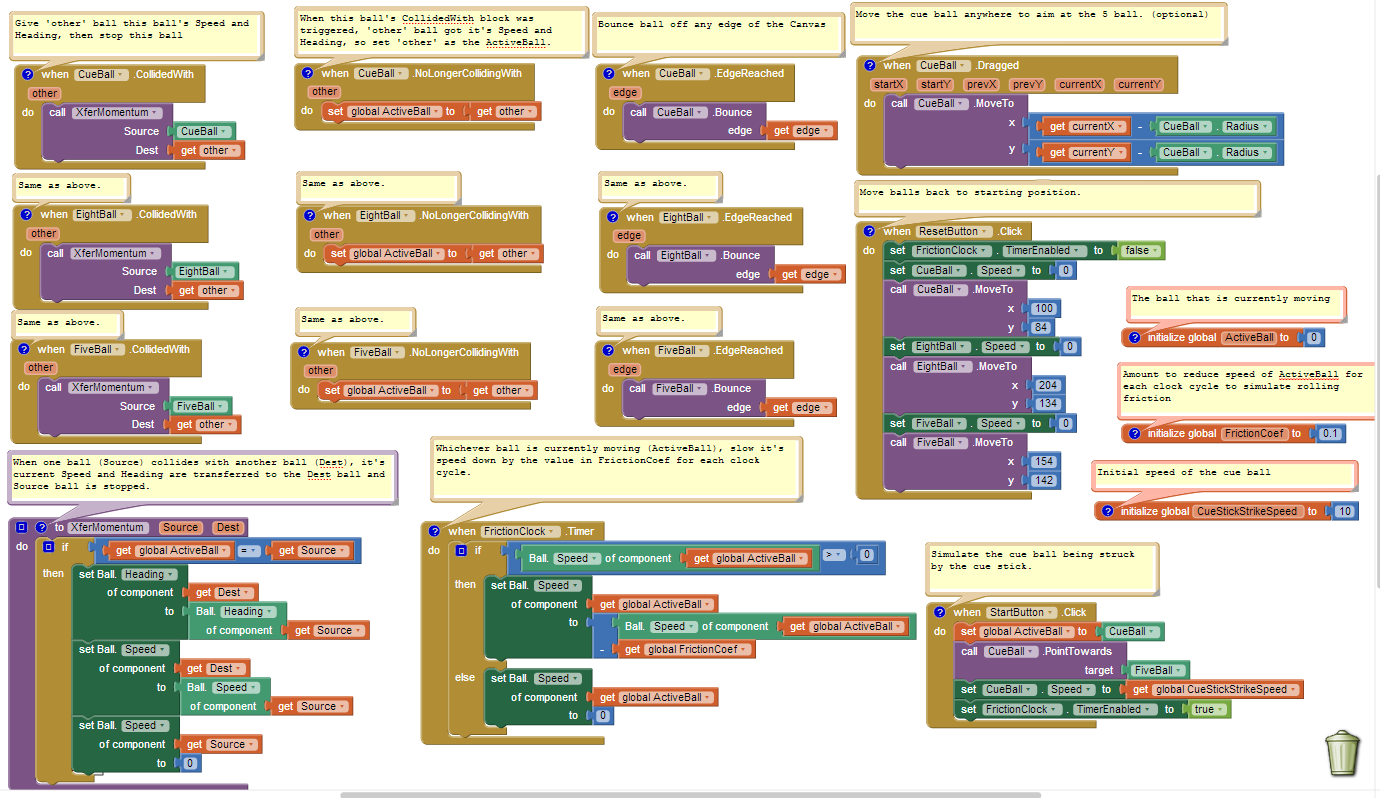
Basically, when one ball hits another one, the first ball stops and the second ball continues to roll in the same directions as the first ball and with the same speed.
To make it more realistic, I have added rolling friction to gradually stop whichever ball is rolling.
I will be working on a video demonstration that explains the blocks better but there are some comments with the blocks that may help for now in the aia project > here <.
---
Scott
Abraham Getzler
Jun 2, 2014, 4:59:39 PM6/2/14
to mitappinv...@googlegroups.com
Here are some observations based on the math at the start of this pdf
http://www.ifi.unicamp.br/~coluci/f129i/wallace.pdf
This case is for friction-free collision of a cue ball with a stationary target ball of the same size and mass,
with no spin, and fully elastic (no energy or momentum loss).
The target ball is going to move in a direction formed by a line between the cue ball and the
target ball at the moment of collision. You can use the arctan2 block with the differences
between the coordinates of the two balls for the x and y values, but there is a catch:
The y pixels run from top to bottom of the screen, the opposite from typical math graphing
examples. That means you might have to use y1-y2 instead of y2-y1 in your blocks.
Experiment to see what works.
The cue ball, if slightly off from the center line to the target ball, will continue moving,
but at right angles to the new direction of movement of the target ball.
(This is derived in that Wallace pdf, but seems to be well known.)
This direction is easy to calculate from the direction of the target ball.
Just add (or was it subtract?) 90 degrees to or from the target ball's
new direction. The +/- problem comes from whether you are hitting
on the right or left side of the target ball.
Now to the speeds of the two balls after collision ...
The original cue ball direction is along a line.
Where that line hits the edge of the target ball,
the target ball goes off in a new direction (see above).
The angle between those two lines (call it theta) determines the
distribution of speeds between the cue ball and target ball
after collision.
Assign the original speed of the cue ball to a variable v.
The cue ball should get a new speed of sin(theta) times v.
The target ball should get a new speed of cos(theta) times v.
You will have to fiddle with the sign of theta -
if it's negative, the sin(theta) will come out negative and give you a negative
speed for the cue ball. Use the abs() block for this, or see if failure to
compensate for the choice of right/left side collision earlier
will give you a direction that compensates for this. I suspect AI2
will not like a negative speed.
I have not had the time to code this or test this.
I hope this reading of the math from the Wallace pdf
helps.
ABG
The target ball goes off with a speed of
http://www.ifi.unicamp.br/~coluci/f129i/wallace.pdf
This case is for friction-free collision of a cue ball with a stationary target ball of the same size and mass,
with no spin, and fully elastic (no energy or momentum loss).
The target ball is going to move in a direction formed by a line between the cue ball and the
target ball at the moment of collision. You can use the arctan2 block with the differences
between the coordinates of the two balls for the x and y values, but there is a catch:
The y pixels run from top to bottom of the screen, the opposite from typical math graphing
examples. That means you might have to use y1-y2 instead of y2-y1 in your blocks.
Experiment to see what works.
The cue ball, if slightly off from the center line to the target ball, will continue moving,
but at right angles to the new direction of movement of the target ball.
(This is derived in that Wallace pdf, but seems to be well known.)
This direction is easy to calculate from the direction of the target ball.
Just add (or was it subtract?) 90 degrees to or from the target ball's
new direction. The +/- problem comes from whether you are hitting
on the right or left side of the target ball.
Now to the speeds of the two balls after collision ...
The original cue ball direction is along a line.
Where that line hits the edge of the target ball,
the target ball goes off in a new direction (see above).
The angle between those two lines (call it theta) determines the
distribution of speeds between the cue ball and target ball
after collision.
Assign the original speed of the cue ball to a variable v.
The cue ball should get a new speed of sin(theta) times v.
The target ball should get a new speed of cos(theta) times v.
You will have to fiddle with the sign of theta -
if it's negative, the sin(theta) will come out negative and give you a negative
speed for the cue ball. Use the abs() block for this, or see if failure to
compensate for the choice of right/left side collision earlier
will give you a direction that compensates for this. I suspect AI2
will not like a negative speed.
I have not had the time to code this or test this.
I hope this reading of the math from the Wallace pdf
helps.
ABG
The target ball goes off with a speed of
Scott Ferguson
Jun 2, 2014, 9:42:49 PM6/2/14
to mitappinv...@googlegroups.com
Scott Ferguson
Jun 2, 2014, 10:31:19 PM6/2/14
to mitappinv...@googlegroups.com
@Abraham
If There were a property that indicated the angle of impact in a collision relative to the center point of a Ball sprite that would be most helpful.I imagine that value could be used with the cue ball heading in order to determine the Speeds and Headings of both balls post collision.
As it is now, App Inventor can tell us the Heading and Speed of the cue ball and it's x,y position upon impact and the x,y of the ball it hits at the point that either ball's collidedwith blocks are triggered.
If the Heading derived from atan2 (y2-y1,x2-x1) for both balls matches the cue ball's heading then I think that the cue ball should stop and impart it's momentum on the other ball as they would be lined up with no offset angle.
If, however, the angles don't match, perhaps the difference in angles could be used to determine the Speeds and Headings of both balls post collision. If you can figure out a way that works, we would be on our way to making a more complete physics library of functions for App Inventor.
Thanks.
---
Scott
Abraham Getzler
Jun 5, 2014, 10:06:08 PM6/5/14
to mitappinv...@googlegroups.com
I got the case where the cue ball stops dead and transfers all its energy
to the target ball working in the attached .aia source file.
(The project name came from my initial attempt to launch the cue ball
from a slingshot. I gave up on that mechanic, but kept the cute name.)
The cue stick, cue ball, and target ball can all be dragged around to
set up shots.
This is a partial result. It still needs to have the cue ball head off in the
right direction at the right speed. It also only works for collisions against
stationary balls.
That's why I called it V1.
ABG
to the target ball working in the attached .aia source file.
(The project name came from my initial attempt to launch the cue ball
from a slingshot. I gave up on that mechanic, but kept the cute name.)
The cue stick, cue ball, and target ball can all be dragged around to
set up shots.
This is a partial result. It still needs to have the cue ball head off in the
right direction at the right speed. It also only works for collisions against
stationary balls.
That's why I called it V1.
ABG

Abraham Getzler
Jun 6, 2014, 2:50:35 PM6/6/14
to mitappinv...@googlegroups.com
Documentation on the full bounce case is here ...
https://docs.google.com/document/d/1Ex_0xzQ7GqBFwScXSL6_SnjPrr1AzwJoUjB4oGoe060/edit?usp=sharing
ABG
https://docs.google.com/document/d/1Ex_0xzQ7GqBFwScXSL6_SnjPrr1AzwJoUjB4oGoe060/edit?usp=sharing
ABG
Scott Ferguson
Jun 11, 2014, 6:23:47 PM6/11/14
to mitappinv...@googlegroups.com
Very nice documentation!
That is where I am stuck at this point -- "splitting the energy and momentum between the cue ball and target ball,"
---
Scott
Abraham Getzler
Jun 11, 2014, 9:00:41 PM6/11/14
to mitappinv...@googlegroups.com
Thank you.
The required math is in section II.A of the Wallace pdf
http://www.ifi.unicamp.br/~coluci/f129i/wallace.pdf
For the case of a glancing collision of a cue ball off a stationary ball,
according to that article,
the target ball resultant heading sends it off along the line from
the cue ball center to the target ball center, and the cue ball heads off at
right angles to that, choosing the heading that does not take it thru the target ball.
The speeds of the cue ball and target ball are distributed between them in
proportion to the sine and cosine respectively of the angle between the
original cue ball heading and the resultant target ball heading.
This conserves mechanical energy, which is proportional to the sum of the squares of the ball
speeds (sin(x)*sin(x) + cos(x)*cos(x) = 1 always per Pythagoras) and it conserves momentum
in both the x and y directions (hence the cosine and sine according to their definitions.
I regret I haven't had time to code and test this.
ABG
The required math is in section II.A of the Wallace pdf
http://www.ifi.unicamp.br/~coluci/f129i/wallace.pdf
For the case of a glancing collision of a cue ball off a stationary ball,
according to that article,
the target ball resultant heading sends it off along the line from
the cue ball center to the target ball center, and the cue ball heads off at
right angles to that, choosing the heading that does not take it thru the target ball.
The speeds of the cue ball and target ball are distributed between them in
proportion to the sine and cosine respectively of the angle between the
original cue ball heading and the resultant target ball heading.
This conserves mechanical energy, which is proportional to the sum of the squares of the ball
speeds (sin(x)*sin(x) + cos(x)*cos(x) = 1 always per Pythagoras) and it conserves momentum
in both the x and y directions (hence the cosine and sine according to their definitions.
I regret I haven't had time to code and test this.
ABG
Abraham Getzler
Jun 17, 2014, 5:11:02 PM6/17/14
to mitappinv...@googlegroups.com
I finally got around to coding and testing my version of fully elastic pool ball collisions,
with no friction or spin against a stationary target ball.
(The original poster has probably graduated by now.)
All the speeds and angles work.
Here's a link to my doc ...
https://docs.google.com/document/d/1jnhj6JKj-pCfTZInKrVZ2RfHzjiY9fJKXcYkWrRmNpg/edit?usp=sharing
Here's a link to my source ...
https://www.dropbox.com/s/9pgucdkt7tew6at/angry_balls_v2.aia
ABG
with no friction or spin against a stationary target ball.
(The original poster has probably graduated by now.)
All the speeds and angles work.
Here's a link to my doc ...
https://docs.google.com/document/d/1jnhj6JKj-pCfTZInKrVZ2RfHzjiY9fJKXcYkWrRmNpg/edit?usp=sharing
Here's a link to my source ...
https://www.dropbox.com/s/9pgucdkt7tew6at/angry_balls_v2.aia
ABG
Reply all
Reply to author
Forward
Message has been deleted
0 new messages