
Multiple question quiz - saving score
Skip to first unread message

Sarah Buck
Jul 28, 2015, 1:25:44 PM7/28/15
to MIT App Inventor Forum
I have a multiple choice quiz (3 choices), but how do I score the results? I don't want to give feedback for each question, but I do want to give a final score after the quiz is finished (with 3 different scores - number of correct responses, number of incorrect responses, and number of neutral responses).
In my AnswerChoicesList I have arranged the choices so that the first index is the correct one, the second is the neutral one, and the third is the incorrect one. They are presented in a random order during the quiz, but because they are coded with this order I am sure there is a way to calculate the final score of the three types of answers... but how?
In my AnswerChoicesList I have arranged the choices so that the first index is the correct one, the second is the neutral one, and the third is the incorrect one. They are presented in a random order during the quiz, but because they are coded with this order I am sure there is a way to calculate the final score of the three types of answers... but how?

Taifun
Jul 28, 2015, 1:52:46 PM7/28/15
to MIT App Inventor Forum, sarahmc...@gmail.com
I have arranged the choices so that the first index is the correct one, the second is the neutral one, and the third is the incorrect one.
use 3 counter variables: correct, neutral and incorrect and increment the corresponding counter variable after selecting an answer
Taifun
Trying to push the limits of App Inventor!
Snippets and
Tutorials from
Pura Vida Apps by
 Taifun.

Toni Schuh
Jul 28, 2015, 1:55:10 PM7/28/15
to MIT App Inventor Forum
Make variables for all three posibilities and let them start at zero. When the button is clicked, check the answer index, get the correspondending variable and set it to +1.
Sarah Buck
Jul 28, 2015, 2:44:00 PM7/28/15
to mitappinv...@googlegroups.com, taifu...@gmail.com
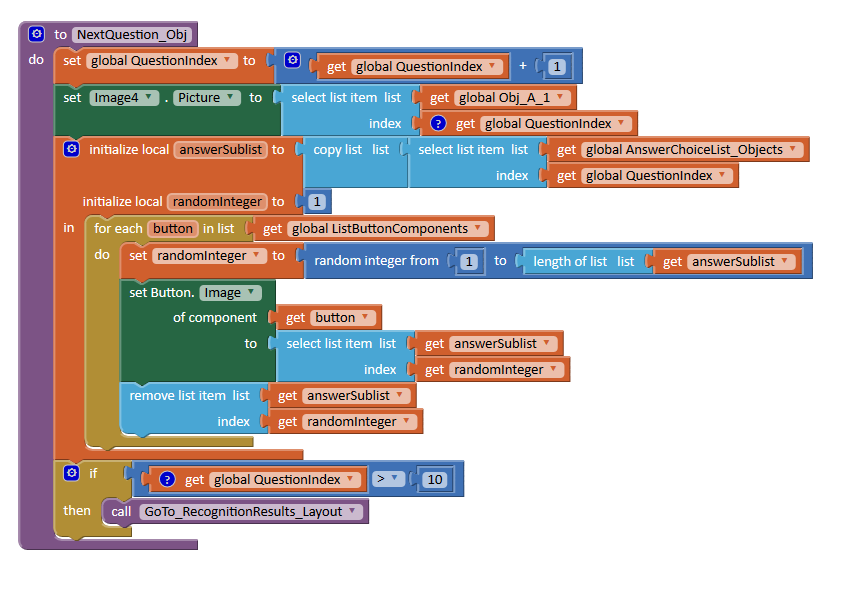
I already have a variable for each of the 3 possible answer, which are set to 0 when the quiz starts. I can't just increment the counter variable since I don't know under which button (1, 2, or 3) the corresponding answer was. The correct answer is not always under the first button, it is randomised.
Basically I want to increment the counter variable "correct" if the random integer for the "AnswerSublit" is 1, increment the variable "neutral" if the random integer is 2, and increment the variable "incorrect" if the random integer is 3. But I can't...

Abraham Getzler
Jul 28, 2015, 3:03:00 PM7/28/15
to MIT App Inventor Forum, sarahmc...@gmail.com
You have three buttons for three possible answers, identified by
their image contents.
Each button requires a Clicked event block.
Start an empty procedure ProcessAnswer() to handle the three buttons,
with an input parameter AnswerButtonPressed
identifying which button was pressed to answer.
Go back to the three Clicked event blocks, and in each insert
a call to ProcessAnswer, passing it the component block for that
button. The component block is the last block in that button's
pallete.
In the ProcessAnswer procedure, you need to check the
background image file name of the input button against
the list of image names for the current question,
and retrieve the index (1-4?) of the matching file name from
that list.
That index value (1-4) determines which of your three counters you
should increment, based on your design of the question/answer table.
Got it?
ABG
Sarah Buck
Jul 28, 2015, 3:54:07 PM7/28/15
to mitappinv...@googlegroups.com, aget...@gmail.com
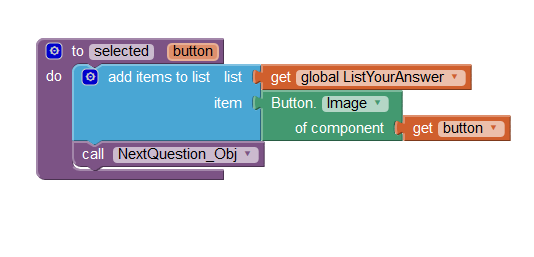
Thank you for your help Abraham.
I have made the procedure for the selected button and have inserted the call procedure for each button click.
I do not understand the next steps though.
-How do I check the backgound image of the button against the image name of the current question?
-How do i retrieve the index of the matching file name?
Many thanks!
I have made the procedure for the selected button and have inserted the call procedure for each button click.
I do not understand the next steps though.
-How do I check the backgound image of the button against the image name of the current question?
-How do i retrieve the index of the matching file name?
Many thanks!
Abraham Getzler
Jul 28, 2015, 4:25:43 PM7/28/15
to MIT App Inventor Forum, sarahmc...@gmail.com
See section 6 of this list tutorial.
Also see
Basically I want to increment the counter variable "correct" if the random integer for the "AnswerSublit" is 1, increment the variable "neutral" if the random integer is 2, and increment the variable "incorrect" if the random integer is 3.
So you are building up a list of the answered image names.
After it is full, clear your three counters, loop through your question and answer lists
by index = 1 to length of list,
and for each question/answer list and given answer at the curent index,
use the lookup item in list block to lookup the answered image name in the current question/answer table row.
-How do I check the backgound image of the button against the image name of the current question?
String comparison. You already got the answer image name in the answered list, and in one of the four columns of the current question/answer table row. You can loop thru the columns of the row and check column by column.
-How do i retrieve the index of the matching file name?
Walk the list, and save the index when you get a match. (I used the terms file name and image name interchangably. Sorry if that confused you.)
ABG
Sarah Buck
Jul 28, 2015, 5:44:39 PM7/28/15
to mitappinv...@googlegroups.com, aget...@gmail.com
Sorry I am very confused...
I have done many tutorials but none of them seem to be answering my questions. I should have specified that the stimuli which are considered as "correct answers" are also "neutral answers" for other questions. So I can't simply look up the name of the file behind the selected button, because it will be considered as correct or neutral depending on the question.
I am indeed building a list of my answers, but to be honest I simply copied a tutorial and don't know what this is used for.
Scoring the results is much more very difficult than I thought! Sorry I may need more help with this... Do you perhaps have an example of what you are suggesting me to do? I am not sure which blocks you are referring to in your suggestion.
Many thanks for your help!
I have done many tutorials but none of them seem to be answering my questions. I should have specified that the stimuli which are considered as "correct answers" are also "neutral answers" for other questions. So I can't simply look up the name of the file behind the selected button, because it will be considered as correct or neutral depending on the question.
I am indeed building a list of my answers, but to be honest I simply copied a tutorial and don't know what this is used for.
Scoring the results is much more very difficult than I thought! Sorry I may need more help with this... Do you perhaps have an example of what you are suggesting me to do? I am not sure which blocks you are referring to in your suggestion.
Many thanks for your help!
Abraham Getzler
Jul 28, 2015, 9:16:01 PM7/28/15
to MIT App Inventor Forum, sarahmc...@gmail.com
Have you done the QuizMe tutorial yet?
Actually built it and tested it, not just browsed it?
It's a foundation for understanding this exercise.
ABG
Abraham Getzler
Jul 28, 2015, 9:34:13 PM7/28/15
to MIT App Inventor Forum, sarahmc...@gmail.com
In my AnswerChoicesList I have arranged the choices so that the first index is the correct one, the second is the neutral one, and the third is the incorrect one.
Based on the above quote from your first post, here's a procedure to increment the appropriate global counter given a list of potential answers and the answer given...
procedure Score (AnswerList, Answer)
If Answer = (Select item 1 of AnswerList) then
set global correct_answers = correct_answers + 1
ElseIf Answer = (Select item 2 of AnswerList) then
set global neutral_answer = neutral_answers + 1
ElseIf Answer = (Select item 3 of AnswerList) then
set global incorrect_answers = incorrect_answers + 1
end if
end procedure
Once you have coded the Score procedure,
apply it to each answer row and answer
using a for index = 1 to length(list) over both your
given answer set table and your collected answers.
Afterwards your three counters will have your desired counts.
ABG
Sarah Buck
Jul 30, 2015, 4:11:13 AM7/30/15
to MIT App Inventor Forum, aget...@gmail.com
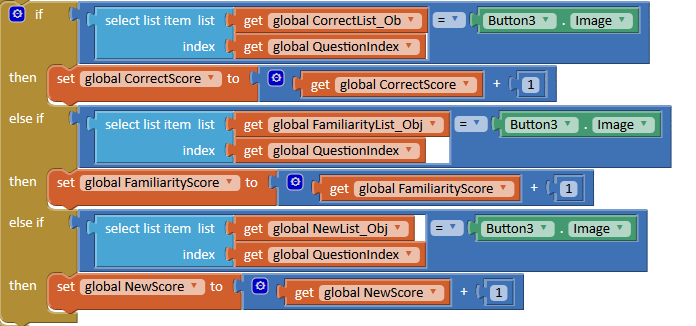
Thank you very much Abraham for your help! :)
Abraham Getzler
Jul 30, 2015, 9:40:43 AM7/30/15
to MIT App Inventor Forum, sarahmc...@gmail.com
I'm not convinced you tested it completely.
In your snapshot, you test against the Button3 image.
That's fine.
But From the nomenclature, I guess from that name that there
is also a Button1 and Button2 that need to be tested in a similar
manner if they are pressed.
Is that the case?
ABG
Abraham Getzler
Jul 30, 2015, 9:42:50 AM7/30/15
to MIT App Inventor Forum, sarahmc...@gmail.com
Oops, never mind.
I missed the place where you said you did it for every button.
Glad you got it working!
ABG
Sarah Buck
Jul 30, 2015, 12:48:03 PM7/30/15
to MIT App Inventor Forum, aget...@gmail.com
Abraham Getzler
Jul 30, 2015, 1:12:52 PM7/30/15
to MIT App Inventor Forum, sarahmc...@gmail.com
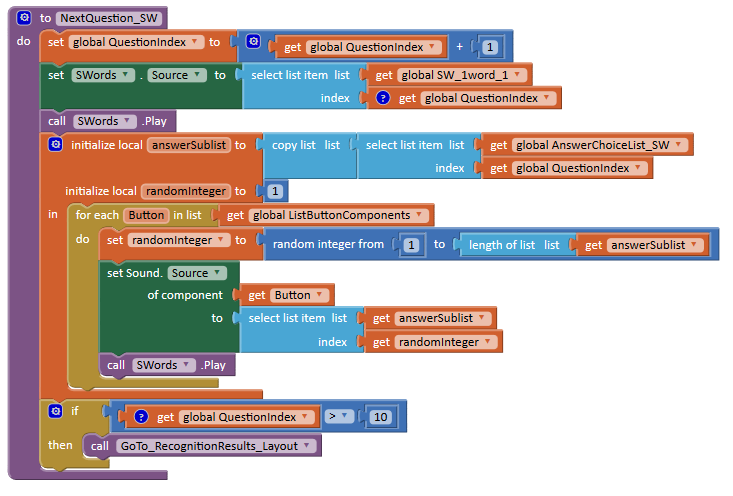
Show us where and how you fill the global list SW_1word1 ?
ABG
Abraham Getzler
Jul 30, 2015, 1:27:30 PM7/30/15
to MIT App Inventor Forum, sarahmc...@gmail.com
That place at the center of your logic where you set the sound source from the button won't work.
If you want to play a sound based on the picture behind the button that was just pressed,
keep a global list mapping picture names into sound file names:
initialize global sounds_of_pictures as create list (
(cow.png, moo.mp3),
(cat.png, meow.mp3),
...
)
(Use nested create list blocks or play with the csv to table block for that)
When a button is pressed, use the lookup-in-pairs block to get the .mp3
file name from the map using the button image as the lookup tag.
Once you have the .mp3 file name, load it into the sound player and play it.
ABG
Sarah Buck
Jul 30, 2015, 2:04:04 PM7/30/15
to mitappinv...@googlegroups.com, aget...@gmail.com
sorry I should have been more precised...
The pictures for my buttons don't matter (they are all going to be the same), but the buttons generate a different possible answer. I have actually managed to work it out in the mean time... I had not add a "List Sound Component" variable to replace the "list Button Component" that I had for the previous task!
The pictures for my buttons don't matter (they are all going to be the same), but the buttons generate a different possible answer. I have actually managed to work it out in the mean time... I had not add a "List Sound Component" variable to replace the "list Button Component" that I had for the previous task!
Reply all
Reply to author
Forward
0 new messages