Skip to first unread message

K_S_1993

unread,
Dec 11, 2015, 2:55:20 AM12/11/15
to MIT App Inventor Forum
Hello, 
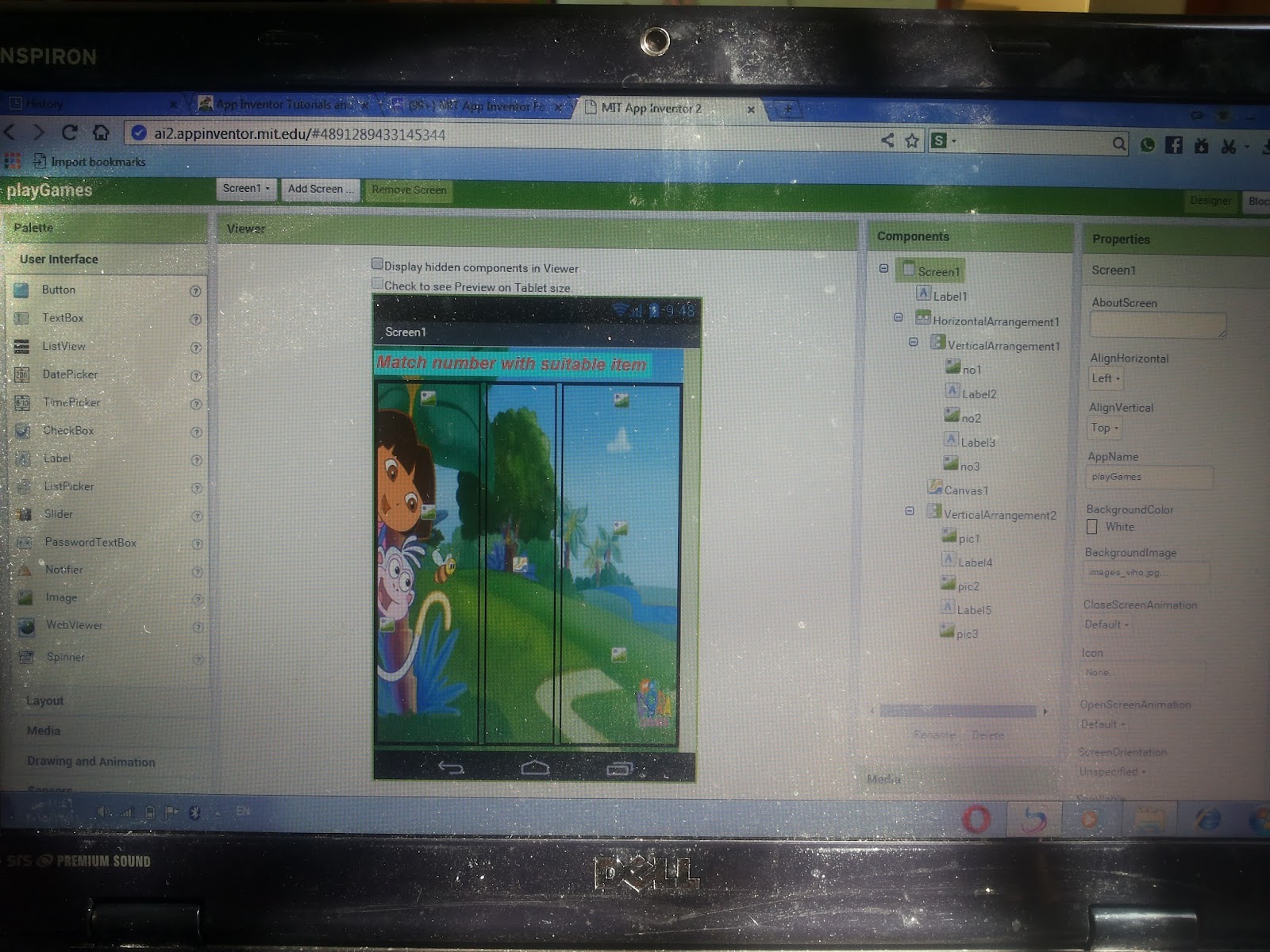
I want to make a game in app inventor which is matching game. I have numbers from 1 to 10 and pictures of items . I want to match the number with the suitable bicture . I tryied to create a list for numbers and a list for items, and when screen initialized a random picture will be shown from each list. The problem I don't know how to join the number with suitable item pic and I don't know how to draw a line which connect them .. Can any one help me please ??  


here is the design , I don't know if it is correct or not 


and her is how it comes when I preview the app , as you can see the items are not same as numbers 


Italo

unread,
Dec 11, 2015, 3:25:03 AM12/11/15
to mitappinv...@googlegroups.com
One possible solution:
Name your number images like this 01_number.png, 02_number.png, 03_number.png, etc (or jpg, it depends on what you are using)
Name your figures images like this 01_figures.png, 02_figures.png, 03_figures.png, etc

When the user do the matching, ask if segment (image1, 1, 2) = segment (image2, 1, 2). If true, that means both images start with the same 2 digits and it's a match.

The problem with drawing the line is that you are using the component IMAGE to show the numbers and figures. Those are not clickable. So there's no way to do the match.
You should use just one canvas and sprites for the numbers and figures. That way you can detect which sprite is touched, and you will be able to draw the line to connect them.


SteveJG

unread,
Dec 11, 2015, 8:22:58 AM12/11/15
to MIT App Inventor Forum
You can use buttons and layouts  or use a Canvas.   Italo has some great ideas that should work for you.   An alternate way is to use a Canvas or several Canvas objects and do something like in the following tutorial       

Animal Canvas – a children’s educational App Inventor 2 game tutorial

                   that MATCHES   images with words.   Either technique should work.  Based on your images, Italo's recommendation might be best if you already have the code using images.    If you have to draw a line to connect the numerical sprites with the image sprites, use the Canvas.Draw function.  It draws between coordinates on the Canvas.    Have you read this great article                The article describes how the Canvas screen is numbered in pixels.  You need to draw from one x,y set of coordinates to another.

Regards,
Steve

K_S_1993

unread,
Dec 13, 2015, 1:27:40 PM12/13/15
to MIT App Inventor Forum
can you please take a look on my project > I didn't understand very well
playGames.aia
Message has been deleted

Scott Ferguson

unread,
Dec 15, 2015, 3:08:10 PM12/15/15
to MIT App Inventor Forum
Nice looking game!
It looks like you want to drag from a number sprite on the left to a figures sprite on the right.
Although that can be done, it seems to me that would take a lot of blocks.
If you are interested instead in allowing the child to first touch a number, then touch the figures on the right that they think goes with the number it is much easier to code.
And a line can automatically be drawn between the number and figures if they guessed correctly as the examples below show:


I have taken the liberty to modify your blocks to accomplish this.

I hope you don't mind :)


Here are the blocks:


The show procedure makes copies of the numbers_pictures and figures_pictures lists so pictures can be picked from the copied lists and then the picked items removed from the lists so they cannot be picked again.

It also makes sure that the Pictures for the figures on the right are randomly placed.


When the child touches one of the number ImageSprites on the left, the sprite's Touched event block is triggered.

That sprite's component block is saved so it's picture name can be used to compare with the figure name when it is touched to see if the numbers match.

The component block is also used to get the x,y location of the number sprite for drawing a line later if the numbers match.


When the child touches one of the figures ImageSprites on the right, it's Touched event block is triggered and the number part of it's Picture value is compared to the number part of the save ImageSprite's Picture value.

If they match, a line is drawn between the two ImageSprites.

---

sf


PlayGamesDebug.aia
Reply all
Reply to author
Forward
0 new messages