
Skip to first unread message

Robert Blackburn
Aug 15, 2015, 9:43:47 AM8/15/15
to MIT App Inventor Forum
Can I enter a MAC address for a Bluetooth device somewhere in blocks in app inventor? If so where? I'm hoping this way there is no need for the app to open a separate window to select a MAC address from a list on an Android smartphone. The MAC address I am connecting too will not change and the selection will always be the same. So I don't see the point in selecting the same address every time I open the app. As a side note, It would be nice if when I open the app it automatically tries to connect to the device, but that is not as big a concern as the first question.
Would appreciate any help.

Taifun
Aug 15, 2015, 12:20:08 PM8/15/15
to MIT App Inventor Forum
Can I enter a MAC address for a Bluetooth device somewhere in blocks in app inventor?
yes
If so where?
in a text block
As a side note, It would be nice if when I open the app it automatically tries to connect to the device,
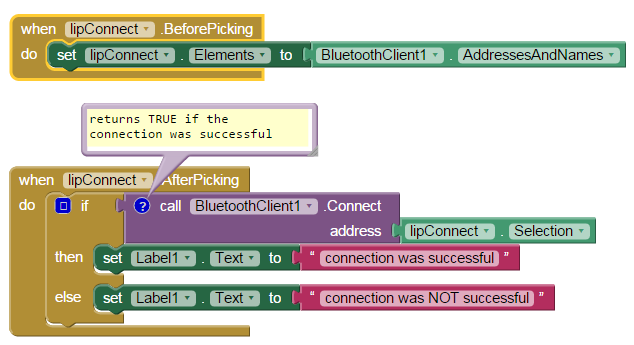
in the screenshot just move the blocks from the listpicker after picking event into Screen.Initialize and replace lipConnect.Selection by the text block containing your MAC address
A very good way to learn App Inventor is to read the free Inventor's Manual here in the AI2 free online eBook http://www.appinventor.org/book2 ... the links are at the bottom of the Web page. The book 'teaches' users how to program with AI2 blocks.
There is a free programming course here http://www.appinventor.org/content/CourseInABox/Intro and the aia files for the projects in the book are here: http://www.appinventor.org/bookFiles
How to do a lot of basic things with App Inventor are described here: http://www.appinventor.org/content/howDoYou/eventHandling .
Also do the tutorials http://appinventor.mit.edu/explore/ai2/tutorials.html to learn the basics of App Inventor, then try something and follow the
Top 5 Tips: How to learn  App Inventor
App InventorYou will not find a tutorial, which does exactly what you are looking for. But doing the tutorials (not only reading a little bit) help you to understand, how things are working. This is important and this is the first step to do.
Taifun
Trying to push the limits of App Inventor! Snippets and Tutorials from Pura Vida Apps by  Taifun.
Reply all
Reply to author
Forward
0 new messages