
Skip to first unread message

sunfl...@gmail.com
Jul 16, 2014, 11:25:51 AM7/16/14
to mitappinv...@googlegroups.com
Based on my personal experience with the app inventor 2, I think that you should be able to look at work history, or go through the trash for previously made blocks.

Enis
Jul 16, 2014, 11:29:34 AM7/16/14
to mitappinv...@googlegroups.com
Trash is final... sorry.
If you really NEED to do that, make constant AIA file backups. Then, you could always bring those back into AI and see what you had done before.
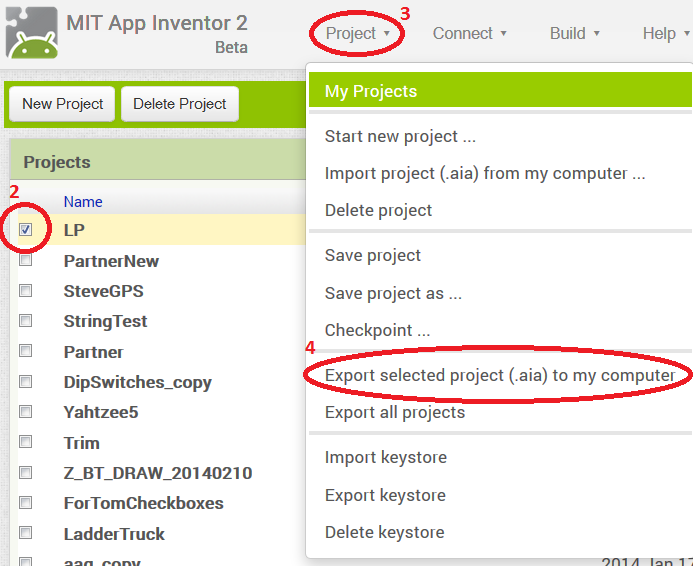
To Export Your Project to an AIA file...
If you really NEED to do that, make constant AIA file backups. Then, you could always bring those back into AI and see what you had done before.
To Export Your Project to an AIA file...
- Click on the My Projects link at the top of the UI:
- When the list of projects shows up, put a check mark by the project you want to export
- Then click on the Project link (notice that they're similarly named but not the same)
- Choose Export selected project (.aia) to my computer...

Reply all
Reply to author
Forward
0 new messages