
Skip to first unread message

keith banaybanay
Feb 7, 2016, 11:25:17 PM2/7/16
to MIT App Inventor Forum
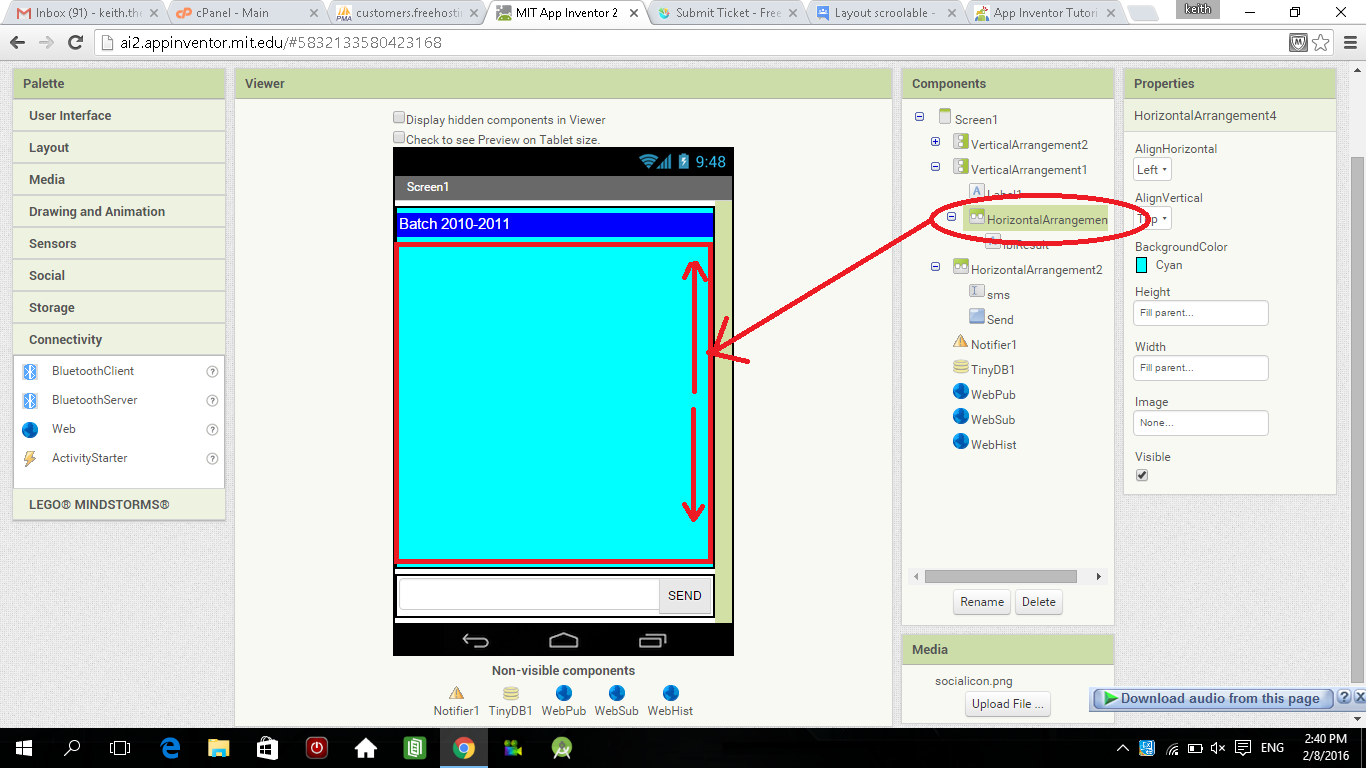
is there any way to make the layout scrollable?,., please help me

Scott Ferguson
Feb 8, 2016, 1:10:50 AM2/8/16
to MIT App Inventor Forum
Please provide more information.
What exactly do you want to scroll?
Which way to scroll, etc.
---
sf
keith banaybanay
Feb 8, 2016, 1:45:10 AM2/8/16
to mitappinv...@googlegroups.com
provided the screenshot i got a horizontal arrangement and i want it to be scrollable when i put a bunch of text in a label, and then the text box and button should be in the same position.
Message has been deleted


Taifun
Feb 8, 2016, 2:21:41 PM2/8/16
to MIT App Inventor Forum
nice workaround!
Taifun
Scott Ferguson
Feb 8, 2016, 2:30:02 PM2/8/16
to MIT App Inventor Forum
Very clever :-)
+1
---
sf
keith banaybanay
Feb 9, 2016, 8:32:31 AM2/9/16
to MIT App Inventor Forum
i tried it sir abraham but its not scrollable ., :(
Scott Ferguson
Feb 9, 2016, 9:35:17 AM2/9/16
to MIT App Inventor Forum
@keith
Did you make sure that there was more text than can display in the TextBox?
I believe that may be the reason.
@Everyone
One drawback of this method is when dragging up and down, the selection menu may display and the insertion icons for selecting text.
We still need a TextBox.ReadOnly property if this method is going to fly.
---
sf
keith banaybanay
Feb 9, 2016, 11:24:05 AM2/9/16
to MIT App Inventor Forum
@Scott Ferguson
yes, because it is the same text in the example, in fact the text was cut and i cant see the continuation in bottom,
Abraham Getzler
Feb 9, 2016, 1:48:30 PM2/9/16
to MIT App Inventor Forum
Okay, here's another shot at it using a label and a thin canvas on the right side.
I was going to add a drag and segment operation to the canvas to continually
refill the label from a moving middle of the text, but I noticed the label
scrolled fine as is.
ABG


Abraham Getzler
Feb 9, 2016, 2:28:12 PM2/9/16
to MIT App Inventor Forum
I missed the part about the button at the bottom.
It's possible using screen arrangements, and a draggable ball in canvas
to refill the label from a segment of the original source.
See attached.
ABG


Scott Ferguson
Feb 9, 2016, 6:37:02 PM2/9/16
to MIT App Inventor Forum
Very nice!
I tried it and it works well :-)
---
sf
Abraham Getzler
Jul 18, 2016, 4:41:26 PM7/18/16
to MIT App Inventor Forum
FYI - Testers needed - ABG
I have just updated ai2-test.appinventor.mit.edu to have code which should be in our next release, currently scheduled for mid-week this coming week.This *is* a Component release, but the old Companion will mostly work (all but the new Scrollable arrangements will work with the old Companion). For testing ai2-test will ask to auto-update your Companion to the test version (2.37t2).Release notes can be found here.-Jeff
Reply all
Reply to author
Forward
0 new messages