
Skip to first unread message

Hubert Huller
Mar 25, 2018, 4:22:18 PM3/25/18
to MIT App Inventor Forum
I want to get a list of cities when I search for a city with wunderground.
Till now I use the following example url: http://autocomplete.wunderground.com/aq?query=boston&format=xml
I parse all cities in this xml file and will save it in a list.
But how can I do this with json. When I use the same code I will get always the error RESULTS not found.
Hope somebody can help me.
kindly regards
Here my code for xml and the error with json.
Till now I use the following example url: http://autocomplete.wunderground.com/aq?query=boston&format=xml
I parse all cities in this xml file and will save it in a list.
But how can I do this with json. When I use the same code I will get always the error RESULTS not found.
Hope somebody can help me.
kindly regards
Here my code for xml and the error with json.


Hubert Huller
Mar 25, 2018, 7:32:25 PM3/25/18
to MIT App Inventor Forum
Hi!
Thanks a lot for your answer and example.
How is it possible to get only the name or zmw or tz from one city (row).
kindly regards
Thanks a lot for your answer and example.
How is it possible to get only the name or zmw or tz from one city (row).
kindly regards
Abraham Getzler
Mar 25, 2018, 8:34:10 PM3/25/18
to MIT App Inventor Forum
See https://docs.google.com/document/d/12t4HLNRepCnbmcfycdF8wSHWht_D1P8hKJpTknVDChY/edit?usp=sharing
for how to slice and dice a table.
ABG


Abraham Getzler
Mar 26, 2018, 9:01:58 AM3/26/18
to MIT App Inventor Forum
You get empty results because you were impatient,
looking in the results of something that has not yet happened.
Look in the Web blocks for the block that catches the event
of text coming back from the Web, and move all the processing
of results there.
Once you have issued the web.Get command,
there is nothing left to do in that block.
ABG
haiflosse
Mar 26, 2018, 11:13:08 AM3/26/18
to MIT App Inventor Forum
Thanks for your answer.
Sorry, but my english is not the best so I don't know what you mean.
May you can change my code or can explain it what I must change in the code.
Hope you can still help me.
kindly regards
Sorry, but my english is not the best so I don't know what you mean.
May you can change my code or can explain it what I must change in the code.
Hope you can still help me.
kindly regards
Abraham Getzler
Mar 26, 2018, 11:37:45 AM3/26/18
to MIT App Inventor Forum
I can't figure out how to teach some one
speaking a different language.
However, I notice if you search YouTube for MIT App Inventor
or AI2, you will find many introductory videos explaining it
in many different languages, maybe even one in your native language.
There are other people on this
board more skilled in other languages than me.
If you post your question
in your own language, maybe they will be able to
answer in your language.
ABG
haiflosse
Mar 26, 2018, 12:14:56 PM3/26/18
to MIT App Inventor Forum
Hi!
Kindly regards for your answer.
Bad luck for me that you cannot help me anymore.
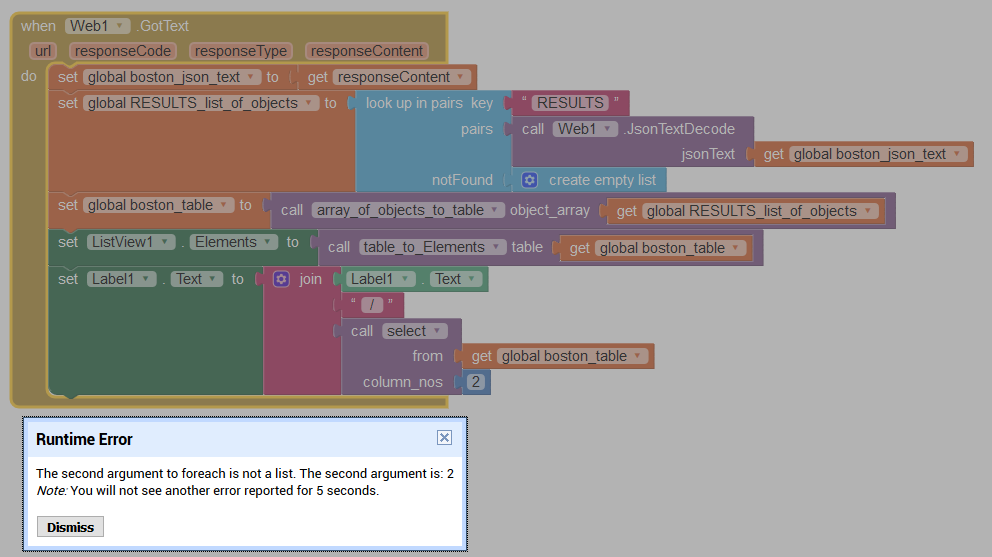
I understand that I must move the block label1.text to an other position of the code. I tried also other possibilities but couldn't find a solution.
I tried also to move it at the end of web1.got text but there I will get the error that the second argument (index) is not in the list.
I thought it is only a little error of mine to move the label1.text to the right position of the whole code (but where?).
But maybe I am total wrong and my planing is not correct.
May you can still help me and can give me some more ideas.
kindly regards.
here my second code I have tried with error:
Kindly regards for your answer.
Bad luck for me that you cannot help me anymore.
I understand that I must move the block label1.text to an other position of the code. I tried also other possibilities but couldn't find a solution.
I tried also to move it at the end of web1.got text but there I will get the error that the second argument (index) is not in the list.
I thought it is only a little error of mine to move the label1.text to the right position of the whole code (but where?).
But maybe I am total wrong and my planing is not correct.
May you can still help me and can give me some more ideas.
kindly regards.
here my second code I have tried with error:
Abraham Getzler
Mar 26, 2018, 12:23:27 PM3/26/18
to MIT App Inventor Forum
Your screen shot does not have all your blocks.
Post a Downloaded Blocks Image.
ABG
Abraham Getzler
Mar 26, 2018, 12:25:27 PM3/26/18
to MIT App Inventor Forum
Also, to debug your blocks,
use the Blocks Editor right click Do It on
all blocks, starting from the top down
until your blocks look like a pin cushion.
ABG


Abraham Getzler
Mar 26, 2018, 1:18:42 PM3/26/18
to MIT App Inventor Forum
The select procedure you used is not set up to accept only a single column number.
It only works with a list of multiple column numbers.
Instead of select, use this new procedure column
to extract a single column from a table.
ABG

Abraham Getzler
Mar 26, 2018, 1:26:55 PM3/26/18
to MIT App Inventor Forum
I forgot to mention that for new line, use \n
ABG
haiflosse
Mar 26, 2018, 5:06:52 PM3/26/18
to MIT App Inventor Forum
Thanks again for your answer.
I have add the function column and it works wonderful when I use a separate list (in my example liste).
I have marked it with a red circle.
But when I try it with the global list boston_table I will still get a () as result.
So I think the items from the json file will not add to the list correctly as separated fileds.
So hope you can still help me.
kindly regards
Here my full code:
I have marked it with a red circle.
But when I try it with the global list boston_table I will still get a () as result.
So I think the items from the json file will not add to the list correctly as separated fileds.
So hope you can still help me.
kindly regards
Here my full code:

Abraham Getzler
Mar 26, 2018, 5:53:02 PM3/26/18
to MIT App Inventor Forum
See attached.
Web queries take time.
So do File requests.
It might be too fast for a human to notice,
but your app will find the Boston table empty
immediately after the Get request, because it is very fast
faster than the web site can respond.
That is why AI2 has event blocks
like Web1.GotText
ABG

haiflosse
Mar 27, 2018, 4:31:01 AM3/27/18
to MIT App Inventor Forum
Thanks again for your answer.
Now it works perfect.
I can check now if xml or json is better.
The code for json is a bit more complex than in xml.
kindly regards for your help
I can check now if xml or json is better.
The code for json is a bit more complex than in xml.
kindly regards for your help
Abraham Getzler
Mar 27, 2018, 10:13:21 AM3/27/18
to MIT App Inventor Forum
I can check now if xml or json is better.
For this web site, json is better.
If you examine the text returned from the website in xml versus json,
you will see [] and {} delimiters that express clearly the
differences between an array and an object.
See http://www.json.org/ for an explanation.
XML does not have a markup to distinguish arrays from objects,
at least on your web site, making it much harder to navigate
the data.
ABG
Reply all
Reply to author
Forward
0 new messages