
magic8-ball tutorial. How do I get text to speech and random text to occur
297 views
Skip to first unread message
 Assigned to joshes...@gmail.com by taifu...@gmail.com
bluesto...@gmail.com
Jul 9, 2014, 5:23:33 AM7/9/14
to mitappinv...@googlegroups.com
At the end of the magic 8-ball tutorial I am challenged to get the app to make the magic 8-ball speak the randomly chosen text in addition to having it appear. I can't figure out how to make both outcomes happen.
It seems like a rather basic thing to be able to have two outcomes result from some other given condition/outcome. I feel like I would be missing something very essential to pass up the challenge.

Taifun
Jul 9, 2014, 9:48:26 AM7/9/14
to mitappinv...@googlegroups.com
It would really help if you provided a screenshot of your relevant
blocks, so we can see what you are trying to do, and where the problem
may be.
Taifun
Trying to push the limits of App Inventor!
Snippets and
Tutorials from
Pura Vida Apps by
 Taifun.
bluesto...@gmail.com
Jul 9, 2014, 3:43:59 PM7/9/14
to mitappinv...@googlegroups.com
Thank you for the reply. I have attached a screenshot. As you can see, the last item on the randomly chosen text list has not been filled. What I am trying to do for that one, and all the others, is to have the text appear and have the speech to text read it aloud for the user.
There must be a very simple way of having more than outcome for a given condition, but I can't find any block combination that works.
Taifun
Jul 9, 2014, 4:02:13 PM7/9/14
to mitappinv...@googlegroups.com
use a local variable myText to pick the random text
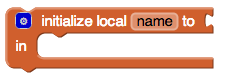
set Label2.Text to get myText
and also use the variable myText for the TextToSpeech block:
callTextToSpeech.Speak
message get myText
Taifun

Mike Harmon
Jul 10, 2014, 2:05:02 PM7/10/14
to mitappinv...@googlegroups.com

bluesto...@gmail.com
Jul 10, 2014, 2:16:49 PM7/10/14
to mitappinv...@googlegroups.com
Thank you for all your work! I will give it a try. I did a lot of reading after looking at the link that Taifun provided and this seems to be consistent with what I have been reading.
bluesto...@gmail.com
Jul 10, 2014, 2:25:10 PM7/10/14
to mitappinv...@googlegroups.com
Thanks Taifun! I found your link to be very informative. I had been looking for an index of such topics but had not been able to find it until last night. It was at the bottom of the Library page under the Documentation section. I find these sort of explanation pages to be a great compliment to the "hands on" tutorials. I think putting an index in a more prominent location would be beneficial to some learners.


Josh @ MIT
Jul 11, 2014, 8:23:20 AM7/11/14
to mitappinv...@googlegroups.com
Hi There,
I agree completely about making the links to these pages (and others) more easily navigable. It's on our list, but it's a fairly daunting task, and is going to take some good design work and user testing. If you have concrete suggestions for how you'd look for such documentation, please do share them.
Best,
Josh
Josh
Reply all
Reply to author
Forward
0 new messages