
Bug: ListView not displaying elements from List
879 views
Skip to first unread message

Jonathan Grice
Feb 18, 2016, 2:24:35 AM2/18/16
to mitappinv...@googlegroups.com, jonath...@yahoo.com
ListView not populating though global variable using "set ListView.Elements to". Instead of displaying elements from database tag, it populates the ListView with the number 2147483647 which is not even saved in the list, for the tag in the TinyDB.
I'm not using the emulator. I'm downloading the apk to my phone and running the app from my phone. I'm using an HTC M8 running Android 5.0.2.
I have included a screenshot of my blocks for the screen I'm having trouble with and can include a copy of my app for inspection upon request.

Ghica
Feb 18, 2016, 7:26:43 AM2/18/16
to MIT App Inventor Forum, jonath...@yahoo.com
Well, Start using the emulator. It will be much easier to debug your app, because there are some things wrong with it. And you can use DoIt so see what you are doing.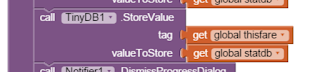
First of all a global is not global between screens, just within a screen. In your StatisticsSreen initialize, you first have to retrieve the values from your TinyDB and place them in global statdb,
Second, what are you trying to achieve with
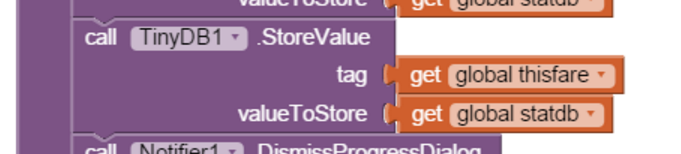
in deletefrare?
Cheers, Ghica.
Jonathan Grice
Feb 18, 2016, 7:55:31 AM2/18/16
to mitappinv...@googlegroups.com, jonath...@yahoo.com
If you look at the entire code blocks you can see that all variables are initialized and their values are set on this screen, and are the ones that I aim to use.
Thank you for pointing out the fact that global isn't app wide but only for one screen, although, I already know that from my web development background, just like one variable can only be shared through a get or put method, just like variables can't be shared between screens except when sent using the "open screen" block that allows passing variable values between screens.
The statdb variable is initialized as a blank list and is set in screen initialize where the value is used to populate "listview" elements. Since I am gathering data directly from TinyDB, the block "set ListView.Elements to" has to be used instead of "set ListView.ElementsFromString to" since I'm not using a CSV list as the value of that particular variable.
The problem lies with retrieving the list saved in TinyDB. I haven't gotten multidimensional arrays down yet with App Inventor so I'm using one tag to add to or delete a saved clock instant.. Then saving specific data to separate tags for each item from the first list. I'm focused on the main tag first. The app is not retrieving data as it should. Instead of populating the ListView with each specific clock instant (saved as milliseconds), it's repeating the same weird number. When I use a label to display the data, it's correct. When I use an alert to display the data, it's correct.
Don't worry about the deletefare blocks, as they are working in a similar fashion elsewhere in the app.
Attached is a screenshot from the running app.
Update: I can use any other block, such as, list picker or spinner and the elements are also not populated correctly. I can use a for each loop and populate a CSV list and the elements will populate correctly but that's the long way of doing it.

Abraham Getzler
Feb 18, 2016, 10:51:17 AM2/18/16
to MIT App Inventor Forum, jonath...@yahoo.com
The Get from TinyDB block has an unhelpful default not-found value of " ".
You are probably loading the variable statdb with " ", while an empty list would be more appropriate.
The ListView.Elements might be loaded with " ", with unpredictable results.
I would start by switching out the " " from the statdb = Get from TinyDB block for a Create Empty List block.
I would also double check the Designer definition of the ListView to insure its Elements From String is empty.
You don't want interference between the two loading mechanisms.
ABG
Abraham Getzler
Feb 18, 2016, 10:53:15 AM2/18/16
to MIT App Inventor Forum, jonath...@yahoo.com
Jonathan Grice
Feb 18, 2016, 11:01:19 AM2/18/16
to MIT App Inventor Forum, jonath...@yahoo.com
If you look at the code blocks in the screenshot I posted, you can see that I'm setting the variable with "create empty list".
Abraham Getzler
Feb 18, 2016, 11:24:14 AM2/18/16
to MIT App Inventor Forum, jonath...@yahoo.com
The setting of the statdb global to empty list happens before the screen initialize block.
The screen initialize block tries to look up statsdb tag in TinyDB, fails, and replaces global statdb with " ".
Then the list picker (listview?) Elements is loaded from global statdb with unpredictable results.
Use a right-click-Do It on the get global statdb block feeding the listview.elements, and I bet you will see a blank text value.
ABG
Abraham Getzler
Feb 18, 2016, 11:36:15 AM2/18/16
to MIT App Inventor Forum, jonath...@yahoo.com
I tried feeding a ListView.Elements from a blank string, and it rejected it properly.
So the bug must be in another screen, where you are loading up TinyDB tag statsdb .
Could you post screen shots of the blocks in that other sscreen?
ABG
Jonathan Grice
Feb 18, 2016, 11:38:39 AM2/18/16
to MIT App Inventor Forum, jonath...@yahoo.com
That's why I download the apk and run it in the real world so that the tag gets populated normally through use of the program.
Ghica
Feb 18, 2016, 11:54:10 AM2/18/16
to MIT App Inventor Forum
That is why you should start using the companion!!!
Your app will work the exactly the same, loading the "real world" data and saving it too. Only when you are finished with development, and run the real app, you have to populate the TinyDB again.
BUT: you can also see what you really got passed from that other screen, and probably there is the problem, as ABG suggests.
Cheers, Ghica.
Your app will work the exactly the same, loading the "real world" data and saving it too. Only when you are finished with development, and run the real app, you have to populate the TinyDB again.
BUT: you can also see what you really got passed from that other screen, and probably there is the problem, as ABG suggests.
Cheers, Ghica.
Jonathan Grice
Feb 18, 2016, 12:07:49 PM2/18/16
to MIT App Inventor Forum
The problem is not that the variable isn't being populated from the database because the values ARE there when put in a label or message alert....... It's the block for ListView that doesn't properly populate with the same data.
Jonathan Grice
Feb 18, 2016, 12:17:13 PM2/18/16
to MIT App Inventor Forum
As you can see from the screenshot, the value is populated from TinyDB as it is being displayed at the top in the label with the red background colour. The ListView doesn't populate with the same data. I've gotten suggestions that is related but not specifically targeting the problem that I'm having.
Ghica
Feb 18, 2016, 12:22:47 PM2/18/16
to MIT App Inventor Forum
That can only mean that you do not have a proper list at this tag in the TinyDB, or maybe some strange numbers and not strings.
If you are willing to post an .aia we can take a proper look at it.
If you are willing to post an .aia we can take a proper look at it.
@ABG: nice catch about the Mersenne prime! My mathematical husband says this number is 32 binary 1's. Maybe that says something about the problem?
Cheers, Ghica.
Abraham Getzler
Feb 18, 2016, 2:23:31 PM2/18/16
to MIT App Inventor Forum, jonath...@yahoo.com
We have to see the blocks in the other screens or the .aia to give an informed answer here.
ABG
Jonathan Grice
Feb 18, 2016, 3:00:11 PM2/18/16
to MIT App Inventor Forum
Will upload AIA when I get back home.
Ghica
Feb 20, 2016, 3:11:36 PM2/20/16
to MIT App Inventor Forum
Hi Jonathan,
I am looking at your .aia, but so far I am having problems with it. You have a really strange way of switching screens, which at first sight is not really wrong, but even when building an .apk it does not work.
Further, it seems that you are testing for things in the TinyDB which are just not there. You never seem to set that a password is stored, which would allow you to set rates. There is also a lot of copy-past duplication, which makes your code hard to follow. So I am not even close to finding out where you set these problematic listview entries.
I will work on it some more tonight. Cheers, Ghica.
Ghica
Feb 20, 2016, 4:18:52 PM2/20/16
to MIT App Inventor Forum
So, after some more experiments, and trying to add some trips to the TinyDB, I found the following, using the StatisticsScreen:

These numbers are milliseconds. To show them in a nice way, you could add a clock (disable it taking time) and then calculate the dates (as you do in the meter screen). I used a listpicker here, the consensus is that it works better than a listview:

You can call setTimes in the Screen initialize. To find out which fare a user clicked, do this: (I did not add the notifier yet)

So, it seems to me, that not much is wrong with the numbers, at least not in my version, but you have a lot of polishing to do before this will work.
It is late in my part of the world now, if I feel like it, I will send you an updated .aia tomorrow.
Cheers, Ghica.
Ghica
Feb 20, 2016, 4:21:09 PM2/20/16
to MIT App Inventor Forum
And, I would like to add: this meterscreen calculating distances seems very complex, if it works, it is awesome!
But it seems like a very good subject to write an extension for...
Cheers, Ghica.
Abraham Getzler
Feb 20, 2016, 11:08:37 PM2/20/16
to MIT App Inventor Forum, jonath...@yahoo.com
How do you expect the default values of your TinyDV lookups
to be available if you return them as pieces of text and then
try to treat them like lists?
What is the 4th element of "2.50" ?
ABG
Jonathan Grice
Feb 21, 2016, 8:05:10 AM2/21/16
to mitappinv...@googlegroups.com
I'm going back over question and comments from since I uploaded the aia file. Please bear with me...
Ghica:
The saved information is not in the tinydb until a trip is ran, that's why it isn't in the database furthermore, as the documentation for the location sensor, the gps information is not gathered except for the apk running on a physical device.
The tags are to be saved as milliseconds which are unique identifiers, and converted to MM DD, YYYY hh:mm on each listview element so that it is readable friendly as well as the total fare and running total for the day from 00:01 to 00:00 to be shown on each "listview" element if possible.
I'm using the Haversine formula for calculating distance from latitude and longitude that takes into account of the circumference of earth. Even though the formula isn't exact for long distances, that's why it is calculated every time the values is updated, to make up for the margin in error.
Lastly, the ONLY screen I was having problems with was the statistics screen with the ListView. The Meter screen works flawless. I don't have the "Pause" button working but besides that, the intended use of that screen works.
It wasn't the fact that the data wasn't there in the database, it was the fact that when I "set ListView.Elements to" and using a get tag from the database, it lists that weird number for/each item in list instead of the actual numbers from the index tag where the data is saved as a list under that tag.
Abraham:
The data is all saved as list items in the database. The ListView is to call the data for each Index item when selected and display the complements or data from a saved trip.
The tariff data for companies differ. Thus the need to be able to edit tariffs and extras accordingly. They usually have the following: Base Fare (ex. 2.50), Price per mile (ex. 2.00), Price per minute (ex. .35 or $21 p/hr), wait time is sometimes different than price p/min, when waiting, and some companies charge both minutes and miles consecutively at the same time.
----
Hope I was able to explain the calculations and answered any questions.


Taifun
Feb 21, 2016, 10:02:07 AM2/21/16
to MIT App Inventor Forum
What is the 4th element of "2.50" ?
what ABG is trying to tell you, that you can't use a select list item block on a text value like 2.50
in the beginning, TinyDB is empty and for working with lists, you also should use list blocks in the valueIfTagNotThere socket of the TinyDB.GetValue block, in your case a default list, which has 4 items

generally my recommendation is, test frequently!
add a few blocks, then test and only if it works, then continue adding more blocks...
Taifun
Trying to push the limits of App Inventor!
Snippets,
Tutorials and
Extensions from
Pura Vida Apps by
 Taifun.
Jonathan Grice
Feb 21, 2016, 10:04:43 AM2/21/16
to mitappinv...@googlegroups.com
Taifun:
That's on an entirely different screen and that screen works the way it should. You don't understand the implementation. Taifun
Feb 21, 2016, 10:19:03 AM2/21/16
to MIT App Inventor Forum
well, we can see what you are doing (see screenshot) and using a text value in the valueIfTagNotThere socket will not work for lists
I was assuming, you are looking for help?
you might want to learn how to work with lists
Taifun
Jonathan Grice
Feb 21, 2016, 10:22:18 AM2/21/16
to mitappinv...@googlegroups.com
I have enough IF,THEN checks on that screen that it will not, not get a value from a list.
I am looking for help on a different screen on the app. the aia is attached to one of my posts..... I wanted to use ListView and not ListPicker. The suggestions offered works (kudos to Ghica) but doesn't fix the problem I was having with ListView.
Ghica
Feb 22, 2016, 4:48:30 PM2/22/16
to MIT App Inventor Forum
Tim,
Look at the .aia attached for a solution to the LV problem. It is really, really the same as the ListPicker solution, because they work almost the same, whether you believe it or not.
I made some changes and corrections, however, I did not go through all of it. There is still a lot to fix or improve. I stop with this now, to be continued when you studied lists, switching screens and start using the AI Companion, if you wish, but not before.
Cheers, Ghica.
Jonathan Grice
Feb 24, 2016, 12:11:13 PM2/24/16
to MIT App Inventor Forum
Thanks for the responses folks. I understand list is the same thing as arrays, like in php or javascript, but I just have to get it down how AI implements them. I'm still learning about AI so, please bear with me. It's just frustrating for me when it doesn't work the same.
Abraham Getzler
Feb 24, 2016, 12:17:12 PM2/24/16
to MIT App Inventor Forum, jonath...@yahoo.com
Regarding arrays versus lists, an important difference ...
If you remove a middle element from a list, all elements above it will move down one slot,
like a collapsing building.
Arrays (in the ancient languages I have learned) don't behave like that.
ABG
Reply all
Reply to author
Forward
0 new messages