
How to stop or pause texto to speech in App Inventor 2. Thanks.
2,207 views
Skip to first unread message

Jose Palacios
Jan 3, 2016, 8:49:12 AM1/3/16
to MIT App Inventor Forum
Hi. I am trying to use App Inventor 2 using text to speech, and I would
like to know, what can I do to stop or pause text to speech.
I was trying that but really, I don't know what can I do.
I would like your help or comments about that.
Thank you and have a great weekend.
Sincerely
Jose I Palacios
like to know, what can I do to stop or pause text to speech.
I was trying that but really, I don't know what can I do.
I would like your help or comments about that.
Thank you and have a great weekend.
Sincerely
Jose I Palacios

Taifun
Jan 3, 2016, 9:59:54 AM1/3/16
to MIT App Inventor Forum
try a search in the forum like this https://groups.google.com/forum/#!searchin/mitappinventortest/text$20to$20speech$20stop
Taifun
Trying to push the limits of App Inventor! Snippets and Tutorials from Pura Vida Apps by  Taifun.
Advice: Before posting, it's a good idea to search in this forum. Many others have likely run into problems similar to yours. How to search see screenshot.
 App Inventor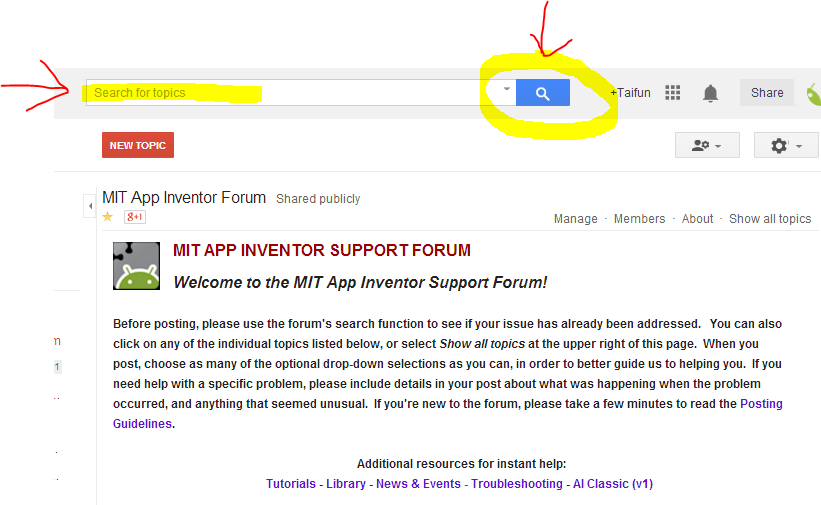
Jose Palacios
Jan 3, 2016, 12:53:43 PM1/3/16
to MIT App Inventor Forum
Thank you for your example Taifun, but I would like to use a text like a one, two or more paragraphs, using read and stop text to speech.
This example works only by reading ans stop with syllable and I need to read and stop a paragraphs.
Please, could you help me.
I will appreciate your cooperation.
Thank you.
Taifun
Jan 3, 2016, 2:01:38 PM1/3/16
to MIT App Inventor Forum
I did not provide an example, I tried to show you how to search the forum
as you have seen after looking at the blocks or reading in the documentation http://ai2.appinventor.mit.edu/reference/components/media.html#TextToSpeech the text to speech component does not have a stop or pause block
what you can do is to be creative and to find a workaround yourself
or do a search in the forum and see, what others found out
also you could write your own extension and create a block yourself...
more information see here https://groups.google.com/d/msg/mitappinventortest/Ip2AX036d0U/5NJlAEbFCgAJ
however that will be more advanced and will require some Java skills...

Scott Ferguson
Jan 3, 2016, 8:05:50 PM1/3/16
to mitappinv...@googlegroups.com
Here ya go...


The user enters a code which, when inserted in text to be spoken is interpreted as a pause code, stopping speech at that point until a button is pressed.
The '~' (tilde) character was used in the example, but any text could be used such as a custom xml tag: '<pause>', for example.
---
sf
Scott Ferguson
Jan 4, 2016, 10:43:56 AM1/4/16
to mitappinv...@googlegroups.com
Jose responded to me via email indicating that my initial solution did not meet his requirements which are that speech playback should pause when the user presses a button, then continue playback when a button is pressed.
I initally tried splitting the text at every word, but that results in mechanical, halting spoken text.
A better solution is to break the text at natural points where punctuation marks occur.
Then if the user presses a button during playback of a phrase, speech stops when the phrase has been spoken.
That is how this solution works.
---
sf


Scott Ferguson
Jan 6, 2016, 8:12:36 AM1/6/16
to MIT App Inventor Forum
Jose again responded via email asking that I help with adding a reset feature.
Please do not use my personal email unless I OK it first.
To add a reset feature to the app, all you need to do is add a reset button and include the attached blocks.
---
sf

Reply all
Reply to author
Forward
0 new messages