
The last update ruined the wifi connection
1,413 views
Skip to first unread message

Or Hasan
Aug 25, 2015, 7:38:53 PM8/25/15
to MIT App Inventor Forum
Hello,
I'm using this app for a few months, and I have seen today I can't connect my phone with wifi connection. After I checked I saw there is a new update, I did it, and to my surprise it didn't solve anything.
In the phone nothing happens and on the computer it's writing network error.
I'm using my home wifi, not for the first time, I tried close the cellular data, tried to connect with another computer, tried to reinstall and etc..
I planned to finish the app today and now I think it's will not going to happen..
By the way, if i'm already writhing to you, why you don't adding a lot of comfort things? To be honest, I don't seeing myself using this app again in the future, I constantly have to look for things for a long time in the blocks place for example, why there is not zoom in and out? A way to mark places maybe like a box that you put inside it part of the program with a name for this part to know what it is and things like that.
One more thing is that in some point the website run slow and the app updates slowly if you add "to much" things (There is no connection to the speed of the internet or the strength of the computer, trust me).
I hopes it will be solved tomorrow and i'll wait for an answer if not, thanks.
In the phone nothing happens and on the computer it's writing network error.
I'm using my home wifi, not for the first time, I tried close the cellular data, tried to connect with another computer, tried to reinstall and etc..
I planned to finish the app today and now I think it's will not going to happen..
By the way, if i'm already writhing to you, why you don't adding a lot of comfort things? To be honest, I don't seeing myself using this app again in the future, I constantly have to look for things for a long time in the blocks place for example, why there is not zoom in and out? A way to mark places maybe like a box that you put inside it part of the program with a name for this part to know what it is and things like that.
One more thing is that in some point the website run slow and the app updates slowly if you add "to much" things (There is no connection to the speed of the internet or the strength of the computer, trust me).
I hopes it will be solved tomorrow and i'll wait for an answer if not, thanks.

Taifun
Aug 26, 2015, 2:09:30 PM8/26/15
to MIT App Inventor Forum
the wifi connection works fine for me with the latest version
make sure to use the latest companion app and use the same wireless network for your computer and your device...
see also the troubleshooting tips http://appinventor.mit.edu/explore/ai2/setup-device-wifi.html
Taifun
Trying to push the limits of App Inventor!
Snippets and
Tutorials from
Pura Vida Apps by
 Taifun.
Or Hasan
Aug 26, 2015, 2:40:30 PM8/26/15
to MIT App Inventor Forum
Like I said, I'm using my home network - the same network, and It happened after I did the last update so it up to date. It worked fine 2/3 days ago.
I'm going on vacation for a couple of days so if I don't respond it's because I can't, but i still can't test the app because i can't connect my phone. There are more ways to solve it? (And I can't all the time make an apk because many times there are bugs related to the site itself, one more thing that makes it harder to work, but I taking it on the good side and trying to think of creative ways how to solve it and I need to check every change I do in this way because I don't know when it will work).
I'm going on vacation for a couple of days so if I don't respond it's because I can't, but i still can't test the app because i can't connect my phone. There are more ways to solve it? (And I can't all the time make an apk because many times there are bugs related to the site itself, one more thing that makes it harder to work, but I taking it on the good side and trying to think of creative ways how to solve it and I need to check every change I do in this way because I don't know when it will work).
Taifun
Aug 26, 2015, 4:04:05 PM8/26/15
to MIT App Inventor Forum
what about following the troubleshooting tips?
Taifun
Or Hasan
Aug 26, 2015, 4:28:25 PM8/26/15
to MIT App Inventor Forum
I tried it already, except step 3, I don't understand what i need to write in the ip section.
Taifun
Aug 26, 2015, 4:30:41 PM8/26/15
to MIT App Inventor Forum
what about reading the detailed instructions of step 3?
If the steps above both work, try using the "ping" command to ping to the IP Address of the phone (displayed by the MIT AICompanion in its startup window). If you are using windows, type "ping" + *IP address of the phone* in cmd.exe window, if you are using mac or linux, type type "ping" + *IP address of the phone* in terminal window. Detailed instruction see http://www.wikihow.com/Ping-an-IP-Address
Taifun
Or Hasan
Aug 26, 2015, 4:33:39 PM8/26/15
to mitappinv...@googlegroups.com
I've already read it, but i need to write the ip of the phone, where i can find it
Taifun
Aug 26, 2015, 5:07:37 PM8/26/15
to MIT App Inventor Forum
Or Hasan
Aug 26, 2015, 5:54:18 PM8/26/15
to MIT App Inventor Forum
From what I see I did it good in the first time, so this is the result:
Destination host unreachable
I don't see in this instruction what to do in this situation.
p.s!
It's writing the wrong ip in the replay, I write the ip with 4 in the end and in the replay lines the last number is 7 instead of 4
Taifun
Aug 26, 2015, 8:40:26 PM8/26/15
to MIT App Inventor Forum
It's writing the wrong ip in the replay, I write the ip with 4 in the end and in the replay lines the last number is 7 instead of 4
???
try using the "ping" command to ping to the IP Address of the phone (displayed by the MIT AICompanion in its startup window)
so which IP address is displayed by the companion and which reply do you get after sending a ping to that address?
a screenshot could help us to better understand what you are talking about
Taifun
a screenshot could help us to better understand what you are talking about
Taifun
Or Hasan
Aug 27, 2015, 2:04:13 AM8/27/15
to mitappinv...@googlegroups.com
The IP in the app / phone setting is: 10.0.0.4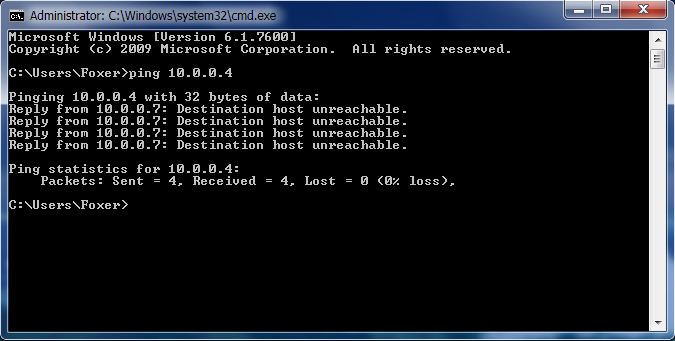
.And i'm going now, i'll try to answer again, if i don't get a chance i'll respond on monday
(I will mention again that this is not the first time i'm using my home network)
Taifun
Aug 27, 2015, 9:42:03 AM8/27/15
to MIT App Inventor Forum
you will have to find out, why you do not get a response from your device
probably a firewall issue on your computer?
Taifun
Or Hasan
Sep 1, 2015, 11:09:47 AM9/1/15
to MIT App Inventor Forum
Nop, it's not the firewall and it's not the antivirus, i turned but of them off and still nothing, even after a week and more update to the app =\

Italo
Sep 1, 2015, 11:34:44 AM9/1/15
to MIT App Inventor Forum
It doesn't look like it's an AI2 issue. If it was, more people would be having it also. Right?
You need to find out what changed in your wifi, your computer or your phone configuration lately.
Some things I would do:
1. Try to connect with a different device.
2. Try to connect in a different wifi (maybe at a friend's house) with the same device.
3. Connect in a different wifi with a different device.
4. Check what other items were installed (both in your computer and phone) since it stopped connecting to your device.
5. As a last resource, reset your router to factory settings.
Or Hasan
Sep 1, 2015, 2:06:16 PM9/1/15
to MIT App Inventor Forum
Thank you, I solved the problem =)
It was something with the router, don't know why it happened but finally I fixed it (I lost my only time for this marginal thing).
And yup, it was a coincidence that something went wrong exactly when there was a new update.
By the way, I still recommend you to add things to the website as zoom in and out in the blocks and things to ease the arrangement of the blocks to find different parts of the program more easily.
And yup, it was a coincidence that something went wrong exactly when there was a new update.
By the way, I still recommend you to add things to the website as zoom in and out in the blocks and things to ease the arrangement of the blocks to find different parts of the program more easily.
Italo
Sep 1, 2015, 2:14:48 PM9/1/15
to MIT App Inventor Forum
If you use Chrome, you can hold ctrl down and use the mouse wheel to zoom in and out. I'm sure Firefox has the same functionality.
Also to organize a little better your blocks, you can right click on the white area and select "Sort blocks by category". May be it can help you find things faster.
Or Hasan
Sep 1, 2015, 2:29:11 PM9/1/15
to MIT App Inventor Forum
I mean organize things according to their meaning in the program, if i would use these buttons i'll mess the whole program, not knowing what is what (i have built a large program).
And good to know about the zoom, I did not know that it also affects the blocks.
And good to know about the zoom, I did not know that it also affects the blocks.

James H
Sep 3, 2015, 10:34:44 AM9/3/15
to MIT App Inventor Forum
also try using ctrl - f , it will highlight the blocks you search for
Reply all
Reply to author
Forward
0 new messages