
Emulator is not working
333 views
Skip to first unread message

Clever Oliveira
Mar 10, 2014, 1:31:12 PM3/10/14
to mitappinv...@googlegroups.com
Good afternoon friends.
I'm having a problem with the Emulator, the MIT AI 2. When I start the connection to the emulator, the following message appears:
"App Inventor is unable to connect to the Android emulator. Please see this webpage for help in dealing with this issue."
I followed the link as suggested, the same as forum account, seeking solution, did the tests, removed the Inventor and did the installation again, rebooted the computer whenever necessary, reinstalled Java, tested in Firefox and Chrome and the problem was not resolved.
Strange is that on Friday 7 was running everything normally, I made no changes to my computer, and the problem appeared.
Some of you know this problem?
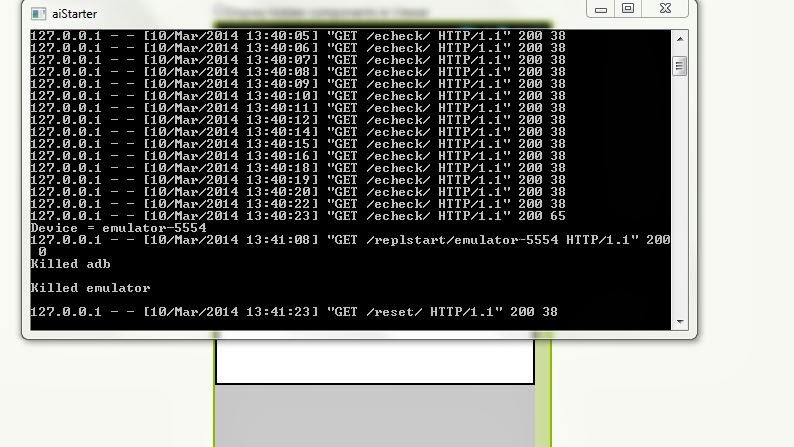
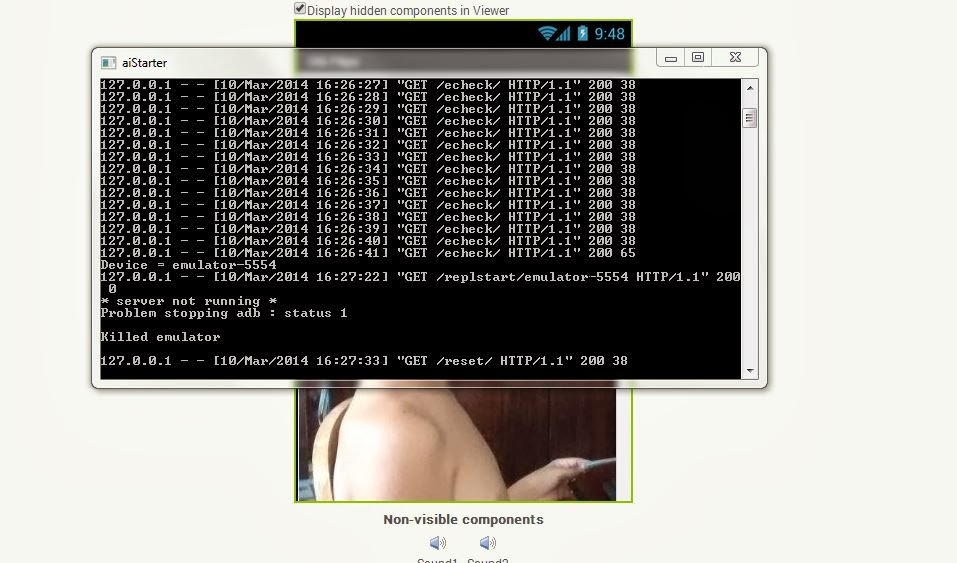
To help you help me, follows some prints of the problem.
I am working with windows 7 Ultimate 32bits e o MIT AI 2, and using the Chrome browser.
Thank you.



Clever Oliveira
Mar 10, 2014, 1:34:08 PM3/10/14
to mitappinv...@googlegroups.com
I did an update on the emulator, plus the problem persisted.

Clever Oliveira
Mar 10, 2014, 4:14:41 PM3/10/14
to mitappinv...@googlegroups.com

cdathen...@gmail.com
Mar 10, 2014, 6:13:37 PM3/10/14
to mitappinv...@googlegroups.com
Hello I am experiencing the same issue on about 10 Windows 7 machines. Last weekend as part of a CoderDojo session the students downloaded the latest App Inventor software. Unfortunately on each machine the emulator software would not connect to the App Inventor software. In the end we had to test all apps with physical devices.
What I believe might be happening is the Android Emulator takes too long to load the AI Companion software and the AppInventor software reports it as a falure to connect. Is it possible to increase the wait time or number of times the APP Inventor software will poll the emulator before deciding there is no network connection. I have tried disabling the firewall; adding the emulator process and the .appinventor folders to exclusion entries for the Anti-Virus software al with no success.
Any help would be greatly apreciated; all the kids at the Code Dojo loved the software and have some great app ideas.
What I believe might be happening is the Android Emulator takes too long to load the AI Companion software and the AppInventor software reports it as a falure to connect. Is it possible to increase the wait time or number of times the APP Inventor software will poll the emulator before deciding there is no network connection. I have tried disabling the firewall; adding the emulator process and the .appinventor folders to exclusion entries for the Anti-Virus software al with no success.
Any help would be greatly apreciated; all the kids at the Code Dojo loved the software and have some great app ideas.

Abraham Getzler
Mar 10, 2014, 6:55:14 PM3/10/14
to mitappinv...@googlegroups.com
My emulator version is up to 2.15 by now.
Update your ai2starter package.
ABG
Update your ai2starter package.
ABG

Enis
Mar 10, 2014, 7:05:52 PM3/10/14
to
Abraham...
The current Companion is 2.16ai2zx1
Paul:
I doubt it has anything to do with the speed of the emulator booting up. It's a slow emulator in all environments and definitely takes a while to load. When it loads the companion, the companion communicates with the UI and the blocks get sent over to the device.
Most of the emulator connection problems we have seen are a result of not having the most current version of the App Inventor setup software, or that software having been incompletely installed.
Still, there can be many other issues that could cause the connection to the emulator to fail. Please read and follow the document below on connection issues:
Click here for Emulator Setup and Trouble Shooting Instructions
If you still cannot get the emulator running after following that document, please post in the forum and we'll try to help you out.
The current Companion is 2.16ai2zx1
Paul:
I doubt it has anything to do with the speed of the emulator booting up. It's a slow emulator in all environments and definitely takes a while to load. When it loads the companion, the companion communicates with the UI and the blocks get sent over to the device.
Most of the emulator connection problems we have seen are a result of not having the most current version of the App Inventor setup software, or that software having been incompletely installed.
Still, there can be many other issues that could cause the connection to the emulator to fail. Please read and follow the document below on connection issues:
Click here for Emulator Setup and Trouble Shooting Instructions
If you still cannot get the emulator running after following that document, please post in the forum and we'll try to help you out.

jeffrey.schiller
Mar 10, 2014, 8:47:44 PM3/10/14
to mitappinv...@googlegroups.com
We suspect that the problem may be the timeout code we recently added. App Inventor used to wait indefinitely for the Companion to start. This resulted in some people waiting way too long for a Companion to start, that never would. So we added a timeout. I just doubled that timeout (just deployed within the last few minutes). Hopefully this will help.
-Jeff
Clever Oliveira
Mar 11, 2014, 12:39:43 PM3/11/14
to mitappinv...@googlegroups.com
Problem solved guys!After trying to reinstall the MIT AI 2 several times and not get solution, I decided to check the directory where you installed the App Inventor.This account folder with multiple files. Bat, I ran them all and then I started AiStarter I opened my project at MIT, and connected to the emulator. The emulator started in version 2.11 and asked to update, I updated and went to version 2.16. Connected and loaded the blocks perfectly! Is working and is faster too.Do not let them know exactly what. Bat file solved the problem, so all run. You may need to reinstall the package AppInventor.One problem that I found in version 2.16 that plays audio is quite smaller than the actual volume, the more it does not directly interfere in the performance of the emulator and also believe it will be fixed quickly. The big advantage is that it is much faster to start and load the blocks.Thank you.
cdathen...@gmail.com
Mar 11, 2014, 5:00:35 PM3/11/14
to mitappinv...@googlegroups.com
Hi Jeffrey,
Thank you so much for the very quick response. The change you have made works a treat. On two machines that were encountering the issue it has been solved.
My recommendation to people who encounter the issue is they may have to do a "Hard Reset" first in order to pick up the changes.
Thank you again.
Thank you so much for the very quick response. The change you have made works a treat. On two machines that were encountering the issue it has been solved.
My recommendation to people who encounter the issue is they may have to do a "Hard Reset" first in order to pick up the changes.
Thank you again.
Enis
Mar 11, 2014, 7:25:56 PM3/11/14
to mitappinv...@googlegroups.com, cdathen...@gmail.com
We're SO glad you both got it working... Yes indeed, Jeff is a magician! Well done Jeff!!!
Reply all
Reply to author
Forward
0 new messages