
When button Clik and If then Else
145 views
Skip to first unread message

Peter Kirklewski
Sep 7, 2015, 1:42:30 PM9/7/15
to MIT App Inventor Forum
Hi There, 
I was looking as crazy but there is no IF-THEN-ELSE block that I can attach to the "when Button1.Click" bloc directly.
The bellow picture shows what I'm trying to accomplish, there are my attempts at the top, and the screen from the tutorial at the bottom.
The tutorial is based on the old version of App Inventor, I'm using the new version.


Taifun
Sep 7, 2015, 1:47:26 PM9/7/15
to MIT App Inventor Forum
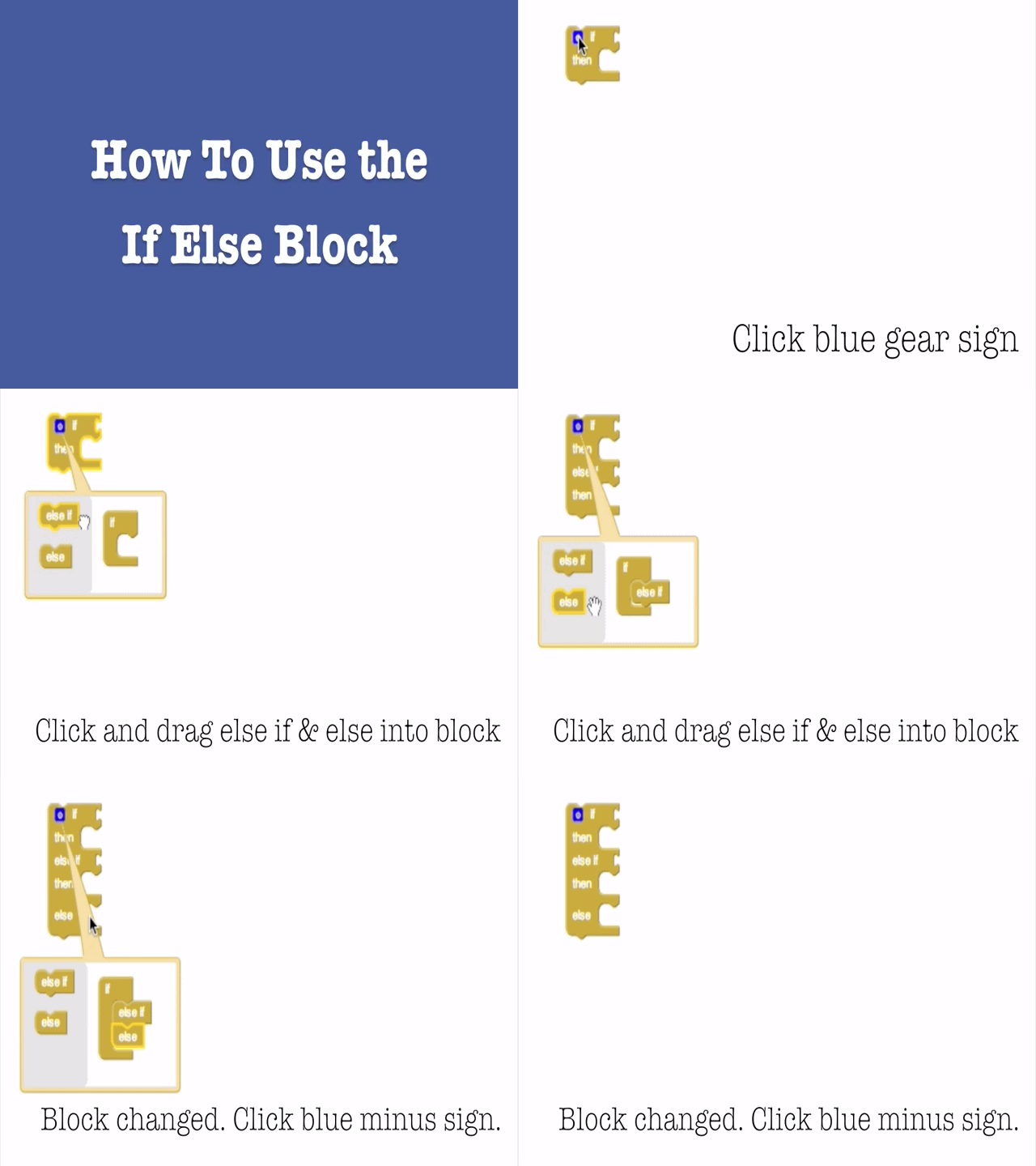
A very good way to learn App Inventor is to read the free Inventor's Manual here in the AI2 free online eBook http://www.appinventor.org/book2 ... the links are at the bottom of the Web page. The book 'teaches' users how to program with AI2 blocks.
There is a free programming course here http://www.appinventor.org/content/CourseInABox/Intro and the aia files for the projects in the book are here: http://www.appinventor.org/bookFiles
How to do a lot of basic things with App Inventor are described here: http://www.appinventor.org/content/howDoYou/eventHandling .
Also do the tutorials http://appinventor.mit.edu/explore/ai2/tutorials.html to learn the basics of App Inventor, then try something and follow the
Top 5 Tips: How to learn  App Inventor
App InventorYou will not find a tutorial, which does exactly what you are looking for. But doing the tutorials (not only reading a little bit) help you to understand, how things are working. This is important and this is the first step to do.
Taifun
Trying to push the limits of App Inventor! Snippets and Tutorials from Pura Vida Apps by  Taifun.
Reply all
Reply to author
Forward
0 new messages