
Skip to first unread message

K2
Feb 10, 2015, 11:10:53 AM2/10/15
to mitappinv...@googlegroups.com
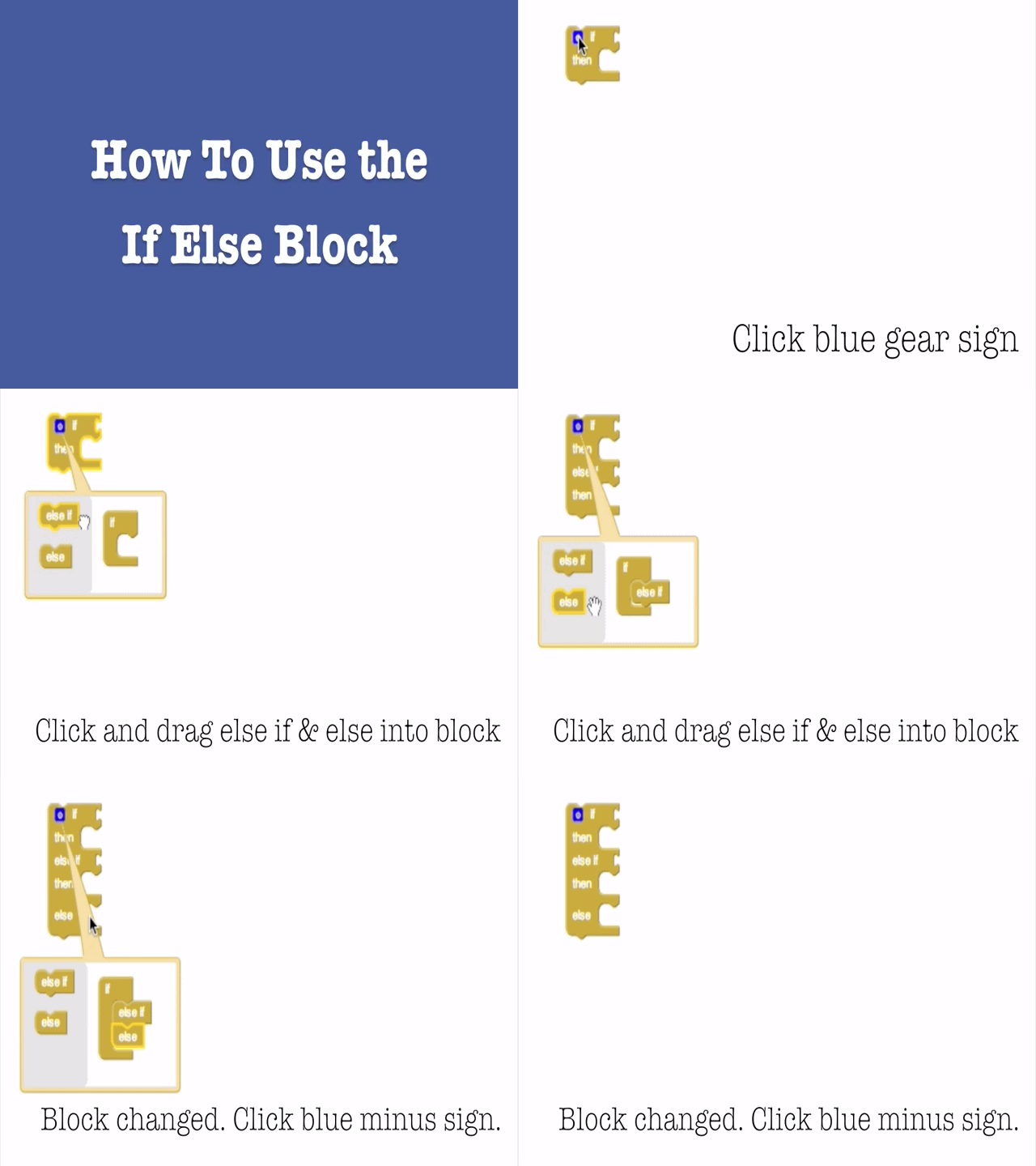
When I pull out the if then block and try to add the else block it generally won't attach the block (I got it to work once.)
I believe there is a glitch in the program.

Enis
Feb 10, 2015, 11:36:08 AM2/10/15
to
There is NO glitch in the program!
You click on the blue mutator, and when the little window pops up, SLIDE the Else block from the left to the set on the right... Works every time. It has to snap to the If block just like it would do in the blocks editor.
You click on the blue mutator, and when the little window pops up, SLIDE the Else block from the left to the set on the right... Works every time. It has to snap to the If block just like it would do in the blocks editor.

Abraham Getzler
Feb 10, 2015, 11:54:13 AM2/10/15
to mitappinv...@googlegroups.com
The mutator is like a Voodoo doll.
You work on the model, not the modeled object.
ABG

Taifun
Feb 10, 2015, 1:12:59 PM2/10/15
to mitappinv...@googlegroups.com
Reply all
Reply to author
Forward
0 new messages