
TinyDB/File cmpnnt: the best way to import/export in csv (without internet)
5,645 views
Skip to first unread message

Enora Nedelec
Mar 25, 2015, 8:01:28 AM3/25/15
to mitappinv...@googlegroups.com
I have read many threads on the forum and following several tutos but my questions remain unanswered.
Any insight would be welcome !
I want to make an app that stores for each event several data. So I have made a "form" that stores those data in a TinyDB. This is a great solution because I won't have internet each time I add a new event so the persistant data storage feature of TinyDB is perfect. BUT, I want to be able to export my data once in a while to save them (when I have access to internet) and this export should be as a .CVS file because I will need to run SQL queries and do some maths (for example finding the average time of the events, based on the time entered for each event).
1) TinyDB vs File component (.CSV): Here is where my problem starts: because we can't access TinyDB unless we root the phone, TinyDB doesn't seems the right way to store my data, BUT each time I read a thread about saving data to a file component, there are always at least one post advising to use TinyDB (for example: post 3 here) . Why is TinyDb a better solution? Would it also be a better solution for me knowing that I don't have internet connection (fusion table would have be so great otherwise) and that I need to export my data as .CSV?
2) If you recommend using TinyDB, I have another question. What would be the best way to organize my tag/list to later export them to a .csv. In have followed a tuto explaining list to/from csv table/row but I wonder what would be the best way to organize my lists:
My unique requirement is that I want all my events have each a unique ID that increments automatically each time I save a new event (that would be easier for SQL queries). At the same time, I would like to have a screen where all the data collected are displayed so setting a unique Tag under which all the data are stored seems like the best way to do that. (Having on tag -1,2,3...- per event, or one tag "Event" for all the ID that are incremented automatically and then each ID would be a list of the data stored per event would be more difficult to display on a screen, at least to my level of knowledge).
Thanks a lot for your help!

M. Hossein Amerkashi
Mar 25, 2015, 9:19:27 AM3/25/15
to mitappinv...@googlegroups.com
You could use TinyDB. TinyDB has GetTags blocks that returns a list of all tags. Once you have the tags, you can loop over and for example store using File component.
Regarding how to organize tags, you could keep a global counter (let's say varIndex) that should get incremented every time an event is stored into TinyDB. Your tags can be like "EVENT" + varIndex. This way, when you GetTags and loop over to persist into file, you could examine to inspect if the tag contains "EVENT" or not.
You'll also need to store your final counter (varIndex) into TinyDB so that on subsequent session you retrieve and start from last used counter
____________________________________________________________________

Hossein Amerkashi

SteveJG
Mar 25, 2015, 9:39:54 AM3/25/15
to mitappinv...@googlegroups.com
A csv works fine for storing data; it is a viable alternative to a TinyDB. The TinyDB stores within the app and is persistant. To use a File to store data, you store on the SD card or an emulated SD card. Since you are going to eventually export using a csv, using the File component as a database seems practical.
I often use a csv in preference to a TinyDB. Neither of these options can use sql. To sort data etc within your app, you still need to move the data, whether it is in a csv or TinyDb into a list to do the manipulation.
If you save your csv as a csv table, you can store your counting information too; you just have to be careful how you design your routines. Remember, part of what you store on a csv can be in a format that can read back as a list if you put it in double quotes ( " " ). The File component and the csv you might create can be very flexible.
Use what you are comfortable coding.
Regards,
Steve

Abraham Getzler
Mar 25, 2015, 11:30:21 AM3/25/15
to mitappinv...@googlegroups.com
Here's a further complication -
Will multiple people on separate devices be uploading data to a common table?
ABG
Enora Nedelec
Mar 26, 2015, 8:01:48 AM3/26/15
to mitappinv...@googlegroups.com
Thanks a lot for your help Hossein and Steve!
I have worked on my project, tried several different approaches and have chosen to use both TinyDB (as a first storage) and then File component(as a second storage): this allow me to use the GetValue and the GetTag blocks. I could figure out how to set the set everything up to save first in TinyDb and then in File component but I still have 2 issues:
I have worked on my project, tried several different approaches and have chosen to use both TinyDB (as a first storage) and then File component(as a second storage): this allow me to use the GetValue and the GetTag blocks. I could figure out how to set the set everything up to save first in TinyDb and then in File component but I still have 2 issues:
1) I can't find a way to save in file component using the block "list to csv table", this block required to have the block "list to csv row" after but I can't set up a unique row or several unique row as the row should be an event, and thus the keep adding each time. On printscreen 1, I have joined the two procedure that are launched when I click on a "Save Event" button.
2) The I tried to set up what Hossein adviced me : having a "EVENT + current_ID" tag but when I display the data, from TinyDB, I get the "else" action of my "if" and the alert "the loop isn't working!" is displayed. Why?
Any idea idea on how to solve these? Thanks!
For Abraham, I could be possible in the future that several person use the same DB from several devices but because those devices won't have access to internet all the time, I thinks it's easier to have separate file and later on merge the file.


Abraham Getzler
Mar 26, 2015, 12:31:46 PM3/26/15
to mitappinv...@googlegroups.com
Start your emulator, connect to it, and right-click-DoIt your relevant blocks
until your block diagram looks like a pin cushion.
ABG
Enora Nedelec
Mar 27, 2015, 6:30:15 AM3/27/15
to mitappinv...@googlegroups.com
So far so good. But then when I root my emulator and open data.csv with excel all the data of 1 event appear in a single field instead of one in each file.
I have read carefully the app inventor guide for the csv blocks, but couldn't find my mistake.
Any idea what I have missed here?
Thanks a lot for your help!
By the way, thanks Abraham for your reply, it really helps me a lot to understand what I have in each variable!

SteveJG
Mar 27, 2015, 8:10:07 AM3/27/15
to mitappinv...@googlegroups.com
You just opened the csv file in Excel? That will not work, you have to Import as a csv file and you may have to 'tell' Excel that the 'separator' is a comma.
The problem is not with your csv, it is how you import the file into Excel... it needs formatting.
Regards,
Steve
Enora Nedelec
Mar 27, 2015, 8:31:17 AM3/27/15
to mitappinv...@googlegroups.com
Thanks Steve! I have tried importing as csv* in excel but still getting the same wrong result. Is it normal that I have a double double quote around each item when I sent them to DATA.csv file (look into the left rectangle, just above the excel print screen, in the image joined in my previous post)? I can only set one double quote as a text qualifier during my import in excel (cf printscreen 1 below)

If I open DATA.csv with notepad, is also see those double double quote (cf printscreen 2 below).

*To import as .csv I have opened Excel,
data tab - from text - select the file - import - delimited - next - comma - next - text - finish.EDIT:
I could manage to have each item in a separate field by setting text qualifier to "none" but then, I still have those double double quotes. Is that normal?

SteveJG
Mar 27, 2015, 9:11:57 AM3/27/15
to mitappinv...@googlegroups.com
Looks fine to me. Congratulations on the import. Yes the quotes are a problem. AI2 allows strings with punctuation that is normally used as delimiters in csv files by placing blocks of text within quotes and separating using commas. CSV means different things to lots of people, it is a loose standard.
I think you can replace all quotes withing the excel file. There is a replace function that can removes the quotes and the Excell cells should look nice. If you do not have an commas (,) within quotes anywhare ..that is you are using a comma delimiter, you can remove the quotes using the replace in Notepad or Notepad++ . You will either have to do some pre- or post processing of the resulting csv file. Realize, that you can also use a pipe ( | ) as a delimiter and also a semicolon ; If you had no quotes in you csv (like most of the AI2 csv's I use with AI2), the import would have been perfect.
Does this help? Someone might have another solution.
-- Steve
Enora Nedelec
Mar 27, 2015, 9:34:44 AM3/27/15
to mitappinv...@googlegroups.com
Well that's a good thing to know! I have followed you advice, and have deleted the double quotes before saving the csv table to the csv file. I am not sure if the way I have chosen is the less consuming one but it's working. I really want the formatting to happen before I save the data to the csv file, post-processing would be to time consuming.
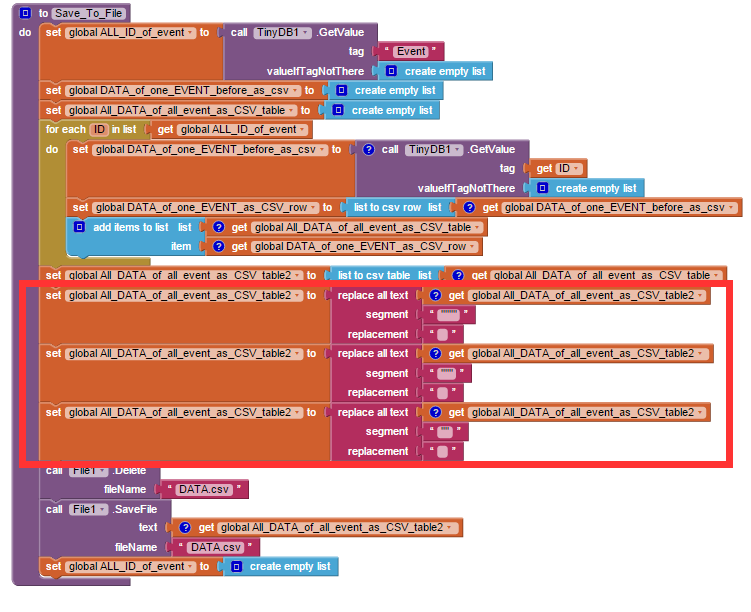
Thanks a lot for your time Steve and your precious help!

SteveJG
Mar 27, 2015, 9:49:36 AM3/27/15
to mitappinv...@googlegroups.com
Great. Perhaps, instead of exporting the csv file from AI2, you remove all the Quotes within AI2 using the replace all text ... segment " replace (with a space) block on the csv file you want to export?
In your example image, the Red box ... you only need to remove ( " ) once, the replace all text will replace all " with a blank or space.
Or perhaps, you do not need the quotes in the csv to begin with? You do not need quotes, even in Ai2 as long as nothing in what you would put in quotes now is a delimiter in AI2 or a proscribed character.
Smile... you are doing fine.
--Steve
Enora Nedelec
Mar 27, 2015, 10:00:44 AM3/27/15
to mitappinv...@googlegroups.com
I am a little confused with your last message, I think I didn't get what you wrote. I don't need the quotes around the fields in my final csv file, so I prefer to remove them in AI2: I want my excel table to look nice!
At the same time, I don't want to proscribe the double character as it could come up in one of the item. So I have replace with the block "replace all text ... segment ... replace" all the "" (before and after each field), the """ (before first item and after last item) and the """" (when item is empty) with nothing.
SteveJG
Mar 27, 2015, 11:23:11 AM3/27/15
to mitappinv...@googlegroups.com
I think instead of """ (before first item and after last item) and the """" Just replace " with a space and take all of the quotes away ..Yes, that might not work for you if you have any commas within the quotes. You might avoid inadvertently deleting necessary quotes by replacing quotes with perhaps an * or # symbol at the point the user enter the data (write code that if " then replace with *) and remove the symbol when the csv is read? The price of transparency for the users is complications for the developer and more error control. :(
I guess, just continue on with what you are doing if it works.
--Steve
Enora Nedelec
Mar 27, 2015, 1:15:40 PM3/27/15
to mitappinv...@googlegroups.com
!!! EDIT !!! See reply below : if you save as CSV in the correct way, you don't need for those workaround!
Oh, yes I got it now! That's a tricky thing to understand! Thanks for your patience!
Well I guess I found a way to do it:
first replace all comma of users by some weird UFT8 symbol
then forbid this symbol + pipe to user (couldn't find a way to do it in a more elegant way, or as a procedure which I will need later on as I will have several others textboxes and not just "location")

then before saving to csv, replace all comma by a pipe and replacing the weird UFT8 (actually it's a star!) symbol by comma.

Enora Nedelec
Mar 30, 2015, 7:22:14 AM3/30/15
to mitappinv...@googlegroups.com
Well, all the double double quotes were caused by the fact I didn't use the correct blocks to save my data as CSV. Here is the correct way to save as a csv and also an example of how to retrieve a single item. To use the block "list to CSV table" we only need to have a list of lists We don't need to have the first list formatted as a CSV row (Thanks Taifun for this precious advice!). Doing things this way, the csv is save with double quote around each field, so no need of the tricky workaround. Here is a the correct way of saving as as a csv (go here if you want an example of saving as csv from TinyDB):

Reply all
Reply to author
Forward
0 new messages