
Skip to first unread message

Frank
Apr 21, 2014, 1:31:47 AM4/21/14
to mitappinv...@googlegroups.com
Hello,
I would like to know how I can work with floating point numbers in App Inventor, it seems to hide types as much as possible and that's not cool. I'm working on a microcontroller-based application and I'd like to do some floating point arithmetic (namely converting floating-point numbers to character strings) on the more robust phone to reduce code-size overhead. I'm coding the microcontroller in C, so I plan to place my floating-point numbers in a union with a long and then send a 4-byte string of data to the phone where it can be interpreted as a float and displayed to the user. Is this possible in AI?
I would like to know how I can work with floating point numbers in App Inventor, it seems to hide types as much as possible and that's not cool. I'm working on a microcontroller-based application and I'd like to do some floating point arithmetic (namely converting floating-point numbers to character strings) on the more robust phone to reduce code-size overhead. I'm coding the microcontroller in C, so I plan to place my floating-point numbers in a union with a long and then send a 4-byte string of data to the phone where it can be interpreted as a float and displayed to the user. Is this possible in AI?

Taifun
Apr 21, 2014, 10:13:27 AM4/21/14
to mitappinv...@googlegroups.com
I would like to know how I can work with floating point numbers in App Inventor, it seems to hide types as much as possible and that's not cool.
actually that's very cool...
you don't have to worry about data types, it just works... just try...
Taifun
Frank
Apr 21, 2014, 1:23:37 PM4/21/14
to
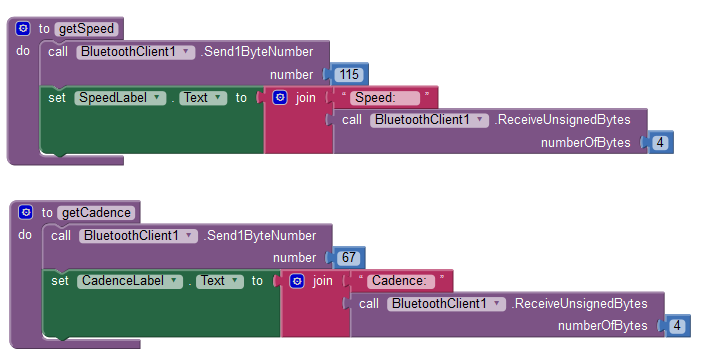
Nope, just gave it a shot. Instead it's displaying the byte
representation of my numbers (which are constants for now); I've tried
sending the data both MSB first and LSB first with the same results. My microcontroller is behaving just fine though; when it receives a command (115 or 67), it responds with the desired information.
So for instance, the label for cadence (sent LSB first) is Cadence: (219 15 73 64) and the label for speed (sent MSB first) is Speed: (63 157 243 182) for the floating point numbers 3.14159265392 and 1.234 respectively. The numbers make sense; that's the correct floating point byte representation. But again, I need this information concatenated into one floating-point number.
Taifun
Apr 21, 2014, 1:43:08 PM4/21/14
to mitappinv...@googlegroups.com
did you try to send it as string?
Taifun
Frank
Apr 21, 2014, 1:44:07 PM4/21/14
to mitappinv...@googlegroups.com
Oh, and just for the record, I also tried using the ReceiveText block instead. It just displays the data as ASCII, still not much use.
On Monday, April 21, 2014 10:13:27 AM UTC-4, Taifun wrote:

Liz Looney
Apr 21, 2014, 2:10:07 PM4/21/14
to Frank, mitappinv...@googlegroups.com
Frank,
I think you are going to have to construct the floating point number yourself from the bytes you receive using the ReceiveUnsignedBytes block. I haven't needed to do that with AppInventor yet, but I'll give it a whirl.
What floating point format does your microcontroller use? 4 bytes implies a single precision floating point (see http://en.wikipedia.org/wiki/Single-precision_floating-point_format), but I tried parsing your cadence value of (219 15 73 64) and couldn't get it to equal 3.14159265392.
-Liz
--To view this discussion on the web visit https://groups.google.com/d/msgid/mitappinventortest/eafb7371-e1a8-4ff2-8fb4-35a2ee7fe59a%40googlegroups.com.
You received this message because you are subscribed to the Google Groups "MIT App Inventor Forum" group.
To unsubscribe from this group and stop receiving emails from it, send an email to mitappinventort...@googlegroups.com.
Visit this group at http://groups.google.com/group/mitappinventortest.
Message has been deleted
Frank
Apr 21, 2014, 3:39:05 PM4/21/14
to mitappinv...@googlegroups.com
Hi Liz,
Thanks for the response. I'm using IEEE
single-precision just as you mentioned. But it's interesting that you're
not getting the same results, my value should be right. Frank
Frank
Apr 21, 2014, 3:41:51 PM4/21/14
to mitappinv...@googlegroups.com
That's my other option, however the IDE I'm using has a code-size limit and so including sprintf() to convert the float to a string blows my MCU program up. So that's why I want to send it as a float and do the processing on the phone.
Liz Looney
Apr 21, 2014, 4:13:49 PM4/21/14
to Frank, mitappinv...@googlegroups.com
Hi Frank,
After re-reading about single precision floating point, I was able to parse (by hand) the cadence value of (219 15 73 64) and get the value of 3.14159274101258, which is pretty close to 3.14159265392.
I'll work on the blocks this afternoon/evening and post a picture of them in this thread.
-Liz
Liz Looney
Apr 21, 2014, 4:41:23 PM4/21/14
to Frank, mitappinv...@googlegroups.com
Frank,
I noticed that the bytes you receive for cadence (219 15 73 64) are little endian but the bytes you receive for speed (63 157 243 182) are big endian. How'd that happen?
-Liz
Frank
Apr 21, 2014, 5:49:04 PM4/21/14
to
Thanks Liz,
The reason is because I tried sending the
data both ways just to see if the app would recognize it. So I sent one
of the MSB first and the other LSB first.Liz Looney
Apr 22, 2014, 1:45:39 AM4/22/14
to Frank, mitappinv...@googlegroups.com
Ahh. That makes sense. Here are blocks that assume the floating point number is sent MSB first.

-Liz
On Mon, Apr 21, 2014 at 2:48 PM, Frank <fpern...@gmail.com> wrote:
Thanks Liz,The reason is because I tried sending the data both ways just to see if the app would recognize it. So I sent one of the MSB first and the other LSB first.
On Monday, April 21, 2014 4:41:23 PM UTC-4, lizlooney wrote:
Frank,I noticed that the bytes you receive for cadence (219 15 73 64) are little endian but the bytes you receive for speed (63 157 243 182) are big endian. How'd that happen?-Liz
On Mon, Apr 21, 2014 at 1:13 PM, Liz Looney <lizl...@google.com> wrote:
Hi Frank,After re-reading about single precision floating point, I was able to parse (by hand) the cadence value of (219 15 73 64) and get the value of 3.14159274101258, which is pretty close to 3.14159265392.I'll work on the blocks this afternoon/evening and post a picture of them in this thread.
-Liz
On Mon, Apr 21, 2014 at 11:10 AM, Liz Looney <lizl...@google.com> wrote:
Frank,I think you are going to have to construct the floating point number yourself from the bytes you receive using the ReceiveUnsignedBytes block. I haven't needed to do that with AppInventor yet, but I'll give it a whirl.What floating point format does your microcontroller use? 4 bytes implies a single precision floating point (see http://en.wikipedia.org/wiki/Single-precision_floating-point_format), but I tried parsing your cadence value of (219 15 73 64) and couldn't get it to equal 3.14159265392.-Liz
On Mon, Apr 21, 2014 at 10:44 AM, Frank <fpern...@gmail.com> wrote:
Oh, and just for the record, I also tried using the ReceiveText block instead. It just displays the data as ASCII, still not much use.
On Monday, April 21, 2014 10:13:27 AM UTC-4, Taifun wrote:I would like to know how I can work with floating point numbers in App Inventor, it seems to hide types as much as possible and that's not cool.actually that's very cool...you don't have to worry about data types, it just works... just try...Taifun
--
You received this message because you are subscribed to the Google Groups "MIT App Inventor Forum" group.
To unsubscribe from this group and stop receiving emails from it, send an email to mitappinventortest+unsub...@googlegroups.com.
To view this discussion on the web visit https://groups.google.com/d/msgid/mitappinventortest/eafb7371-e1a8-4ff2-8fb4-35a2ee7fe59a%40googlegroups.com.
--
You received this message because you are subscribed to the Google Groups "MIT App Inventor Forum" group.
To unsubscribe from this group and stop receiving emails from it, send an email to mitappinventort...@googlegroups.com.
Visit this group at http://groups.google.com/group/mitappinventortest.
To view this discussion on the web visit https://groups.google.com/d/msgid/mitappinventortest/1c06e2d1-0558-40d9-832d-c42ac98f91f9%40googlegroups.com.
Frank
Apr 22, 2014, 1:49:47 AM4/22/14
to mitappinv...@googlegroups.com, Frank
Awesome, just in the nick of time; I was about to drive myself insane over this lol!
Looks complex though, I must say. It's funny, App Inventor seems to make hard things easy and easy things hard. Doing this in plain old C or Java would just be a matter of typecasting -___-, but I digress. I'm gonna try it out now, thanks again!
Looks complex though, I must say. It's funny, App Inventor seems to make hard things easy and easy things hard. Doing this in plain old C or Java would just be a matter of typecasting -___-, but I digress. I'm gonna try it out now, thanks again!
To unsubscribe from this group and stop receiving emails from it, send an email to mitappinventortest+unsubscribe@googlegroups.com.
To view this discussion on the web visit https://groups.google.com/d/msgid/mitappinventortest/eafb7371-e1a8-4ff2-8fb4-35a2ee7fe59a%40googlegroups.com.
--
You received this message because you are subscribed to the Google Groups "MIT App Inventor Forum" group.
To unsubscribe from this group and stop receiving emails from it, send an email to mitappinventortest+unsub...@googlegroups.com.
Visit this group at http://groups.google.com/group/mitappinventortest.
Frank
Apr 22, 2014, 2:44:21 AM4/22/14
to
Thank you, Thank you, Thank you! It works like a charm, I wouldn't even know how to repay you for this.
On an unrelated note though, how did you get your blocks so nicely shaped like that? All my math blocks are arranged horizontally rather than vertically like yours, which results in a long string of blocks. Your blocks look very compact and well placed. I was hoping my blocks would arrange themselves like that automatically, but nope.
---------------------
EDIT: never mind, I figured it out. Just posing in case other people want to know later down the road. Right-click on a block and then click on External Inputs
On an unrelated note though, how did you get your blocks so nicely shaped like that? All my math blocks are arranged horizontally rather than vertically like yours, which results in a long string of blocks. Your blocks look very compact and well placed. I was hoping my blocks would arrange themselves like that automatically, but nope.
---------------------
EDIT: never mind, I figured it out. Just posing in case other people want to know later down the road. Right-click on a block and then click on External Inputs
Liz Looney
Apr 22, 2014, 11:37:37 AM4/22/14
to Frank, mitappinv...@googlegroups.com
Hi Frank,
I'm really glad to help!
To make a block vertical, right click on a block and choose "External Inputs" from the menu. To switch back to horizontal, right click and choose "Inline Inputs".
-Liz
On Mon, Apr 21, 2014 at 11:25 PM, Frank <fpern...@gmail.com> wrote:
Thank you, Thank you, Thank you! It works like a charm, I wouldn't even know how to repay you for this.
On an unrelated note though, how did you get your blocks so nicely shaped like that? All my math blocks are arranged horizontally rather than vertically like yours, which results in a long string of blocks. Your blocks look very compact and well placed. I was hoping my blocks would arrange themselves like that automatically, but nope.
--
You received this message because you are subscribed to the Google Groups "MIT App Inventor Forum" group.
To unsubscribe from this group and stop receiving emails from it, send an email to mitappinventort...@googlegroups.com.
To view this discussion on the web visit https://groups.google.com/d/msgid/mitappinventortest/7ed4b61f-7581-4f00-9c75-5f76019ddd34%40googlegroups.com.
Reply all
Reply to author
Forward
0 new messages