cannot find picture in phone gallery

54 views
Skip to first unread message

Joerg

unread,
Nov 26, 2014, 5:33:12 AM11/26/14
to mitappinv...@googlegroups.com
Dear all,

I am using the camera component.

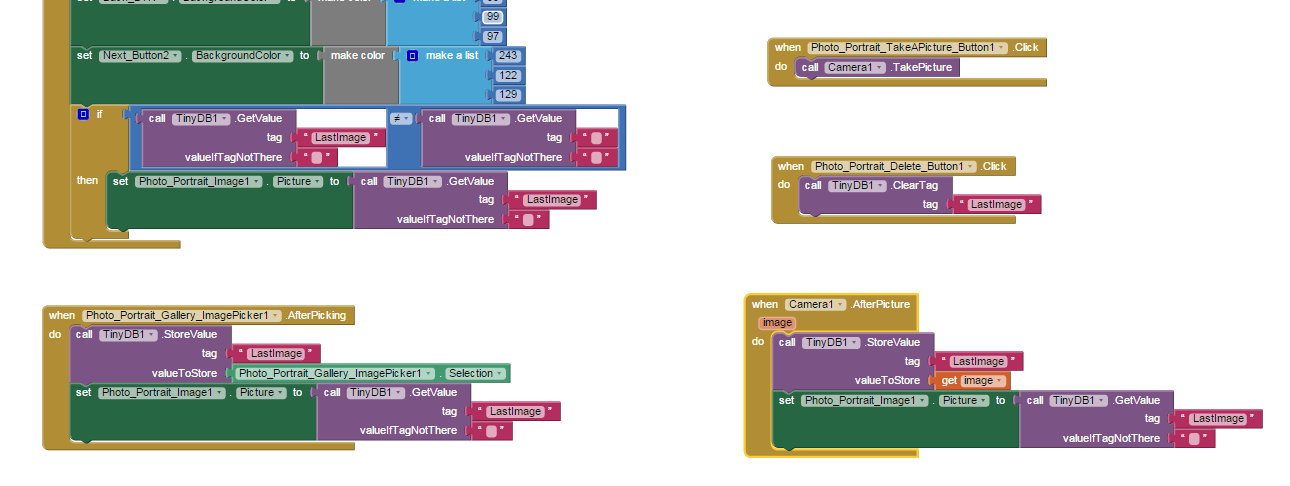
1. I took a picture and this will be stored in tinyDB and the image will be shown in the app.
2. I changed the photo via the image picker from the gallery.

Now I want to change the photo again to the first I made. But I cannot find the photo on my phones gallery. I tested the app also with another phone and a tablet. Where can I find it? Did I something wrong?

Thanks for your help.
Joerg


SteveJG

unread,
Nov 26, 2014, 8:50:51 AM11/26/14
to
You didn't do something wrong Joerg, the  AI2 Camera is one of several AI2 dysfunctional components.

The images the control takes (at least while in 'development' on my Tablet ) are stored here:

/storage/emulated//0/Pictures/app_inventor75.jpg     and others like   /storage/emulated//0/Pictures/app_inventor90.jpg etc

Most of these files are about 750 Kb.


How do you get rid of these images? They do not disappear when you close the app in development.  These images are persistent ..I doubt most developers know they exist and leave them behind after one plays with the control.


The Picture Gallery app in my Samsung Tab II will not find the recent Pictures taken with the AI2 camera until I turn the device off and restart. On restart, Gallery finds some of the images..but not all. Unreal. I can find them ALL with my tablet's  File app (not the AI2 control). Restart the tablet, some images using the Gallery ( ..the app's gallery, not the crippled one displayed by AI2) can be found in the Gallery. The images now can be deleted but only from a few places. Yes, they can be deleted permanently: find them with the tablet's File app, then delete them using this third party app. Not very tidy or professional. Doing this is like performing a scavenger hunt of your device's file system.


Regards,

Steve

Joerg

unread,
Nov 26, 2014, 9:44:37 AM11/26/14
to mitappinv...@googlegroups.com
Hmm...

thanks for your quick response Steve. I will try now a workaround. This is not my ideal solution, but it will work. 
Have a nice day.

Joerg

Joerg

unread,
Nov 26, 2014, 9:47:53 AM11/26/14
to mitappinv...@googlegroups.com
Just another question. if I understood correctly.

I am not running the app on the emulator. It is running under real conditions. And ist work although under real conditions like you have written in your post?

regards
Joerg

SteveJG

unread,
Nov 26, 2014, 9:57:40 AM11/26/14
to mitappinv...@googlegroups.com
What I describe is what happens when you connect with WIFI.  The problems might only be specific to my Samsung Tab II but I expect they are universal.      I do not remember, but a few months ago when I was experimenting with Camera, I am pretty certain I also created an apk and installed and had similar results.

Taifun seems to think the control works pretty good (with some exceptions); perhaps he will post something and have a solution for you.

 You probably have a file viewing control on your device.   You can use that to search for the directory  of the images if it is something other than what I posted.   Be careful not to delete folders that are needed while you do that.  Most of those tools can find a file by using a search function..the problem is figuring out the proper file to search for.

--Steve

Taifun

unread,
Nov 26, 2014, 1:39:26 PM11/26/14
to mitappinv...@googlegroups.com
Taifun seems to think the control works pretty good (with some exceptions)
yes, exactly, there are issues with some devices, especially Samsung devices, also the front facing camera does not work, we talked about that in the other thread recently https://groups.google.com/d/msg/mitappinventortest/Y2I7F59eNYU/6v4CRr_vxAUJ

the simple solution for you is to store the path to the taken photos in a list and the list in TinyDB. Later if you want to access one of the taken photos, just use the stored path from the list

Taifun

Trying to push the limits of App Inventor! Snippets and Tutorials from Pura Vida Apps by Taifun.         

Joerg

unread,
Nov 27, 2014, 7:49:01 AM11/27/14
to mitappinv...@googlegroups.com
Thanks for the info.

Joerg
Reply all
Reply to author
Forward
0 new messages