
Can Hebrew be used with TextToSpeech and YandexTranslate
 Assigned to kkas...@gmail.com by steve....@gmail.com
Ron Barak
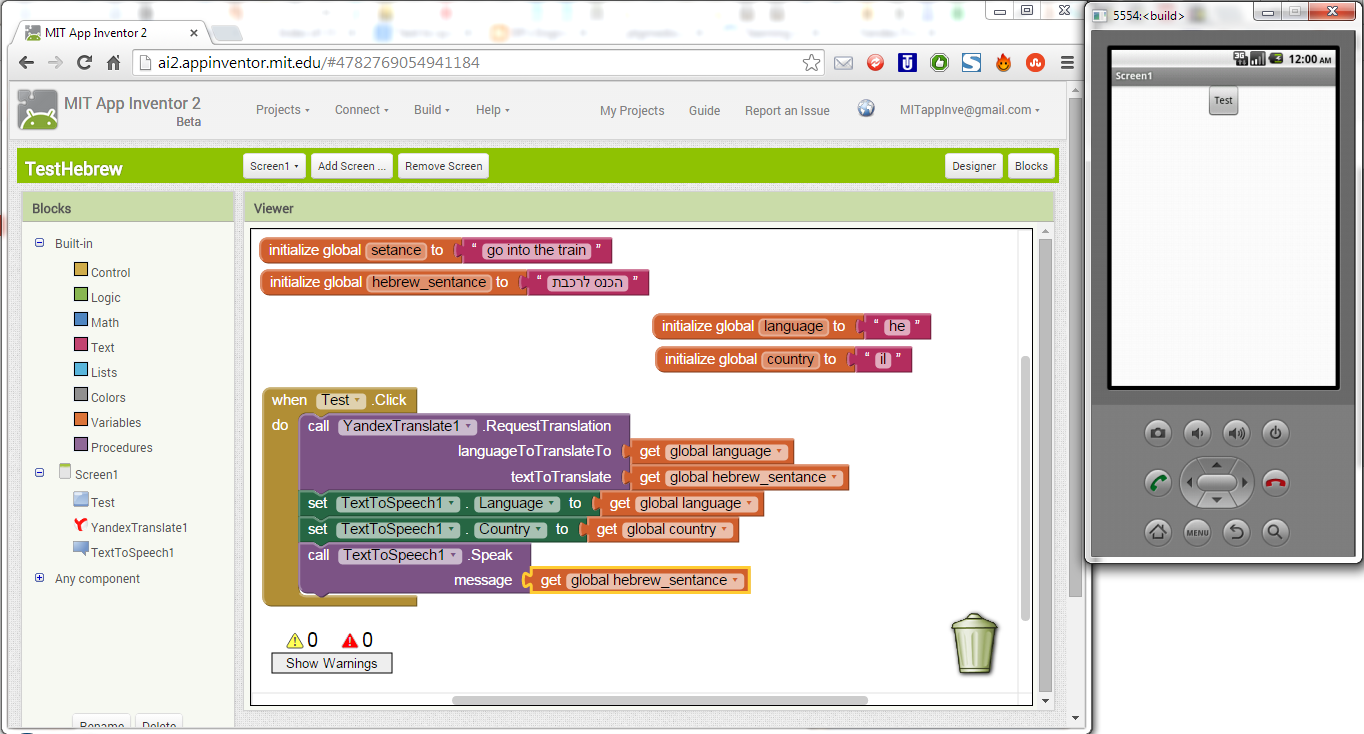
However, the following (switching parameters to spoken English) works just fine:
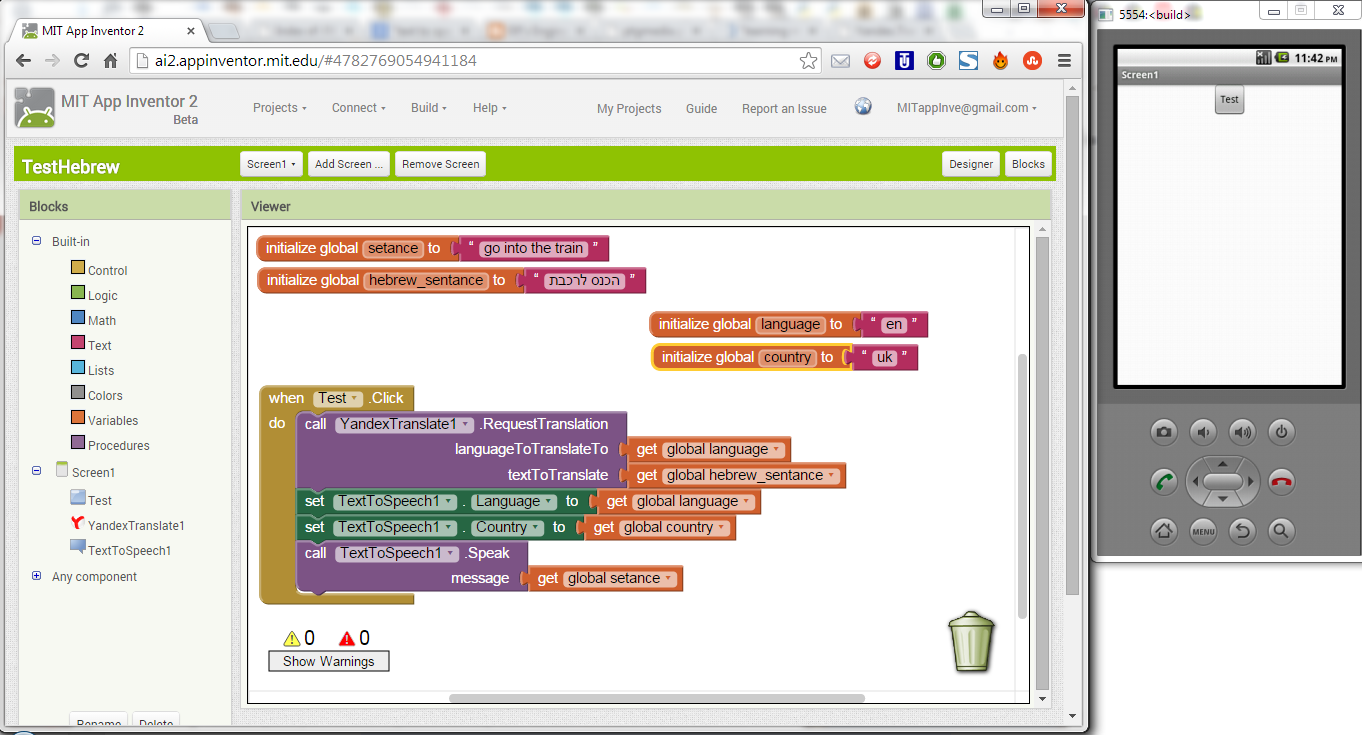
Note that I change the variables "language", "country", "setance", and "hebrew_sentance" to switch between spoken English (which succeeds) and spoken Hebrew (which fails).
Is it possible to get ai2 to speak Hebrew?

SteveJG
Here are the language and country codes you can use. The codes are organized first by language; then, in each language section are a list of possible country codes:
- ces (Czech)
- CZE
- spa (Spanish)
- ESP
- USA
- deu (German)
- AUT
- BEL
- CHE
- DEU
- LIE
- LUX
- fra (French)
- BEL
- CAN
- CHE
- FRA
- LUX
- nld (Dutch)
- BEL
- NLD
- ita (Italian)
- CHE
- ITA
- pol (Polish)
- POL
- eng (English)
- AUS
- BEL
- BWA
- BLZ
- CAN
- GBR
- HKG
- IRL
- IND
- JAM
- MHL
- MLT
- NAM
- NZL
- PHL
- PAK
- SGP
- TTO
- USA
- VIR
- ZAF
- ZWE

Taifun
Taifun
SteveJG
Ron Barak
the reason I hear nothing when the input for AI2 Text to Speech is in Hebrew is because AI2 TTS does not support Hebrew?
Ron Barak
- Thanks for the input of ai2 TTS state-of-the-art, Steve.
Seems that until Hebrew is added to ai2 TTS, I need to find an alternative that can make ai2 talk in Hebrew: does such an alternative exist? - As for translating to Hebrew: I can give back to ai2, but am not sure what it entails and if my skill-set is up to the task. Can you detail (offline to ai2heb....@9ox.net) the requirements and expectations?
SteveJG
the reason I hear nothing when the input for AI2 Text to Speech is in Hebrew is because AI2 TTS does not support Hebrew?
For this app to work, you'll need to load a text-to-speech module, Text-To-Speech Extended , on your phone. App Inventor and other apps rely on this module for the underlying voice synthesis. If you don't already have it, you can download onto your phone using the Android Market:
- On your phone, open the Market app
- Search for TTS
- Select the app Text-To-Speech Extended to install
Once the Text-To-Speech module is installed, open it to test its features. When it opens, set the default language as desired. Then select "Listen to Preview". If you don't hear anything, make sure the volume on your phone is turned on. You can also change the default Engine which can enhance the quality of the spoken words.
Once the Text-To-Speech module is installed and configured as desired, you can use the TextToSpeech component within App Inventor.
Ron Barak
1) Can you verify if I understand all the above correctly:
the reason I hear nothing when the input for AI2 Text to Speech is in Hebrew is because AI2 TTS does not support Hebrew?Possibly correct, AI2's TextToSpeech component does not support Hebrew. However, you should hear something. Perhaps your Android device does not have a TTS engine installed?
...
There may be alternatives to using TTS with Hebrew in an AI2 app (or perhaps not). I mentioned in a previous post: Here are some possibilities for TTS, perhaps by substitution one of these TTS engines in your device, you might get a Hebrew capability: https://www.google.com/search?q=android+translate+hebrew&oq=android+translate+hebrew&aqs=chrome..69i57.5231j0j7&sourceid=chrome&es_sm=93&ie=UTF-8#q=android+hebrew+text+to+speech
...Steve
SteveJG
YandexTranslate
Use this component to translate words and sentences between different languages. This component needs Internet access, as it will request translations to the Yandex.Translate service. Specify the source and target language in the form source-target using two letter language codes. So"en-es" will translate from English to Spanish while "es-ru" will translate from Spanish to Russian. If you leave out the source language, the service will attempt to detect the source language. So providing just "es" will attempt to detect the source language and translate it to Spanish.
This component is powered by the Yandex translation service. See http://api.yandex.com/translate/ for more information, including the list of available languages and the meanings of the language codes and status codes. You will need to find the codes from here for Hebrew, then try some blocks... if you have issues, post a screen capture of your Yandex blocks and someone will probably provide some advice
Note: Translation happens asynchronously in the background. When the translation is complete, the "GotTranslation" event is triggered.
Properties
noneEvents
GotTranslation(text responseCode, text translation)- Event triggered when the Yandex.Translate service returns the translated text. This event also provides a response code for error handling. If the responseCode is not 200, then something went wrong with the call, and the translation will not be available.
Methods
RequestTranslation(text languageToTranslateTo, text textToTranslate)- By providing a target language to translate to (for instance, 'es' for Spanish, 'en' for English, or 'ru' for Russian), and a word or sentence to translate, this method will request a translation to the Yandex.Translate service. Once the text is translated by the external service, the event GotTranslation will be executed. Note: Yandex.Translate will attempt to detect the source language. You can also specify prepending it to the language translation. I.e., es-ru will specify Spanish to Russian translation.
Ron Barak
On Friday, December 19, 2014 4:51:12 PM UTC+2, SteveJG wrote:
Regarding:
- As for translating to Hebrew: I can give back to ai2, but am not sure what it entails and if my skill-set is up to the task. Can you detail the requirements and expectations?
Like to keep the discussion here in the forum Ron. Translating should be possible using the Yandtex component which is described Here: http://ai2.appinventor.mit.edu/reference/components/media.html#YandexTranslate
"App Inventor is currently being translated into 17 languages, only several available at the moment. Unfortunately Hebrew is not among the languages. The AI team might consider if it can find volunteers to translate to Hebrew. Just post a message saying so. All translators are volunteers. Is Hebrew possible? Don't know, just ask."
(note that I'm not trying to implement translation to Hebrew in my ai2 app, but am trying to get ai2 TTS to speak Hebrew).
SteveJG
Ron Barak
On Friday, December 19, 2014 5:23:04 PM UTC+2, SteveJG wrote:
...
Regarding your offer to translate the AI2 documentation/buttons etc. to Hebrew ...
