
How to do something made in AppInventor 1 in Appinventor 2
160 views
Skip to first unread message
 Assigned to scottfr...@gmail.com by steve....@gmail.com
Oswaldo C. Murrieta
Aug 5, 2014, 11:16:40 PM8/5/14
to mitappinv...@googlegroups.com
Hi, first thanks for all the help you guys gave to noobs like me.
Second I've saw a nice tutorial to add a "undo" option to a drawing canvas:
But it looks it was made on previus appinventor interface, I can't understand how to do the same on AppInventor 2, I've search for a new tutorial for that undo option but I haven't been lucky, I hope you can help me.
(I'm using AppInventor 2, Windows 7 and Chrome browser)
Thanks in advance for your help.
(Sorry english is not my first languaje)

rodo...@gmail.com
Aug 6, 2014, 10:52:45 AM8/6/14
to
You have to look at the blocks closely. Some are labeled differently and some are just tweaked in AI 2 than AI1. It takes a while to figure it out but it can be done

Taifun
Aug 6, 2014, 11:11:57 AM8/6/14
to mitappinv...@googlegroups.com
if you want to "translate" an App Inventor Classic example to App Inventor 2, this link can help you: What's different?
Just try something, and if you got stuck, post a screenshot of your relevant blocks
Taifun
Trying to push the limits of App Inventor!
Snippets and
Tutorials from
Pura Vida Apps by
 Taifun.
Oswaldo C. Murrieta
Aug 6, 2014, 11:39:36 AM8/6/14
to mitappinv...@googlegroups.com
Well, thanks for your help, in fact I just need help with the blocks from left, I can't figure how to do that on AppInventor2.


Stephen Zipprich
Aug 6, 2014, 2:52:09 PM8/6/14
to mitappinv...@googlegroups.com
The blocks on the left look to me like a procedure with arguments and a bunch of other procedures inside that one. They look like AI2's procedure do to me.
Also, you can't convert an AI classic to AI2 project automatically yet, I don't believe. Changing the extension of the file will not work.
Taifun
Aug 6, 2014, 6:50:02 PM8/6/14
to mitappinv...@googlegroups.com
see also the documentation about custom procedures http://appinventor.mit.edu/explore/ai2/support/blocks/procedures.html

Scott Ferguson
Aug 6, 2014, 6:59:59 PM8/6/14
to
Hi, Oswaldo.
I am looking at your picture of the AI Classic blocks now and I think I can simplify this with AI2 blocks.
But I will need to install AI Classic to look at the old project first.
I will see what I can do and get back to you on this thread in a day or so.
OK.
I now have a version in AI2 blocks here.
---
sf
Oswaldo C. Murrieta
Aug 6, 2014, 11:14:14 PM8/6/14
to mitappinv...@googlegroups.com
I've been trying to make it work, but now I'm lost XD
Here is what I've done untl now:


Any idea how to do the miss parts?
Taifun
Aug 7, 2014, 10:22:26 AM8/7/14
to mitappinv...@googlegroups.com
the 2nd screenshot looks fine
the first screenshot does not make sense: you do not want to call the procedure there

now how does the custom procedure PutItem look like?
just translate that procedure into App Inventor 2, too...
Taifun
Scott Ferguson
Aug 8, 2014, 5:13:33 PM8/8/14
to mitappinv...@googlegroups.com
These are the blocks for the identical AI2 version:

---
sf
Oswaldo C. Murrieta
Aug 9, 2014, 7:00:39 PM8/9/14
to mitappinv...@googlegroups.com
Thanks Scott Ferguson, I've add the next code:


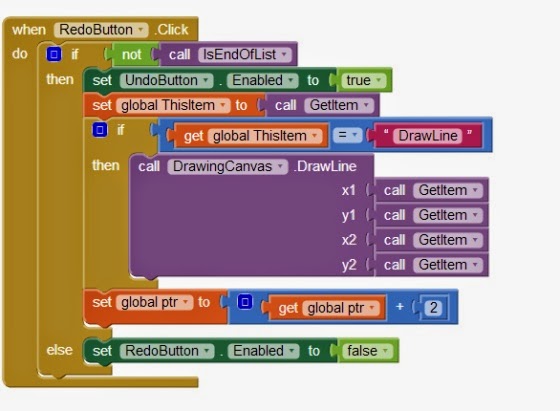
But when i try to make the undo or redo button I get this screen:

Also te undo or redo action won't work.
Scott Ferguson
Aug 9, 2014, 8:47:19 PM8/9/14
to mitappinv...@googlegroups.com
Your blocks look identical to mine.
Make sure that the undo and redo buttons are disabled in the Screen Designer.
You should not be able to click on them until a line has been drawn on the canvas.
I have a simplified version of the app that does not use linked lists.
I will attach it here when I fixed or removed the additional feature that is not working correctly.
---
sf
Scott Ferguson
Aug 10, 2014, 8:40:07 AM8/10/14
to mitappinv...@googlegroups.com
I got it working. I had added undo/redo on the PaintColor but it was a bit tricky to get working properly.
Here is the link to UndoRedo2.aia.
---sf
Reply all
Reply to author
Forward
0 new messages