
About Fusion Tables in MIT App Inventor 2
1,824 views
Skip to first unread message

Indibar Dutta
Nov 12, 2015, 11:57:37 PM11/12/15
to MIT App Inventor Forum
Hi,
I am Indibar speaking. I have a doubt that how to use Fusion Tables component in MIT App Inventor 2? I went on App Inventor 2 tutorials and saw an app called "PizzyParty_MIT_2014". There I saw the component "Fusion Tables" used. I tried to link that program with my programming but it was not working. So can you help me about:
1) How to get the API Key for my table?
2) How to get the Table ID for my table?
3) How to get the Table URL for my table?
Also send a program about my doubt.
Thank You.

Taifun
Nov 13, 2015, 12:13:04 PM11/13/15
to MIT App Inventor Forum
see the Pizza Party tutorial for a detailled descxription of the steps to be done http://explore.appinventor.mit.edu/ai2/pizzaparty
btw. alternatively you might want to use the service account method
Taifun
Indibar Dutta
Nov 14, 2015, 2:17:57 AM11/14/15
to MIT App Inventor Forum
Thank You. I want to ask another question on How to change the Font size and styles in Fusion Tables of MIT App Inventor 2? Eg: To change the height and width of the table, To change the Font size etc.
Taifun
Nov 14, 2015, 7:35:33 AM11/14/15
to MIT App Inventor Forum
are you talking about displaying a fusiontable in the webviewer? as far as I know, you can't change that style.
alternatively you can download your fusiontable (using a SELECT statement) and display it in App Inventor
here is an example, which gives loads of possibilities...
Taifun
Indibar Dutta
Nov 14, 2015, 1:15:58 PM11/14/15
to MIT App Inventor Forum
Yes I am talking about displaying fusiontables in the web viewer. In my project I tried to create a table in Google drives which contains 3 columns and 15 rows. When I tried to display that table in my web viewer it showed but the display was horrible. The three columns name is NAME, ADDRESS, LOCATION. The first input which I gave had uploaded from below. I am not able to understand that why the datas are getting uploaded form bottom to top. Why is it not getting uploaded from top to bottom? And second thing is the font sizes are displaying very big. Can I change the font size to small ? So help me on this problem.
Taifun
Nov 14, 2015, 1:21:55 PM11/14/15
to MIT App Inventor Forum
what is your complete table URL?
Taifun
Indibar Dutta
Nov 14, 2015, 1:49:59 PM11/14/15
to MIT App Inventor Forum
My complete table url is : https://www.google.com/fusiontables/embedviz? viz=GVIZ&t=TABLE&q=select+col0%2C+col1%2C+col2+from+1mb4xICnbmLOJeMYtucgphNelqaANN_d2ljhCQTQu&containerId=googft-gviz-canvas
Taifun
Nov 14, 2015, 2:54:05 PM11/14/15
to MIT App Inventor Forum
you can order your result by any column in ascending or descending order, example:
I just added +ORDER+BY+NAME+DESC after the tableid...
as already said, as far as I know, you can't change that style.
Indibar Dutta
Nov 15, 2015, 8:55:58 AM11/15/15
to MIT App Inventor Forum
Thank You very much. I got another problem while creating my app. The problem is that how can I get my rowid from my table? I want my rowid because when I click clear button it will clear only that row. So How can I do that? Please send this answer quickly because I have to submit this app to my teacher tomorrow.
Taifun
Nov 16, 2015, 9:32:38 AM11/16/15
to MIT App Inventor Forum
just send a SELECT statement to the table like this
SELECT ROWID FROM <tableid> WHERE <your where condition>
to get the row id
Taifun
Indibar Dutta
Nov 18, 2015, 7:59:48 AM11/18/15
to MIT App Inventor Forum
Hi,
I am Indibar speaking.
In my project I have inserted four buttons SAVE,UPDATE,REFRESH and CLEAR. So I want to know that when first time I press SAVE button, it gets saved but it is not uploading in my table. When I refresh the page second time it is showing in my table. Why is this happening? Second thing is how to update my whole table when I press the UPDATE button? Third thing is how to clear only that row on which the data is displayed when I click the clear button? Last thing is that when I click any two rows of my table it should go to Google maps and show the location of that point. So how is that possible? Please help me on this four problems. Also send some pictures.I am Indibar speaking.
Thank You.
Taifun
Nov 18, 2015, 11:18:52 AM11/18/15
to mitappinv...@googlegroups.com
when first time I press SAVE button, it gets saved but it is not uploading in my table
It would really help if you provided a screenshot of your relevant
blocks, so we can see what you are trying to do, and where the problem
may be.
how to update my whole table when I press the UPDATE button?
do a search in the forum and see SQL Reference Documentation of the Fusion Tables API.
you have to update each row one by oneprobably easier to delete the complete table and do an insert again
Third thing is how to clear only that row on which the data is displayed when I click the clear button?
do a search in the forum and see SQL Reference Documentation of the Fusion Tables API.
do it step by step first finish the first task and then think about the next
don'T try to solve all poblems at the same time
later ask again concerning the last task
It does not look like you have used the forums yet, as a search using the search box above would have returned several threads about these topics.
Taifun
Trying to push the limits of App Inventor! Snippets and Tutorials from Pura Vida Apps by  Taifun.
Advice: Before posting, it's a good idea to search in this forum. Many others have likely run into problems similar to yours. How to search see screenshot.
 App Inventor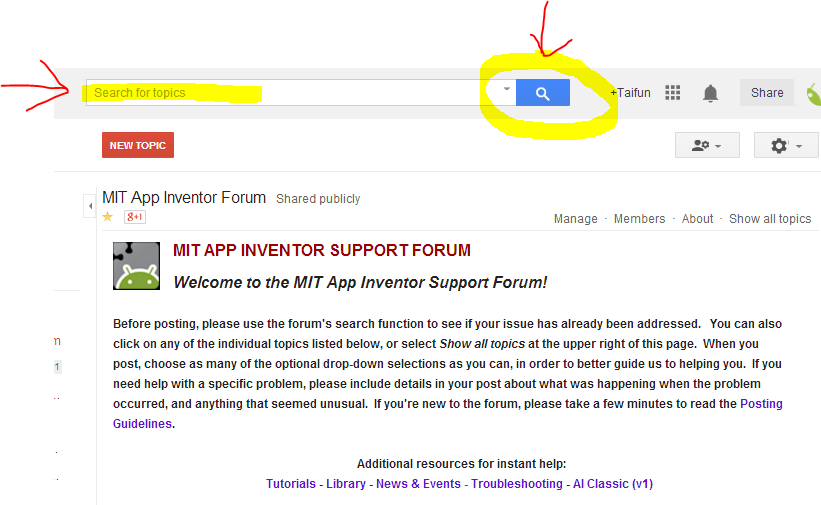
Taifun
Nov 18, 2015, 12:15:34 PM11/18/15
to MIT App Inventor Forum
 Fusiontables and how to fix them
Indibar Dutta
Nov 18, 2015, 12:28:12 PM11/18/15
to MIT App Inventor Forum
Is there any error in my program I sent just few minutes back ago? If there is an error, please let me know. And why did you send this link "Frequently made errors with fusion tables" to me? I am not able to understand.
Taifun
Nov 18, 2015, 2:20:57 PM11/18/15
to MIT App Inventor Forum
I don't know if there is a nerror
the link shows you how to debug your blocks and find problems yourself
also in case of error, I would display the result in the notifier, else how can you know, what kind of error happened?
use Do it to debug your blocks, see also tip 4 here
Taiifun
Indibar Dutta
Nov 19, 2015, 1:07:34 AM11/19/15
to MIT App Inventor Forum
Thank you for your answer taifun. I am asking this same question to Steve DJ. So please show this question to him and let me know the answer. Please do not mind.
Hi,
I am Indibar speaking.
I am Indibar speaking.

Katarina Aleksić
Nov 22, 2015, 7:55:56 AM11/22/15
to MIT App Inventor Forum
Hello AI2 fans! Greetings from Belgrade, Serbia :)
Taifun, this is a problem that I have in last few days - until 12th of Nov, creating P12 for android returned email address like this: xxxx@developer.gserviceaccount.com. From that day, DNS is changed to xxxx@dc4-2015.iam.gserviceaccount.com and Fusion table won't accept it. I've seen the tutorial on https://puravidaapps.com/fusionservice.php, but it's not working. When I want to share Fusion table with xxxx@dc4-2015.iam.gserviceaccount.com this happens

Any ideas?
Thank you in advance!
Taifun
Nov 22, 2015, 11:19:00 AM11/22/15
to mitappinv...@googlegroups.com
@Katarina: obviously it does not make much sense, to notify a service account by email...
therefore you should uncheck the checkbox "Notify people by email"...
Taifun
PS: instead of hijacking another thread, for new questions start a new thread next time. Thank you.

Katarina Aleksić
Nov 22, 2015, 3:42:28 PM11/22/15
to MIT App Inventor Forum
Dearest Taifun, you've solved my problem! Thank you so much.
For everything else - I'm guilty as charged!
Should I delete my posts?

Abraham Getzler
Nov 23, 2015, 10:54:18 AM11/23/15
to MIT App Inventor Forum
It's better to leave your posts and their answers up on the board,
for other people who might have a similar problem in the future.
ABG
Indibar Dutta
Nov 23, 2015, 12:58:03 PM11/23/15
to MIT App Inventor Forum
Hi,
Taifun
I have a really important question to ask you because I really need help of you . The question is that How to choose a particular data from a row in fusiontables?
Eg: In my app I want to choose the GPS Location column from that fusion table and when I click that that particular block it should directly go to google maps and show that location.So how to do that? Please help me because I am creating this app for exhibition which will be held on 1st of December 2015 in my school. Can you please help me to give the answer by today?
Taifun
Nov 23, 2015, 1:29:17 PM11/23/15
to MIT App Inventor Forum
How to choose a particular data from a row in fusiontables?
send a select query to the table and get the result back in the fusiontables control got result event
then convert the result into a list and display it in a listpicker
after picking one of the items open Google Maps using the activity starter together with that GPS location
Taifun
Indibar Dutta
Nov 24, 2015, 1:37:05 PM11/24/15
to MIT App Inventor Forum
Hi,
Taifun
Once you had asked for my Table URL, so I gave my URL. My table contains total 39 or 36 rows. So can you decrease the row to only 8 rows? Whatever you suggested is fine but when I directly click on the location field it should go to google maps. So how to do that? Please suggest me on this problems.
Thank You
Indibar
Taifun
Nov 24, 2015, 3:15:33 PM11/24/15
to MIT App Inventor Forum
My table contains total 39 or 36 rows. So can you decrease the row to only 8 rows?
you can filter your table
but when I directly click on the location field it should go to google maps
the webviewer can only display your table, you can't click onto something to trigger something else
therefore you will have to follow these steps
Indibar Dutta
Nov 26, 2015, 12:25:08 PM11/26/15
to MIT App Inventor Forum
Hi,
Taifun
Is it possible to create links in fusiontables? I asked this question because I wanted to create a link in the location column so that when I click on that link, it will go to google maps and view the locations. So is that possible?
Taifun
Nov 26, 2015, 12:54:40 PM11/26/15
to mitappinv...@googlegroups.com
Is it possible to create links in fusiontables?
as already said, the webviewer can only display your table, you can't click onto something to trigger something else
Taifun
Nov 26, 2015, 1:41:09 PM11/26/15
to MIT App Inventor Forum
After thinking more about it, I'm not sure anymore...
Therefore just try it an let us know, what you find out
Taifun
Therefore just try it an let us know, what you find out
Taifun
Indibar Dutta
Nov 27, 2015, 1:31:05 PM11/27/15
to MIT App Inventor Forum
Hi Taifun,
As you said in the last post "send a select query to the table and get the result back in the fusiontables control got result event then convert the result into a list and display it in a listpicker after picking one of the items open Google Maps using the activity starter together with that GPS location". I understood it but I am not able to write the code in mit app inventor 2. So please can you give me the code on what you said so that I could put it on my app. Please help me and give the code.
Thank You
Indibar
Taifun
Nov 27, 2015, 2:18:29 PM11/27/15
to MIT App Inventor Forum
try something and if you got stuck, provide a screenshot of your relevant blocks
see also
Taifun
PS: sorry, currently I do not have any fish available for you
Indibar Dutta
Nov 28, 2015, 1:32:32 PM11/28/15
to MIT App Inventor Forum
Hi Taifun,
I am happy that I have solved my own problem myself. I have created a button called "VIEW". When I click on this button it will take the values from all the columns of fusion table and display it in an VIEW textbox which I have created later. This part of my program is working. Then I have created a listpicker. In that I wanted to take all the values from the VIEW textbox and display it the list of this format "NAME,ADDRESS,LOCATION","Name1,Address1,1.1111,2.2222". But when I tried it it is coming in serial. So why is this happening?

Taifun
Nov 28, 2015, 2:46:35 PM11/28/15
to MIT App Inventor Forum
use the list from csv table block to convert the result into a list and assign that list to the listpicker.elements property
It would really help if you provided a screenshot of your relevant
blocks, so we can see what you are trying to do, and where the problem
may be.
Indibar Dutta
Nov 29, 2015, 10:49:50 AM11/29/15
to MIT App Inventor Forum
The solution which you told earlier worked perfect. Now I arose with another problem. I have created a string with only name and location with the curly brackets. Eg: (Name1 1.1111,2.2222). First I splited this string by using split at spaces block. It worked. It came like this "(1.1111,2.2222)". Then I again splited at comma using split text at block. It worked. It came like this "2.2222)". Now I came with a problem. The problem is that I wanted to split this string at ")" using split text at block. It didn't work. It came in this format "(2.2222)". So why is this happening? Is there any way so that I can only take the numeric value without the curly bracket?
Taifun
Nov 29, 2015, 12:17:11 PM11/29/15
to MIT App Inventor Forum
learn how to work with lists
Indibar Dutta
Nov 30, 2015, 1:17:30 PM11/30/15
to MIT App Inventor Forum
Thanks for your answer. It really worked. I want to ask a general question, that I have a name Eg:Indibar Dutta as a string. Now I want to replace that space with underscore (_). Eg: Indibar_Dutta as a string. So how to do that?
Taifun
Nov 30, 2015, 2:22:18 PM11/30/15
to MIT App Inventor Forum
for questions not related to the fusiontable control component, please start a new thread
Taifun
Reply all
Reply to author
Forward
0 new messages